CONSTRUCTION
Automated retainage holding on primary documents
Define and assign automated retainage withholding rules on primary documents with the new advanced retainage feature.
Key benefits
-
Streamlines retainage tracking: Track retainage holds in Sage Intacct to reduce manual tracking activities and improve accuracy.
-
Supports complex regional requirements: Handle advanced retainage scenarios (including Australia and New Zealand) beyond simple per-line percentages.
-
Provides flexible calculation methods: Use simple (single-rate) and advanced (multi-tiered or stepped) retainage calculation methods on the same primary document.
-
Refine rules before posting: Update retainage rules and preview calculations for accuracy before posting an invoice.
Why the change
Previously, Sage Intacct allowed users to enter only a single percentage to hold retainage, limiting customers in multinational regions who require a multi-rate solution. Automated retainage holding addresses this gap by allowing users to define specific calculation rules and layered retainage methods.
What's changed
We made the following changes, affecting Accounts Payable (AP) and Purchasing.
We added an Enable advanced retainage setting in Accounts Payable configuration and on Purchasing transaction definitions. This setting is available only if you enable retainage.
To use the advanced retainage workflow, enable retainage and advanced retainage in both locations.
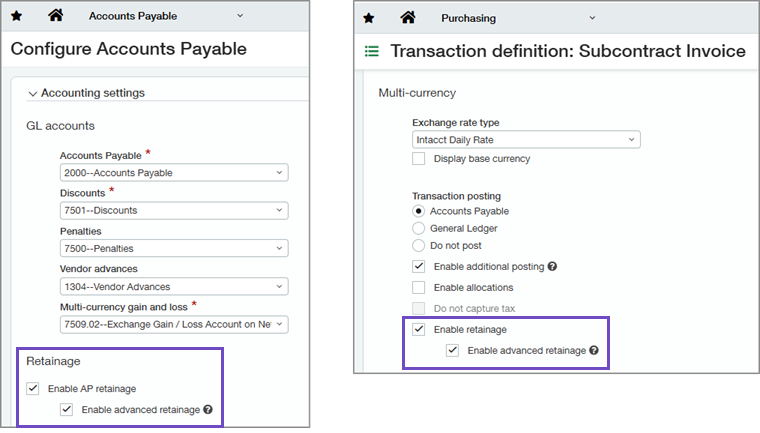
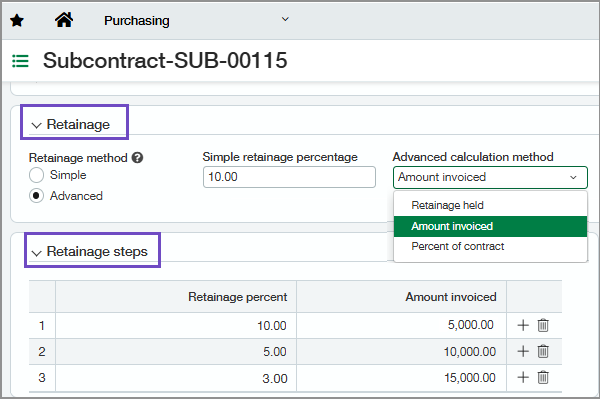
When you enable advanced retainage, primary documents show two new sections where you specify a retainage method and calculation rules:
-
Retainage: Select a retainage method: Simple or Advanced. For simple calculations, set a retainage percentage. For advanced retainage, select the calculation method: Retained amount, Amount invoiced, or Percent of contract.
If you select Simple as the Retainage method, advanced retainage options do not display. -
Retainage steps: For advanced retainage, use this section to define the calculation steps. You can configure one step with a single rate or multiple steps across rows.
On primary documents and invoices with advanced retainage enabled:
-
We added a Retainage method column to the Entries grid. This column shows line-level retainage tracking as either Advanced or Simple.
-
You can include both Advanced and Simple lines on the same primary document or invoice.
On invoices:
-
You can select the new Preview advanced retainage button to review advanced retainage calculations before posting.
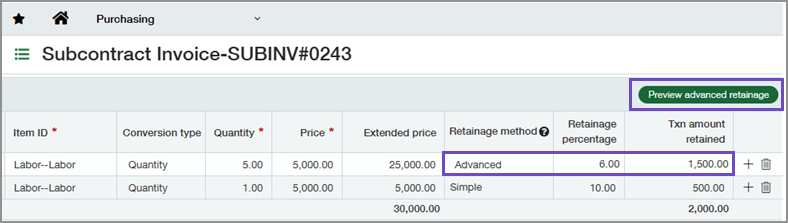
After posting an invoice, you can select More actions > View advanced retainage calculation log to open the new audit log, which details advanced retainage calculations per line.
Good to know
-
To calculate multi-step or advanced retainage, Sage Intacct processes invoice lines in the following order:
-
Lines that use simple retainage
-
Negative lines (credits)
-
Positive lines
-
-
To turn off the advanced retainage feature entirely, you must first delete all documents created with advanced retainage held. If any primary document has a paid invoice with advanced retainage held, you cannot turn off this feature.
-
After you post the invoice, you cannot change the calculation method, but you can modify the calculation rules for that method.
-
Support for REST API capabilities for advanced retainage will be added in a future release.
Permissions and other requirements
| Subscription |
Accounts Payable Construction Purchasing |
|---|---|
| Regional availability |
|
| User type |
Business user with admin privileges (to configure Accounts Payable) Business Construction Manager |
| Permissions |
To configure Accounts Payable
Administration
To configure Purchasing transaction definitions
Purchasing
To use the workflow
Purchasing
|
| Configuration |
Accounts Payable
In Accounts Payable configuration, enable AP retainage and advanced retainage. Purchasing
|
| Dependencies or other requirements |
Accounts Payable
In Accounts Payable, the option to enable advanced retainage is available only if you enable AP retainage. Purchasing
On Purchasing transaction definitions, the option to enable advanced retainage is available only if you do the following:
|
