construction
Enhanced project contract billing workflow—Early Adopter
Bill project expenses with greater flexibility across periods and invoices using the enhanced project contract billing workflow.
Key benefits
-
Expand what you can bill: Include expenses not originally marked as billable or linked to the project's customer.
-
Reduce rework: Update project billable expenses from closed periods without deleting and recreating invoices.
- Save progress: Save invoices in progress and return to complete them when you're ready.
-
Support multi-currency projects: Bill and track project expenses in multiple currencies.
What's changed
In the Projects application, we added a new menu section and new permissions.
New section on the Projects menu
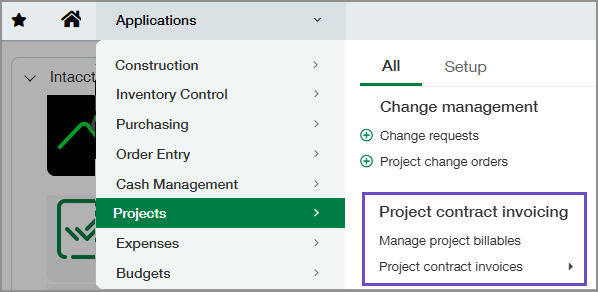
We added a Project contract invoicing section with the following options:
-
Manage project billables: Select project expenses for billing. Then, review and update project billables prior to creating the invoice.
-
Project contract invoices: Add billable expenses to a project contract invoice, save the invoice as a draft to finish later, or post it.
New Projects permissions
We added three Projects permissions:
-
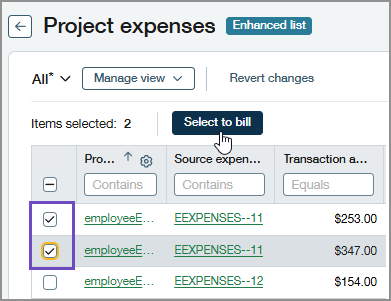
Select project expenses: Allows users to select project expenses for billing from the Project expenses page.
-
Manage project billable expenses: Allows users to access and update billable project expenses from the Project billables page.
-
Project contract invoices: Allows users to access the Project contract invoices menu and create invoices from templates.
Required Order Entry permission
Users who manage project contract invoices through the new workflow require the following Order Entry permission:
-
Order Entry transactions: To allow users to create invoices, assign List, View, and Add. To allow users to create and edit invoices, assign List, View, Add, and Edit.
How it works
-
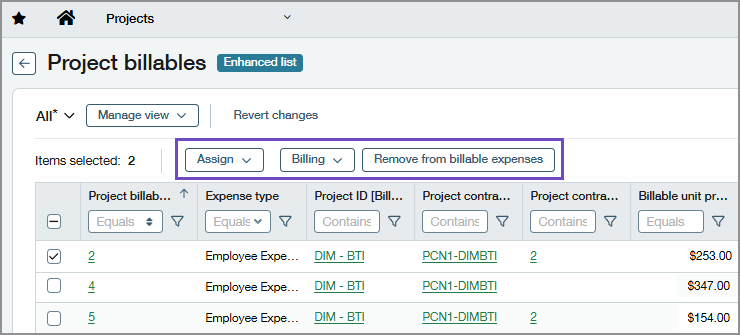
Review project billables prior to creating invoices.
You can update the project contract and project contract line, place billing holds, and exclude expenses from billing using the buttons at the top of the grid.
-
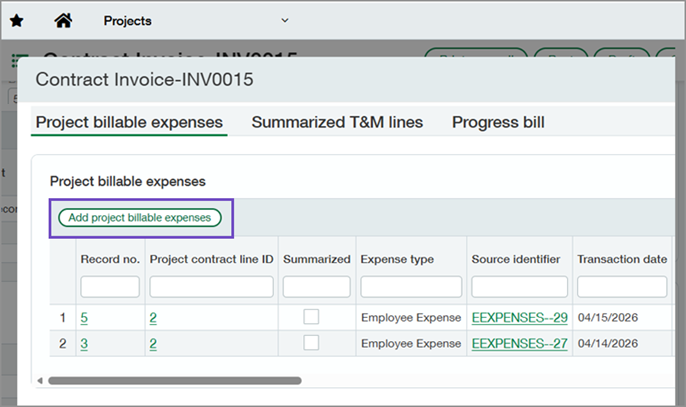
Create the project contract invoice.
During invoicing, you can add or remove billable expenses, and update progress bill and Time and Material (T&M) lines.
-
Save the invoice.
You can save it as a draft or post it.
Good to know
-
Users with the appropriate permissions can continue to bill project contracts through Generate invoices. The new Project contract invoicing feature provides greater flexibility for billing project contract expenses.
-
If you include an expense in a project invoice created through Generate invoices, you cannot include that expense in the project contract billing workflow.
-
Currently, you cannot bill inventory items using the new project contract billing workflow. You can continue to bill materials through Generate invoices.
Join the Early Adopter program
We invite you to explore the new capabilities in the enhanced project contract billing workflow as an Early Adopter. Additional functionality will be introduced in a future release.
Your insights are incredibly valuable. We encourage you to share your feedback on your experience.
For this feature, all customers with a Construction subscription are eligible to participate.
Permissions and other requirements
| Subscription |
Construction Projects configured for Project costing and billing Order Entry |
|---|---|
| Regional availability |
|
| User type |
Business Construction Manager Project Manager |
| Permissions |
To select project expenses for billing
Projects
To update project billable expenses
Projects
To create and edit invoices
Projects
Order Entry
|
