Construction
Subcontractor payment application workflow—Early Adopter
Introducing support for subcontractor payment applications. Record and track applications and valuations in line with regional construction industry practices and requirements.
Key benefits
-
Simplified workflow: Replace manual workarounds with a streamlined workflow, starting with a purchase order and moving from application to valuation to invoice.
-
Improved visibility: Increase audit readiness and stakeholder confidence with clear, consistent visibility into application, valuation, and invoice documents.
-
Greater reporting accuracy: Reduce period‑end adjustments by maintaining accurate, traceable payment amounts across reporting periods.
What's changed
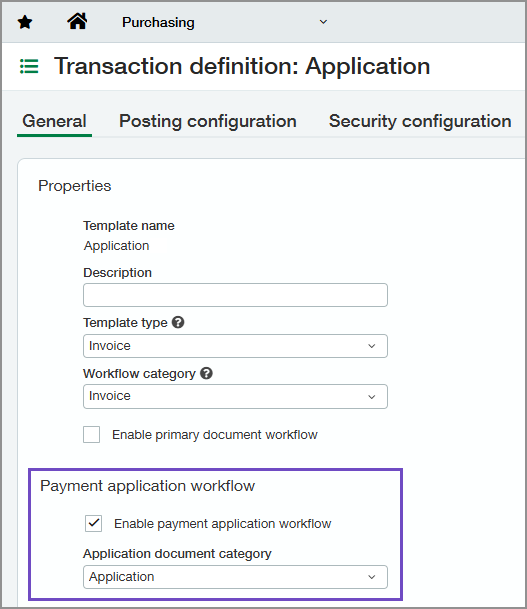
On Purchasing transaction definitions, we added a Payment application workflow section with two new settings:
-
Enable payment application workflow: Use to enable the payment application workflow on the selected transaction definition.
This setting is available only if you select Invoice as the Template type and Workflow category.
-
Application document category: Select the document type for the transaction definition: Application, Valuation, or Invoice.
This setting is available only if you enable the payment application workflow.
How it works
-
Create and post a purchase order or subcontract.
-
Convert the order to an application and post it.
-
When amounts are certified, convert the application to a valuation and post it.
-
Convert the valuation to an invoice.
Good to know
-
In the current release, applications and valuations do not post to Accounts Payable or General Ledger. We plan to support General Ledger posting capabilities in a future release.
-
As documents move through each stage:
-
For payment applications, converted lines must originate from the same primary document.
-
For valuations, converted lines can come from multiple applications if those applications originate from the same primary document.
-
For invoices, converted lines can come from multiple valuations based on the same primary document.
-
-
Payment application 360-degree view tabs for application, valuation, and primary documents will be available in a future release.
Join the Early Adopter program
We invite you to explore the new capabilities of the payment application workflow as an Early Adopter. Additional functionality will be introduced in a future release.
Your insights are incredibly valuable. We encourage you to share your feedback on your experience.
For this feature, all customers with a Construction subscription are eligible to participate.
Permissions and other requirements
| Subscription |
Construction Purchasing |
|---|---|
| Regional availability |
|
| User type |
Business Construction Manager Project Manager |
| Permissions |
To configure transaction definitions
Purchasing
To use the payment application workflow
Purchasing
|
| Dependencies or other requirements |
Purchasing
On purchasing transaction definitions:
|
| Restrictions |
You can only convert transactions with a State of Pending or Partially converted. |
