Fixed Assets Management
Add dimensions and additional fields to the Roll Forward report
This idea came from you
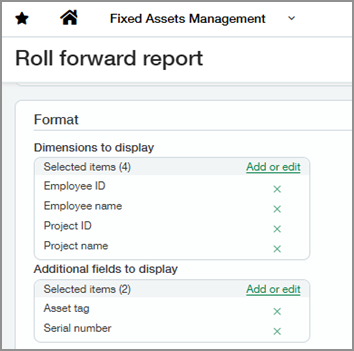
You can now include dimensions and additional asset fields directly in the Roll Forward report. This enhancement lets you view financial amounts alongside asset attributes in a single report, eliminating the need to run and reconcile multiple reports.
Key benefits
-
Analyze in one place: View asset balances and attributes together without cross-referencing other reports.
-
Reduce manual work: Avoid exporting and merging data from multiple sources.
How it works
-
Go to Fixed Assets Management > All > Reports > Roll forward report.
-
Select the fields to include in the report.
-
For Report type, select Detail.
-
View the report.
What's changed
Two new options are available in the Format section of the report:
-
Dimensions to display: Choose from standard and user-defined dimensions.
-
Additional fields to display: Choose from standard asset fields. See the list of available fields below.
Additional fields available to add-
Asset tag
-
Serial number
-
Description
-
Asset type
-
Quantity
-
Capitalization date
-
Asset GL account ID
-
Depreciation expense GL account ID
-
Depreciation GL account ID
-
Gain or loss GL account ID
-
Parent asset ID
-
Disposal GL account ID
-
CIP GL account ID
-
Status
-
CIP asset
-
Depreciate
-
Notes
-
Source type
-
Source line no.
-
Accumulated depreciation GL account
-
Provision derogatory GL account
-
Accumulated provision derogatory GL account
-
Reversal derogatory GL account
-
Selected fields appear as columns to the right of the amount columns.
Good to know
-
Dimensions and additional fields are available only when you select Detail for the report type.
-
Custom fields are not supported.
Permissions and other requirements
| Subscription |
Fixed Assets Management |
|---|---|
| Regional availability |
All regions |
| User type |
Business Employee |
| Permissions |
Roll forward report: Run |
