General Ledger
Simplified General Ledger set up and easier access to journal entry approvals
We've moved the setup for journal entry approvals to the General Ledger (GL) Setup menu.
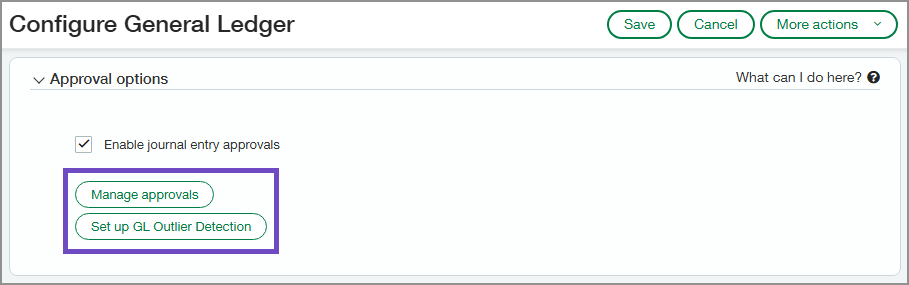
You still enable approvals on the Configure General Ledger page. From there, you can access the setup page by selecting Manage approvals. Or select Setup GL Outlier Detection to set up that feature.
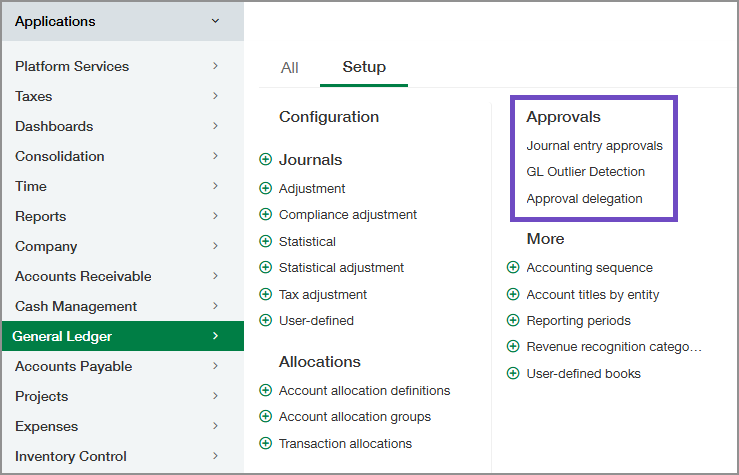
After the feature is enabled, the approvals setup pages are under Approvals on the setup menu.
Key benefits
-
Streamlined General Ledger configuration: Steps for approval policy setup and maintenance have been elevated to be easily accessible from the menu.
-
Simplified approvals setup: The Approvals settings now have their own pages, and you can access them from the General Ledger Setup menu.
-
Enhanced visibility: Managers and auditors can easily see the workflows for journal entry approvals.
Permissions and other requirements
| Subscription |
General Ledger |
|---|---|
| Regional availability |
All regions |
| User type |
Business user with admin privileges |
| Permissions |
Administration Application subscriptions: List, View, Subscribe, Configure |
