general ledger

Easier access to journal entry templates

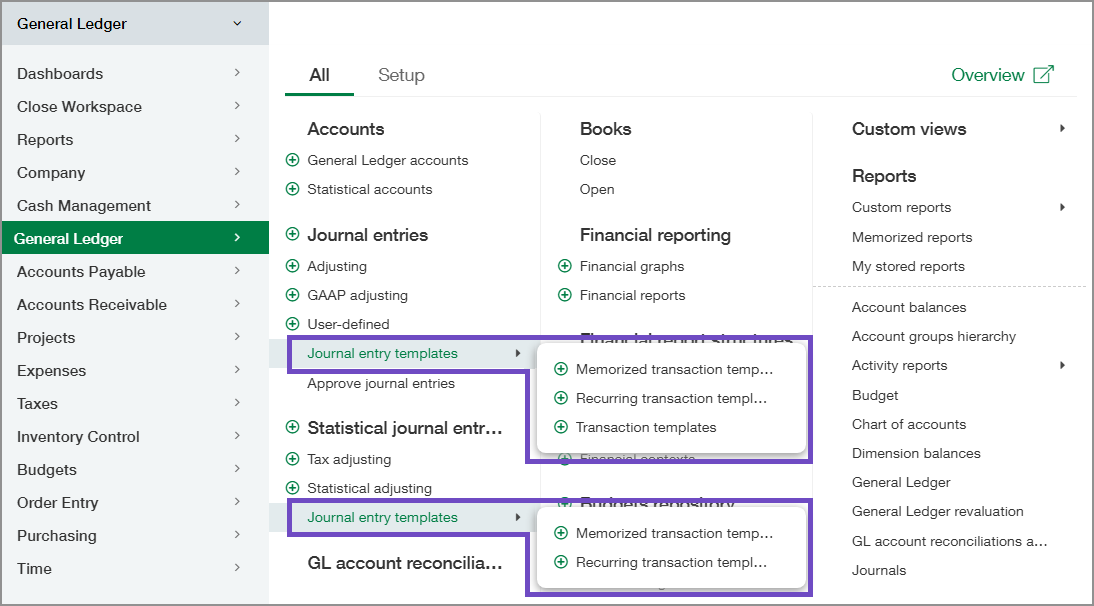
You can access all types of journal entry templates from two sub-menus on the General Ledger > All menu.

General Ledger All menu with Journal entry templates menus circled.

If your organization uses Global Consolidation, the transaction templates are available only at the entity level.

Journal entries 

Under Journal entries, the Journal entry templates sub-menu includes the following options: 

  • Memorized transaction templates

  • Recurring transaction templates

  • Transaction templates

Statistical journal entries

Under Statistical journal entries, the Journal entry templates sub-menu includes the following options:

  • Memorized transaction templates

  • Recurring transaction templates

Key benefits

  • Faster navigation: Access transaction templates from one menu location instead of searching across multiple areas.

  • More consistency: Guide teams to the same entry point for template setup and maintenance.

  • Quicker onboarding: Help new users find template-related work more easily during training and daily use.

Permissions and other requirements

Subscription

General Ledger

Regional availability

All regions

User type

Business

Permissions

General Ledger:

  • Journal entries: List, View, Add, Edit, Delete

  • Statistical journal entries: List, View, Add, Edit, Delete

  • Recurring journal entries: List, View, Add, Edit, Delete

  • Recurring statistical journal entries: List, View, Add, Edit, Delete

  • Transaction templates: List, View, Add, Edit, Delete

  • Post templates: List, View, Add, Edit, Delete