inventory CONTROL
Manage supplies without blocking negative inventory
This idea came from you
No trade-off required. You can now use Supplies Inventory without restricting negative inventory sales transactions. With greater flexibility across all your inventory workflows, you can fulfill urgent requests faster without compromising inventory integrity.
This update introduces an additional adjustment issue option in the Supplies workbench. Now you can accommodate supply requests when there are timing gaps between the physical receipt and issue of supplies.
What's changed
Previously, you couldn’t configure and use Supplies Inventory if your company allowed negative inventory sales transactions. With this new configuration flexibility and an exception-based workflow, you can bridge timing gaps between physical inventory movement and system transactions.
Use both workflows together to:
-
Manage internal supplies with controlled stock levels.
- Allow negative inventory for items you sell.
- Issue supplies when inventory exists physically but has not yet been recorded.
How it works
-
Configure Inventory Control to enable Supplies Inventory.
-
If enabled, clear the option, Do not allow negative inventory globally.
-
Save your changes.
-
Edit the SYS-Supplies adj increase transaction definition with your GL posting configuration.
To perform an adjustment issue transaction, select a new request in the Supplies workbench, then select Adjust and issue.
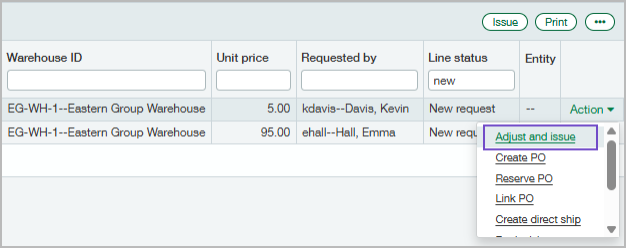
Intacct automatically creates both an adjustment transaction and an issue transaction.
Permissions and other requirements
| Subscription |
Inventory Control |
|---|---|
| Regional availability |
|
| User type |
Business |
| Permissions |
Configure Inventory Control
Administration
Issue supplies
Inventory Control
|
| Configuration |
When you change the configuration to prevent or allow negative inventory, in either Order Entry or Inventory Control, it's a global switch—you're changing the setting for both applications. |
| Restrictions |
Supplies Inventory can only be configured at the top level of a multi-entity environment. Adjustment issues cannot be created for tracked items. |
