Order Entry
Preview invoices for billing groups
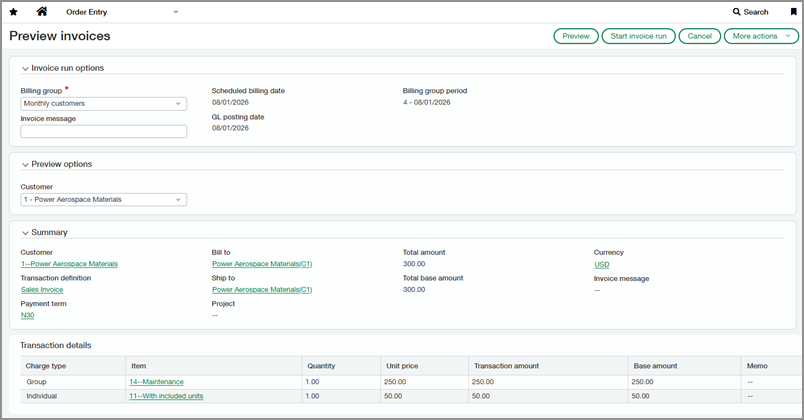
You can now preview invoice details before starting an invoice run for billing groups. Review billing information, invoice amounts, and charges to help catch issues early and bill with confidence. If you use Revenue Management, invoices can be generated in Draft state so you can assign revenue recognition information before posting.
Key benefits
-
Review invoices: Preview invoice details to verify billing information and improve accuracy.
-
Gain visibility into invoice charges: See the total charges included in an invoice, including group and individual charges.
-
Streamline invoice generation: Use a dedicated page to preview and start invoice runs for billing groups.
-
Support revenue management workflows: Generate draft invoices so you can assign revenue recognition details before posting.
How it works
-
Go to Order Entry > All > Billing groups > Preview invoices.
-
Select a billing group and specify options.
-
Preview invoice details.
-
Start the invoice run.
Next steps for Revenue Management workflows:
-
Add a document number to draft invoices before posting.
-
Use the Revenue Transaction Entries page to assign revenue recognition details, make bulk updates, and post transactions.
What's changed
We added a new Preview Invoices page for billing groups. Use this page to select a billing group, preview invoice details, and start an invoice run for the next billing period. The preview includes billing information, invoice amounts, and total charges.
For Revenue Management workflows, billing groups can now generate invoices in Draft state when the associated transaction definition is configured for revenue recognition.
Good to know
The customer field applies only to previewing invoices. When you start an invoice run, it includes all customers in the billing group for the billing period.
Permissions and other requirements
| Subscription |
Order Entry Standard revenue recognition for Order Entry (for Revenue Management workflow) |
|---|---|
| Regional availability |
All regions |
| User type |
Business |
| Permissions |
Order Entry
|
| Configuration |
For Revenue Management workflows, Enable revenue recognition and Display drafts on the Revenue transaction entries page must be selected in the transaction definition used by the billing group. |
