Purchasing
Automate prepaid expense amortization—Early Adopter
This idea came from you
Eliminate manual tracking of prepaid expenses and automate expense recognition over time. You can now apply amortization details to AP purchase invoices and purchasing transactions, and Sage Intacct automatically creates an amortization schedule using the Straight-line method. This improves accuracy and helps ensure that prepaid expenses are recognized in the appropriate accounting periods.
Key benefits
-
Automate expense recognition: Generate amortization schedules that recognize prepaid expenses over time.
-
Reduce manual effort: Replace spreadsheets and manual journal entries used to track prepaid expenses.
-
Improve financial accuracy: Match prepaid expense recognition to the periods in which the benefit is received.
-
Increase visibility: Use amortization schedules and reports to monitor prepaid balances, expense recognition, and upcoming amortization activity.
How it works
-
Enable prepaid expense amortization in Accounts Payable configuration.
-
Set up an amortization template using the Straight-line method.
-
Apply the amortization template and dates to a AP purchase invoice or purchase transaction.
-
Post the transaction.
-
View the generated amortization schedule.
-
Run an amortization forecast report.
What's changed
Amortization templates and dates can now be applied to AP purchase invoice and purchase transaction lines. Templates define how prepaid expenses are amortized over time, including the method, posting schedule, and General Ledger accounts.
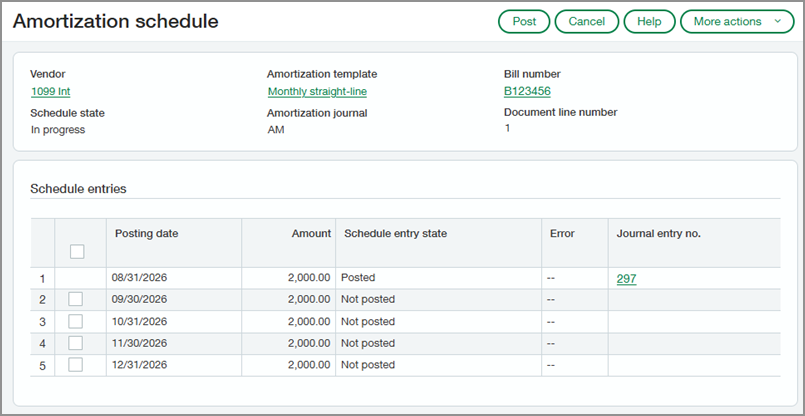
When the AP purchase invoice or purchase transaction is posted, Sage Intacct creates the amortization schedule with the entries needed to recognize the prepaid expense over time. The entries are automatically posted to the General Ledger according to the schedule. You can use the Amortization Forecast report to analyze upcoming amortization activity and prepaid balances.
Good to know
-
The Straight-line method divides the prepaid amount evenly across the amortization period. For example, if you prepay $12,000 for a 12‑month insurance policy, the Straight-line method creates an amortization schedule that recognizes an expense amount of $1,000 for each month of the policy.
-
If you apply the template and dates to a purchase transaction, the amortization information automatically carries forward to the AP purchase invoice. The amortization schedule appears on the AP purchase invoice line.
-
Prepaid expense amortization uses the same framework that supports Deferred adjustments in France. The charges constatées d’avance (CCA) method remains available for France-specific requirements, while the Straight-line method supports prepaid expense amortization in all regions.
Provide feedback as an Early Adopter
We're actively collecting feedback as we continue to refine the experience. Your insights are incredibly valuable and help us prioritize improvements and ensure that the feature meets your needs.
Complete the form below if you'd like to share feedback and help shape the future of this feature.
Provide feedback as an Early Adopter
Permissions and other requirements
| Subscription |
Accounts Payable Purchasing Administration |
|---|---|
| Regional availability |
All regions |
| User type |
To configure this feature: Business user with admin privileges To use this feature: Business |
| Permissions |
To configure this feature
Administration
To use this feature
Accounts Payable
Purchasing
|
| Configuration |
|
| CSV import |
The following fields are available in the AP purchase invoices and Purchasing transactions import templates:
|
| Restrictions |
Amortization is not supported on recurring AP purchase invoices. |
