INDUSTRY SOLUTIONS
Property lease dimension for Sage Intacct Real Estate
This idea came from you
Use the new Property lease dimension to classify transactions by the property leases to which they relate. You can then filter reports and dashboards by property lease to see focused information about specific properties and leases.
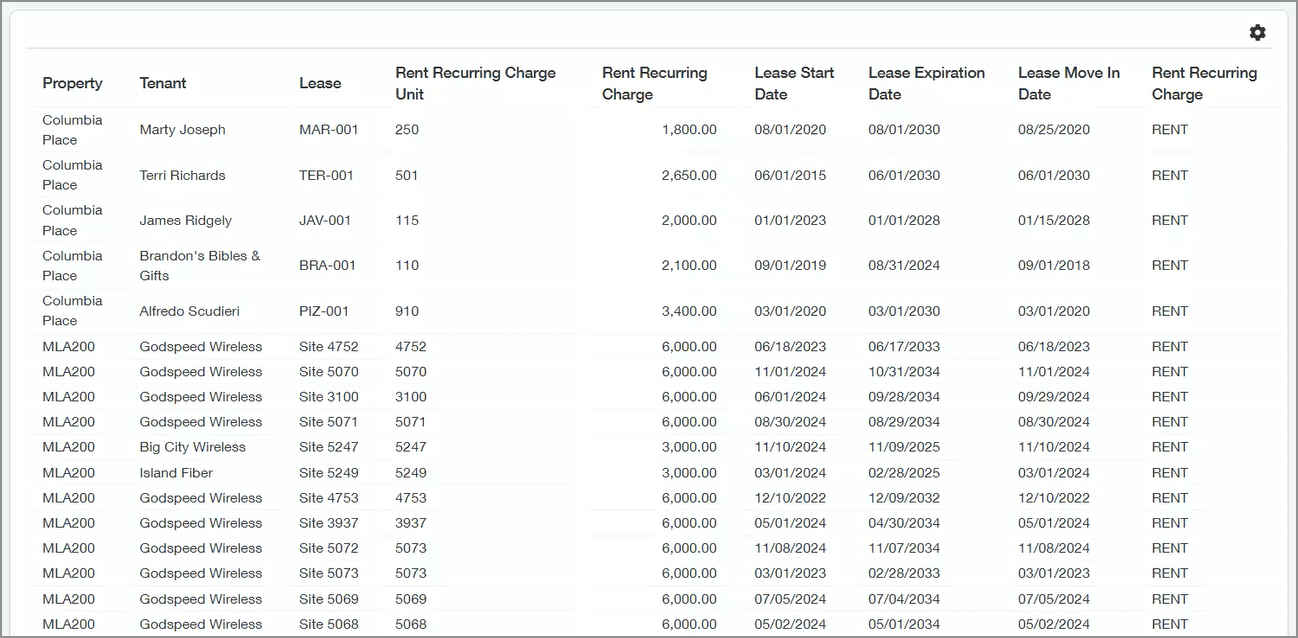
For example, you can now easily generate a rent roll:
Key benefits
- See actionable information about leases in your Sage Intacct dashboards.
- Synchronize property lease information between Sage Intacct and Sage Intacct Real Estate.
- Reference specific leases on any transaction in Sage Intacct and post through to the general ledger.
- Set up related attributes like move-in dates and property units included in a lease agreement.
How it works
- Turn on the Property lease dimension in General Ledger and other applications where you want to track transactions by property lease.
- On the new General tab in the Configure Real Estate Subscription page, set configuration settings for property leases.
You can set a document numbering sequence to automatically assign property lease IDs, and you can select external reference fields to include in your property leases.
- Create property lease objects (property lease business categories, property lease states, property lease termination reasons, and property lease types).
- Create property leases as normal.
The way you create leases is unchanged, but now when you create a lease it's set up as a member of the property lease dimension. You can see all members of the property lease dimension on the Property Leases page (Real Estate > Setup > Property leases).
- For transactions that are related to a property lease, select the lease in the Property lease dimension field on each transaction.
- Filter financial reports and dashboards by property lease.
Good to know
Data is synced between property leases and the property lease dimension, ensuring that lease data is consistent throughout the system. This includes the following:
- Unit details, including associated units, unit names, move-in dates, and the primary unit.
- Lease dates and status-related information such as commencement date, expiration date, termination date, move-in and move-out dates, and month-to-month status.
- Rent and recurring charge details such as current rent, market rent, recurring charge item, current amount, and next date.
- Lease classification and configuration data recorded in the property lease dimension: lease types, states, business categories, and termination reasons.
Permissions and other requirements
| Subscription | Sage Intacct Real Estate |
|---|---|
| Regional availability |
|
| User type | Business user with admin privileges |
| Permissions | Real Estate
|
| Configuration |
|
| Implementation | Requires:
|
