Sage ai & Automation
Gain strategic insight with the Sage NFP Benchmarking Agent
The new Sage NFP Benchmarking Agent provides meaningful peer context to support strategic decisions. Ask questions in Sage Copilot to compare your organization’s financial and operational performance with similar nonprofits.
What’s new
The Sage NFP Benchmarking Agent uses criteria you provide, such as revenue size, organization type, and geography, to identify a relevant peer group and compare your organization with it. You can benchmark measures such as revenue mix, reserves, operational efficiency, fundraising performance, and financial resilience.
The agent pulls relevant metrics, compares your organization with the benchmark group, and provides insights and guidance to help you understand the results.
Key benefits
Relevant peer benchmarks: Compare your organization with nonprofits that share characteristics such as mission, revenue size, and tax year to gain context for understanding your financial health and informing your strategy.
Current and historical context: Compare current Sage Intacct data with peer benchmarks or use historical filing data for a point-in-time comparison.
Greater insight into financial performance: Identify differences in funding streams, financial reserves, operational efficiency, and other financial metrics relative to your peers.
Flexible financial comparisons: Compare your organization with peers across available Form 990 financial measures, such as executive compensation.
How it works
Ask the agent a benchmarking question in Sage Copilot, including characteristics such as organization type, revenue size, geography, or tax year to help identify a relevant peer group.
The agent determines a peer group and compares your organization with that group. Peer figures come from public IRS Form 990 filings. For supported measures that match a pre-delivered Sage QuickStart group, such as Nonprofit Board Book or 990, the agent uses your current-year Intacct figure. For other measures, the agent uses your organization’s last IRS form 990 filing data.
The agent can access only the Intacct data that you already have permission to view. It operates in read-only mode and does not change data in your company.
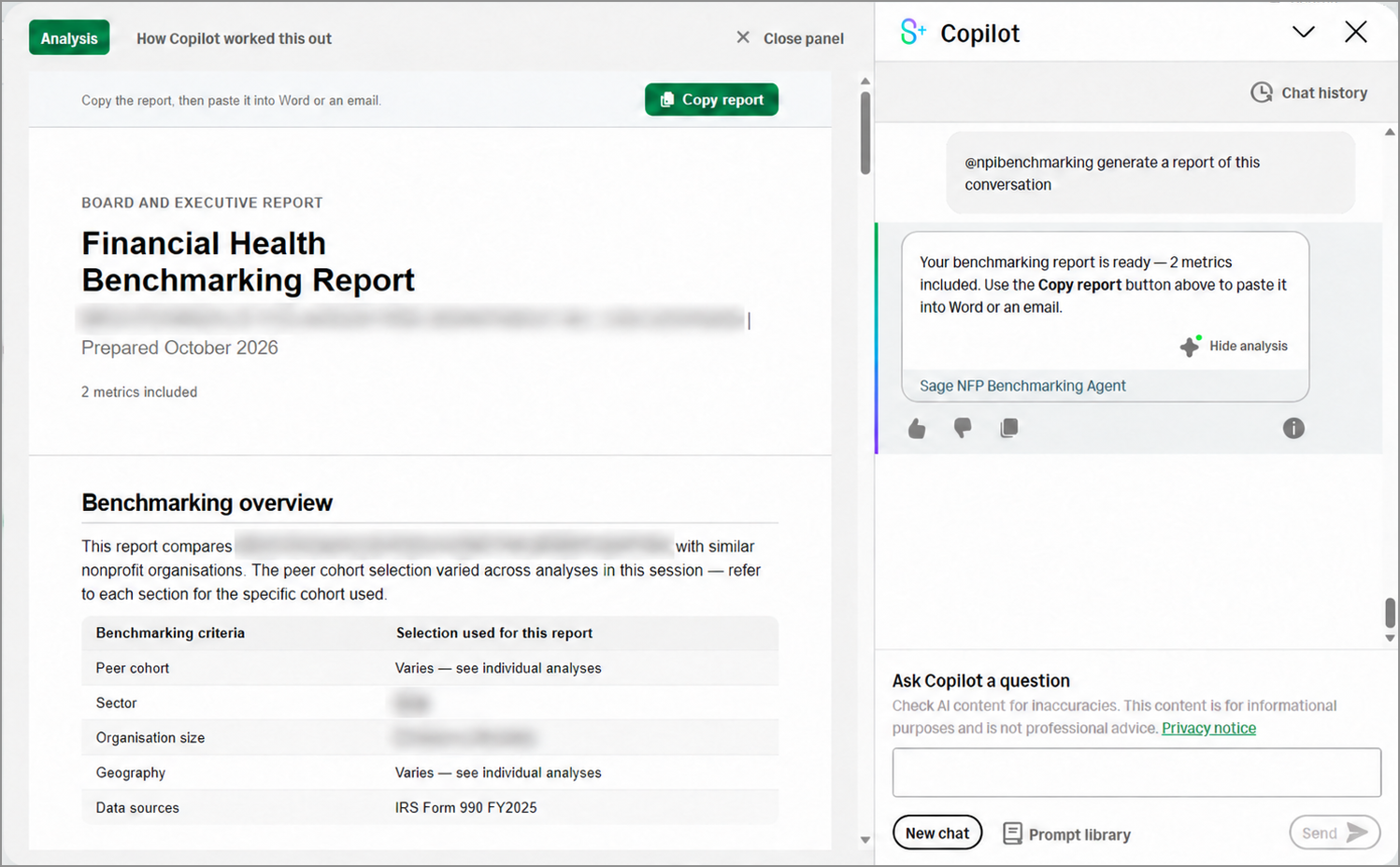
You can copy the agent’s analysis to share with your finance committee, board, or other stakeholders:
In the Sage Copilot response, select View Analysis to see additional insights.
In the side panel, select Copy report to copy the analysis to your clipboard.
Paste the report into an email or document to share it.
Availability and requirements
The Sage NFP Benchmarking Agent is available beginning November 6, 2026, in the United States and is intended for eligible nonprofit organizations using Nonprofit QuickStart.
To use the agent:
Your company must use role-based permissions.
Your company must have access to Sage Copilot through a Finance Intelligence Agent subscription.
Your company must subscribe to the NFP Benchmarking Agent
Assign users a role that includes the active agent.
Good to know
You can review how the agent came to its conclusions by selecting View analysis > How Copilot worked this out, or the information icon under the Copilot chat window:

Review the peer-group filters, reporting period, data source, and any warnings before acting on a result.
Form 990 information can be incomplete or from an earlier filing year, and current-year Intacct figures can represent only part of an open fiscal year.
The agent supports financial analysis, but it does not replace an accountant, auditor, or nonprofit financial adviser.
Permissions and other requirements
Marketplace Agents are only available for use in role-based companies.
| Subscription |
|
|---|---|
| Regional availability | United States |
| User type | Only users whose roles include an active agent can use that agent in Sage Copilot. |
| Permissions | Only users whose roles include an active agent can use that agent in Sage Copilot. |
| Dependencies or other requirements |
|
