Taxes
Sovos Sales Tax for Order Entry
Sage Intacct now offers Sovos Sales Tax as an option for companies that need to calculate sales tax. This provides an integrated experience for tax determination that gives you more flexibility in choosing the tax solution that best fits your company's business needs. You can create a new Sovos account or connect an existing account directly from Sage Intacct and configure Sovos Sales Tax for applicable entities.
Whether you're evaluating tax technology options for a new implementation or looking for an alternate tax service provider, Sovos Sales Tax lets you choose the tax determination option that's right for you.
Key benefits
Greater flexibility: Choose between available sales tax service providers based on your organization's needs.
Self-service onboarding: Create a new Sovos account or connect an existing account through a simplified onboarding experience.
Support for growing organizations: Configure and update tax determination directly in Sovos to meet changing regional tax jurisdiction requirements.
Automated tax calculation in Order Entry: Leverage Sovos's robust tax support to ensure that taxes are calculated correctly for your Order Entry transactions.
How it works
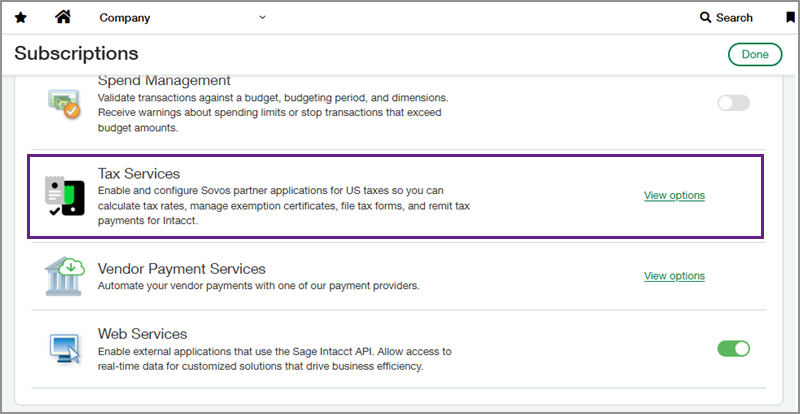
From your company Subscriptions page, go to the Tax Services section to enable and configure Sovos Sales Tax. After you enable the tax service, you can create a new Sovos account using information that is prepopulated from Sage Intacct, or you can enter information to connect an existing Sovos account. Sage Intacct automatically saves your configuration and securely stores the connection details for future tax operations.
If you have a multi-entity company, complete your Sovos setup at the top level. Then you can enable the tax service integration and enter or create a unique organization code at the entity level while maintaining the top-level Sovos account information. When you assign a separate organization code to an entity, you can track that entity's transactions separately in Sovos.
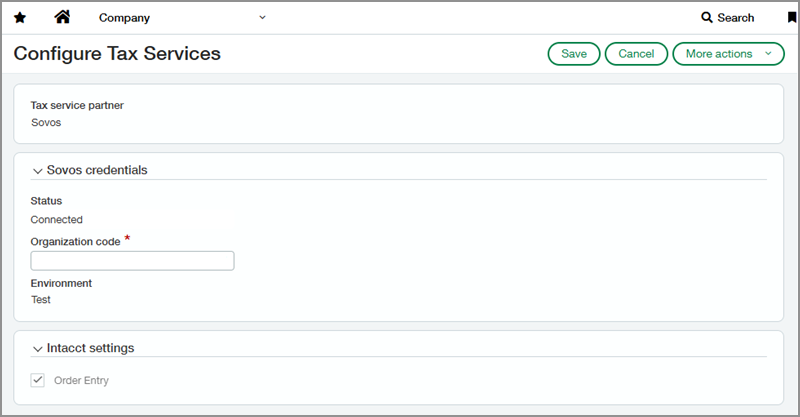
After you enable and configure Sovos Sales Tax in Sage Intacct, go to your Sovos account to configure your tax determination details for your Order Entry transactions.
From your Sovos account, you can submit taxes with Sovos SUT filing and manage tax exemption certificates with Sovos CertManager.
In the Intacct Agent Marketplace, you can access the Sovos Economic Nexus Agent to help identify economic nexus obligations across jurisdictions.
What's changed
You can use Sovos Sales Tax as a tax service option within Sage Intacct, giving you additional flexibility over sales tax determination for your company. The onboarding experience includes account creation or account connection capabilities, automatic configuration saving, and entity-level configuration. Additionally, customers gain access to Sovos' tax filing and tax exemption certificate management.
To request a follow-up on 2026 Release 4 enhancements, fill out this form. Your account manager will be in touch.
To contact your account manager directly, see Contact your Sage Intacct account manager.
Permissions and other requirements
| Subscription | Company Order Entry |
|---|---|
| Regional availability | United States |
| User type | Business |
| Permissions | Administration Application subscriptions: List, View, Subscribe, Configure Company Entities: List, View, Add, Edit Order Entry
|
| Configuration | Enable Sovos Sales Tax in the Tax Services subscription configuration page. |
| Dependencies or other requirements | Contact your Sage Intacct account manager to turn tax services subscriptions. You must create or have an existing Sovos account to use Sovos Sales Tax. |
| Restrictions | Companies can only subscribe to one tax service. You must set up tax nexus and tax determination thresholds in Sovos to capture taxes in Sage Intacct transactions. Tax filing and certificate management are managed through Sovos. |
