accounts payable
Improved remittance support for bank files
Get more control over how remittance information is generated and delivered to suppliers. This enhancement is designed for companies, in particular international ones, who do not use cheque payments and need clearer remittance communication for bank file payments.
Key benefits
-
Clear remittance communication: Send remittance details for bank file payments using dedicated Accounts Payable remittance emails and PDF attachments.
-
Flexible remittance configuration: Control remittance email templates and PDF stubs separately for bank file payments, without affecting cheque remittance.
-
Company and entity logos: Include company‑ or entity‑specific logos in remittance emails and PDFs where applicable.
Learn more about entity-specific logos.
What's changed
You can now configure Accounts Payable with dedicated options for bank file remittance, separate from traditional cheque remittance.
And, we added a dedicated Remittance section on the Configure Accounts Payable page with related options moved from the Enable functionality section. Learn more about UI and label changes.
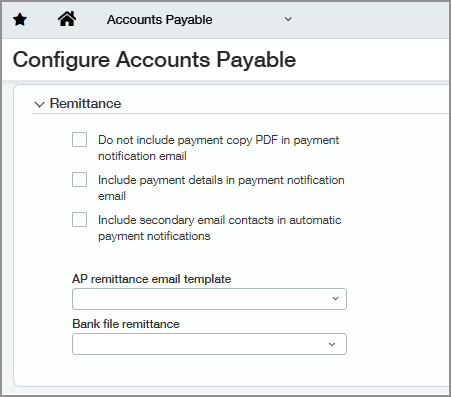
The following are new capabilities:
-
Set up custom remittance email templates specifically for bank file payments.
-
Select configurable PDF remittance stubs (blank, with logo, or without logo).
-
Apply settings on the company or entity level, including entity-specific logos.
If no bank file remittance configuration is set, Sage Intacct continues to use the existing default remittance behavior.
How it works
-
Go to Company > Setup > Settings > Email templates > Add.
-
Enter the necessary information.
-
Select AP remittance for the Template type.
-
Select Save.
-
Go to Accounts Payable > Setup > Configuration.
-
In the Remittance section, select an AP remittance email template for bank file payments.
This template applies only to bank file payments and does not affect cheque remittance.
-
Optionally, configure templates at the entity level to use entity-specific logos.
Otherwise, the company-level template is used.
-
Select the Bank file remittance PDF stub that you want to send with the email.
The remittance PDF stub can be blank, with a logo, or without a logo.
-
Select Save.
When you email a bank file using a configured remittance template, Sage Intacct determines the recipient based on the template settings.
If the template specifies a To address, Intacct sends the email to that address. If the template does not specify a recipient, Intacct sends the email to the supplier contact email.
-
Create and post AP payments using the bank file payment method.
-
When the payment is confirmed, Sage Intacct automatically applies the configured remittance email template and PDF stub.
No manual selection is required at payment time.
-
The remittance email is automatically sent to the supplier using the configured template and includes payment details for payments, AP purchase invoices, adjustments, and advances.
Good to know
For Bank file payments with a configured email template, Sage Intacct does not create a history entry on the History tab of posted payments or payment copies when you take the following actions:
-
Send a payment notification email
-
Print payment copies
And, you can send payment notification emails from the Print payment copies page even if the supplier email address field is empty. Sage Intacct uses the email template To address. If the To address is empty, Sage Intacct uses "noreply@intacct.com".
Permissions and other requirements
| Subscription |
Accounts Payable Cash Management Sage Cloud Services |
|---|---|
| Regional availability |
All regions |
| User type |
Business user with admin privileges Business |
| Permissions |
To configure bank file remittance information
Administration
To send bank file payments with remittance
Accounts Payable
To generate a bank file
Cash Management
|
| Configuration |
Enable Bank file payments in current accounts and supplier records. |
