INDUSTRY SOLUTIONS
Enhancements in Sage Field Operations
Sage Field Operations provides field service teams with critical site details they need to improve productivity and deliver excellent customer service.
This release includes the following enhancements.
Pull quote items directly into work orders
In a work order, you can now see a list of parts and miscellaneous items from the associated quote, and you can pull any of those items directly into the work order.
How it works
- Open a work order in field view.
- Go to the Parts or Misc. Items tab.
A new Quote Parts section shows items linked from the quote associated with the work order.
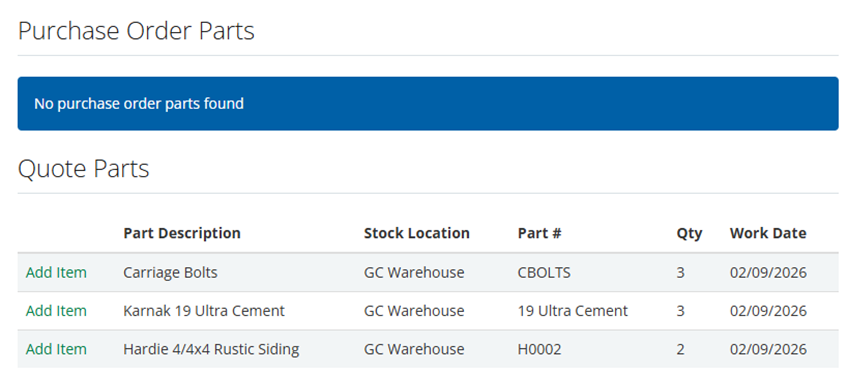
- To pull one of the listed quote items into the work order, select Add Item beside the item.
Use your own email address to send Sage Field Operations emails
Increase attention and responsiveness to your emails by making it clearer that the emails are from you.
Some configuration is needed to set up this feature. For details, contact support@operix.com.
Key benefits
- Customers, colleagues, and vendors are more likely to read and respond to emails coming from your organization's email domain.
- Replies come directly to your email account. Sage Field Operations does not receive replies sent to the email address you set.
Good to know
- Your email address is used only for the Sage Field Operations platform; it is not used for the Customer Portal. Emails sent from the Customer Portal continue to use notify@mobilessc.com.
- If you do not set up this feature, the default address will continue to be used: notify@mobiletechtool.com.
Learn about Sage Field Operations
For more information, talk to your Sage Intacct account manager.
You can also check out the following resources:
- Sage Field Operations user guides—Create a free account to log in and review the user guides.
- Sage Field Operations web page
Permissions and other requirements
| Subscription |
Sage Field Operations Sage Intacct Construction (to use jobs) |
|---|---|
| Regional availability |
|
| Permissions |
Available features are based on users' role and user-based permissions in Sage Intacct. |
