Reclassify data with the affiliate entity dimension and consolidate
Related information
 Related topics
With the affiliate entity standard dimension, Sage Intacct automatically tags automated inter-entity journal entries. You can also use the affiliate entity dimension to tag manually General Ledger (GL) journal entries.
By enabling affiliate entity dimension tagging, you enrich and enhance inter-entity activity and balance information. You'll glean greater detail when you run dimension balance, General Ledger (GL), and financial reports. Also, you'll achieve more granular eliminations and more cleanly track your inter-entity activity.
If you're already processing inter-entity transactions and running consolidations, you'll need to tag your data with the affiliate entity dimension.
Tagging your data with the affiliate entity dimension enables you to do the following:
- Run more granular reports on inter-entity balances.
- Eliminate by the affiliate entity dimension.
Example 1: Reclassify Domestic Consolidation book data with the affiliate entity dimension
In this example, we're going to walk through the process of reclassifying inter-entity activity in a Domestic Consolidation book using one base currency.
In this example, we’ll do the following:
Decide when you want to start tagging existing activity with the affiliate entity dimension. Depending on when you start tracking the affiliate entity dimension, you'll need to reclassify activity accordingly.
For example, suppose that you want to start using the affiliate entity dimension in April. The first thing that you'll do is enable the affiliate entity dimension in your company.
For more information about enabling the affiliate entity dimension and tagging activity going forward, see the following:
In this example, the company uses Domestic Consolidation with a single currency. We're choosing to enable the affiliate entity dimension as of 1 April, being the start of the month and quarter. We'll want to run a Dimension balances report on all accounts for the month before we begin tracking the affiliate entity dimension, in this case March. This report will show all inter-entity balances from inception through March. We'll need to reclassify inter-entity activity to include the affiliate entity dimension so that the balances are correct.
The Dimension balances report includes the following parameters:
- Opening balance date is when you first began tracking data in Intacct. The closing balance date is 31 March.
- Select the accrual reporting book.
- For GL account number selection, select a range of GL accounts for all the inter-entity activity. Alternatively, you can create an account group.
- Location group that includes all the locations that require reclassification. In this example, the company uses a single base currency, such that we can use a single location group for this report.
- Under Format > Show dimension values, order the report by Location ID and name, followed by Account ID and name.
This report shows the balances as of March that we need to reclassify.
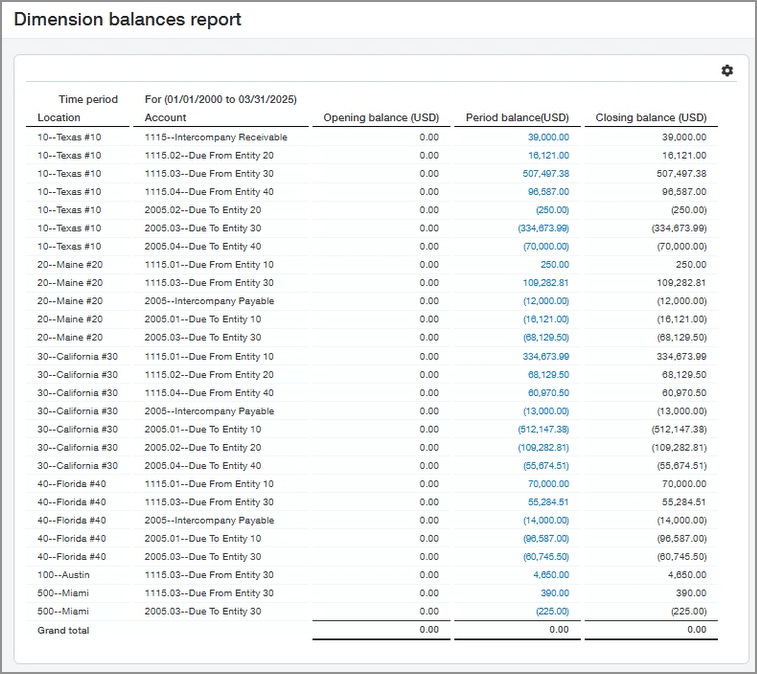
Notice the period balances. These period balances will require reclassification by adding the affiliate entity dimension.
You can determine the affiliate entity for the period balance in different ways:
- You can select the period balance to drill down and view the memos for each inter-entity transaction by location. In this example, drilling down brings up a General Ledger report listing the inter-entity transactions by location.
- You can look at the closing balance per account as listed by location and entity pairs showing due to and due from amounts.
In this example, you drill down to see the details of the first closing balance in the report. This reveals the following inter-entity activity that we’ll need to reclassify later with the relevant affiliate entity:
|
Posted date |
Memo |
Location |
Affiliate entity |
Journal |
Transaction amount |
Debit |
Credit |
Balance |
|---|---|---|---|---|---|---|---|---|
|
01 March |
Balance forward for 1115 inter-entity Receivable |
blank |
blank |
blank |
blank |
blank |
blank |
0.00 |
|
31 March |
Inter-entity due from: 20 |
10 |
blank |
GJ |
12,000.00 |
12,000.00 |
blank |
12,000.00 |
|
31 March |
Inter-entity due from: 30 |
10 |
blank |
GJ |
13,000.00 |
13,000.00 |
blank |
25,000.00 |
|
31 March |
Inter-entity due from: 40 |
10 |
blank |
GJ |
14,000.00 |
14,000.00 |
blank |
39,000.00 |
|
Total |
blank |
blank |
blank |
blank |
blank |
39,000.00 |
0.00 |
39,000.00 |
Notice that the affiliate entity column is blank for each transaction. This is because Intacct wasn’t tracking the affiliate entity dimension when these transactions were created. We'll need to create reclassification entries with the relevant affiliate entity dimension.
Re-allocate the balance to the relevant affiliate entities based on the due to and due from amounts for the transactions. The dimension balances report helps you determine these amounts.
- Go to General Ledger > Journal Entries.
- Add a new general journal transaction.
- Add the inter-entity transactions that you need to reclassify.
- Match the transactions to those listed in the dimension balances report.
- Re-allocate the amounts as needed and apply the relevant affiliate entity for each line.
- Post your changes.
The dimension balances report in Step 2 shows the first inter-entity receivable account with a debit balance of 39,000.00 for entity 10 (Texas #10). Therefore, we need to credit the 39,000.00 to zero out the balance. Then we'll need to create separate debit entries to allocate the debit amounts to the relevant affiliate entities (Maine #20, California #30, Florida #40).
The following table shows this reclassification entry:
|
Date |
Memo |
Account description |
Location name |
Affiliate entity name |
Transaction amount |
Debit |
Credit |
|---|---|---|---|---|---|---|---|
|
31 March |
Reclassify prior periods to include Affiliate Dimension balances |
Inter-entity receivable |
Texas #10 |
blank |
39,000.00 |
0.00 |
39,000.00 |
|
31 March |
Reclassify prior periods to include Affiliate Dimension balances |
Inter-entity receivable |
Texas #10 |
Maine #20 |
12,000.00 |
12,000.00 |
0.00 |
|
31 March |
Reclassify prior periods to include Affiliate Dimension balances |
Inter-entity receivable |
Texas #10 |
California #30 |
13,000.00 |
13,000.00 |
0.00 |
|
31 March |
Reclassify prior periods to include Affiliate Dimension balances |
Inter-entity receivable |
Texas #10 |
Florida #40 |
14,000.00 |
14,000.00 |
0.00 |
The second line in the dimension balances report in Step 2 shows another inter-entity receivable account with a debit balance of 16,121.00 for entity 10 (Texas #10). Therefore, we need to credit the 16,121.00 to zero out the balance. Then we'll need to create a separate entry to allocate the debit amount to the relevant affiliate entity (Maine #20).
The following table shows that this reclassification entry with one sum re-allocated to one affiliate entity:
|
Date |
Memo |
Account description |
Location name |
Affiliate entity name |
Transaction amount |
Debit |
Credit |
|---|---|---|---|---|---|---|---|
|
31 March |
Reclassify prior periods to include Affiliate Dimension balances 1115.02 |
Due From Entity 20 |
Texas #10 |
blank |
16,121.00 |
0.00 |
16,121.00 |
|
31 March |
Reclassify prior periods to include Affiliate Dimension balances 1115.02 |
Due From Entity 20 |
Texas #10 |
Maine #20 |
16,121.00 |
16,121.00 |
0.00 |
After reclassifying the inter-entity activity by affiliate dimension, run the dimension balances report again.
Select the following parameters for the report:
- Opening balance date is when you first began tracking data in Intacct. The closing balance date is 31 March.
- Select the accrual reporting book.
- For GL account number selection, select a range of GL accounts for all the inter-entity activity. Alternatively, you can create an account group.
- Location group that includes all the locations that require reclassification. In this example, the company uses a single base currency, such that we can use a single location group for this report.
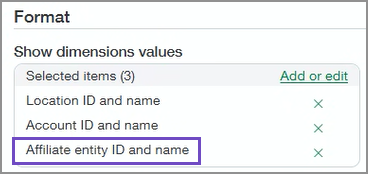
- Under Format > Show dimension values, order the report by Location ID and name, followed by Account ID and name, and Affiliate entity ID and name.
Validate that after you’ve reclassified the journal entries, the dimension balances for the inter-entity accounts match the relevant affiliate entity dimension values.
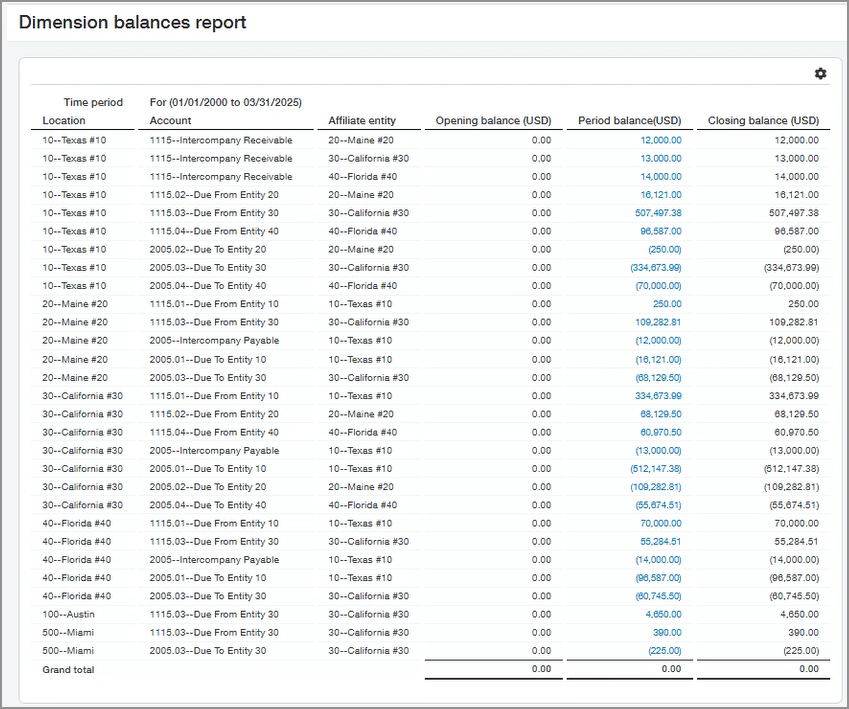
You can drill down for details for the closing balance for account 1115:
|
Posted date |
Memo |
Location |
Affiliate entity |
Journal |
Transaction amount |
Debit |
Credit |
Balance |
|---|---|---|---|---|---|---|---|---|
|
01 March |
Balance forward for 1115 inter-entity Receivable |
blank |
blank |
blank |
blank |
blank |
blank |
0.00 |
|
31 March |
Inter-entity due from: 20 |
10 |
20--Maine #20 |
GJ |
12,000.00 |
12,000.00 |
blank |
12,000.00 |
|
31 March |
Inter-entity due from: 30 |
10 |
30--California #30 |
GJ |
13,000.00 |
13,000.00 |
blank |
25,000.00 |
|
31 March |
Inter-entity due from: 40 |
10 |
40--Florida #40 |
GJ |
14,000.00 |
14,000.00 |
blank |
39,000.00 |
|
Total |
blank |
blank |
blank |
blank |
blank |
39,000.00 |
0.00 |
39,000.00 |
The next step is to include the affiliate entity dimension among the consolidated dimensions for the book. We're looking at the period prior to where we want to start tagging by affiliate entity. In this example, we'll select the affiliate entity dimension as a consolidated dimension for March.
- Go to the list of books or ownership structures:
- Domestic Consolidation > Setup > Books.
- Global Consolidation > Setup > Books.
- Advanced Ownership Consolidation > Setup > Ownership structures.
- Select Edit next to the book or ownership structure that you want to edit.
- Go to Consolidated dimensions and select the Affiliate entity dimension.
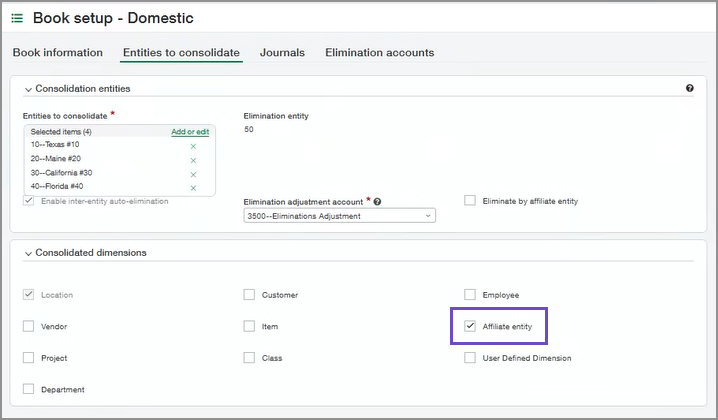
- Save your changes.
Re-run the consolidation for the period for which you reclassified transactions. In this example, the period is March.
- Select Consolidate.
The Consolidation options page appears.
- Choose Re-consolidate the current selected period and delete future consolidations.
- Select OK. The Consolidation window is shown.
- In the table of exchange rates, optionally override the exchange rates as desired.
- Select a consolidation option for the selected reporting period only. For example, the previous image shows a selected period of December 2019.
- Update consolidation with net changes (recommended): Select to only update new, modified, deleted, or otherwise changed transactions from the selected reporting period, and unchanged transactions will not be processed again.
- Delete and re-consolidate: Select to delete the consolidation for the selected reporting period and re-consolidate the period.
-
To start the consolidation immediately, select Consolidate now.
You'll need to wait for the consolidation to finish running before getting back to work.
-
Alternatively, select Consolidate offline to queue the consolidation request.
The Email notification window is shown.
- Enter the email address of the person you want Intacct to notify when the consolidation has finished.
- Select OK.
On the Consolidation page, the period to be consolidated offline is highlighted in yellow until the consolidation has run.
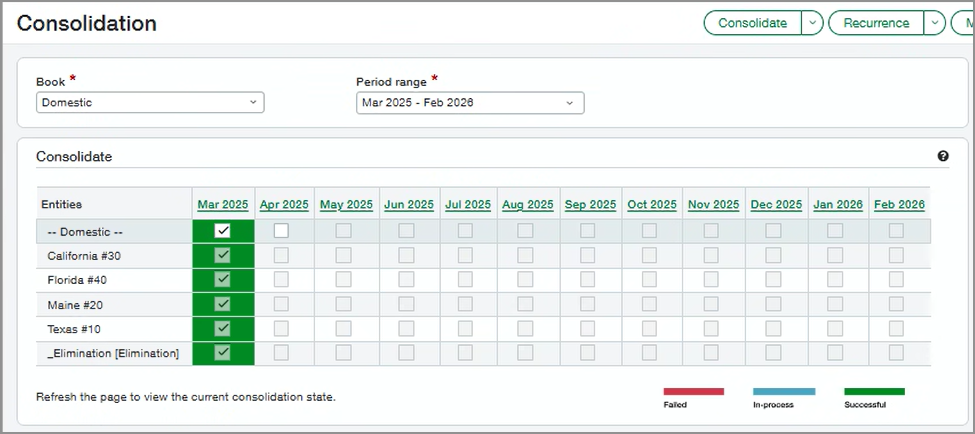
Validate the data we expect to see after having re-consolidated. The report shows the reclassified transactions in March. Ensure that everything going forward from April is properly tagged.
Use the same reporting parameters as before, but run the report against the Domestic Consolidation book.
- Opening balance date is when you first began tracking data in Intacct. The closing balance date is 31 March.
- Select the consolidation reporting book.
- For GL account number selection, select a range of GL accounts for all the inter-entity activity. Alternatively, create an account group.
- Location group that includes all the locations that require reclassification. In this example, the company uses a single base currency, so you can use a single location group for this report.
- Under Format > Show dimension values, order the report by Location ID and name, followed by Account ID and name, and Affiliate entity ID and name.
The dimension balances report shows historical transactions through March that are tagged with the affiliate entity dimension:
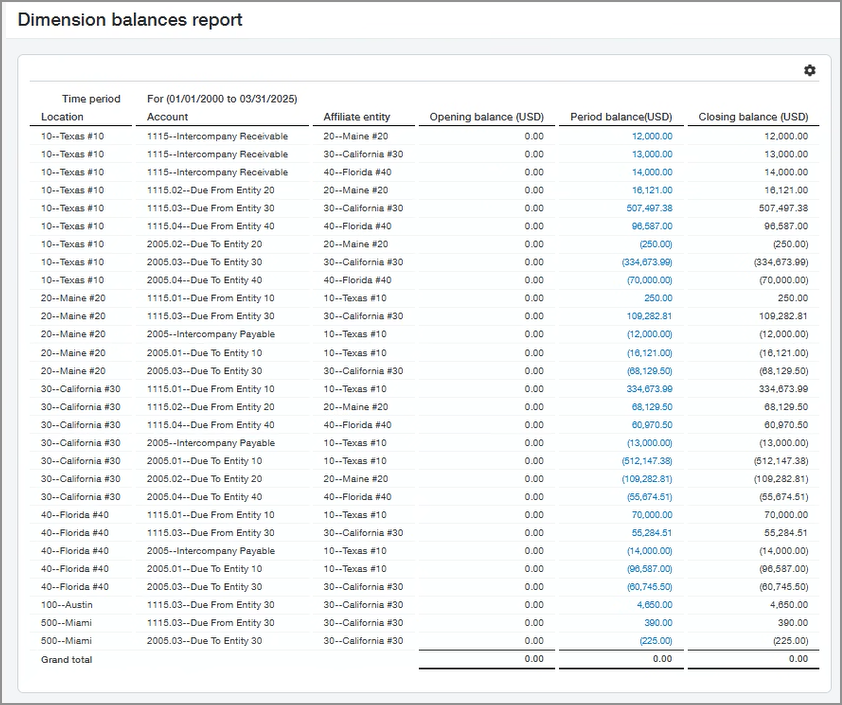
Verify that all transactions are tagged with the affiliate entity before consolidating for April. You'll want to make sure that all activity with elimination accounts has a relevant affiliate entity.
Run the same dimension balances report on the accrual book as described in Step 2, but for April.
Confirm that the report shows the inter-entity elimination accounts all tagged with the relevant affiliate entity dimension values:
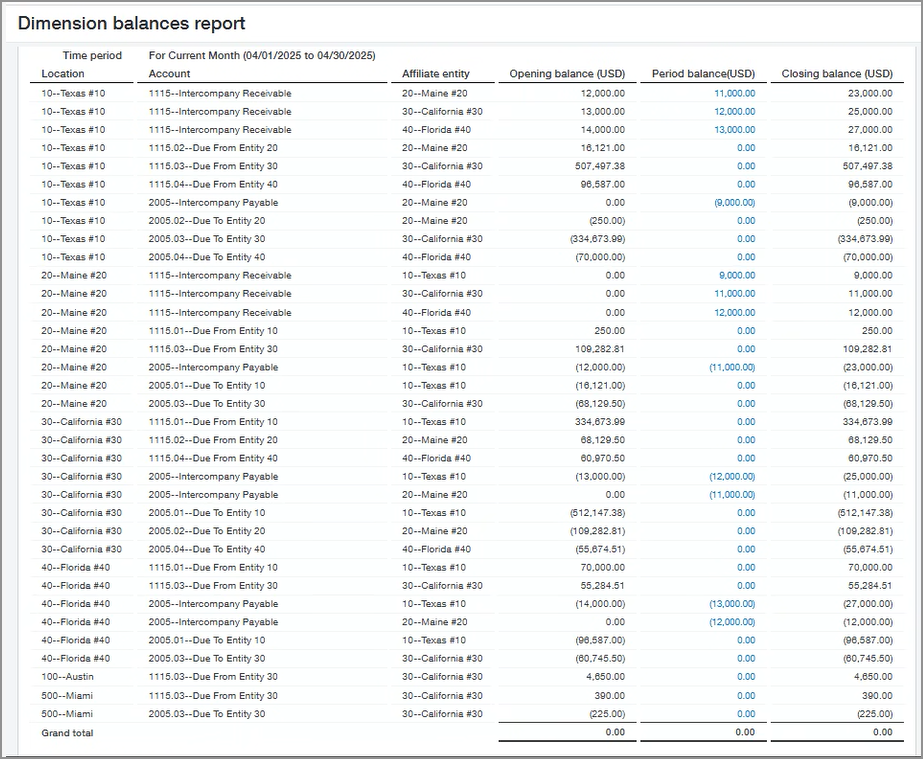
If any inter-entity elimination account is not tagged or is tagged incorrectly, you'll need to reclassify the account. Include the affiliate entity dimension as described in In this example, the company uses Domestic Consolidation with a single currency. We're choosing to enable the affiliate entity dimension as of 1 April, being the start of the month and quarter. We'll want to run a Dimension balances report on all accounts for the month before we begin tracking the affiliate entity dimension, in this case March. This report will show all inter-entity balances from inception through March. We'll need to reclassify inter-entity activity to include the affiliate entity dimension so that the balances are correct. .
Beginning in April, Intacct eliminates the elimination accounts by the affiliate entity dimension after you select Eliminate by affiliate entity.
- Go to the list of books or ownership structures:
- Domestic Consolidation > Setup > Books.
- Global Consolidation > Setup > Books.
- Advanced Ownership Consolidation > Setup > Ownership structures.
- Select Edit next to the book or ownership structure that you want to edit.
- Select Eliminate by affiliate entity.
- For a book: On the Entities to eliminate tab, select Eliminate by affiliate entity.
- For an ownership structure: On the Ownership structure page, select Eliminate by affiliate entity.
After you select Eliminate by affiliate entity, Intacct automatically selects Affiliate entity from the list of Consolidated dimensions if it is not already selected.
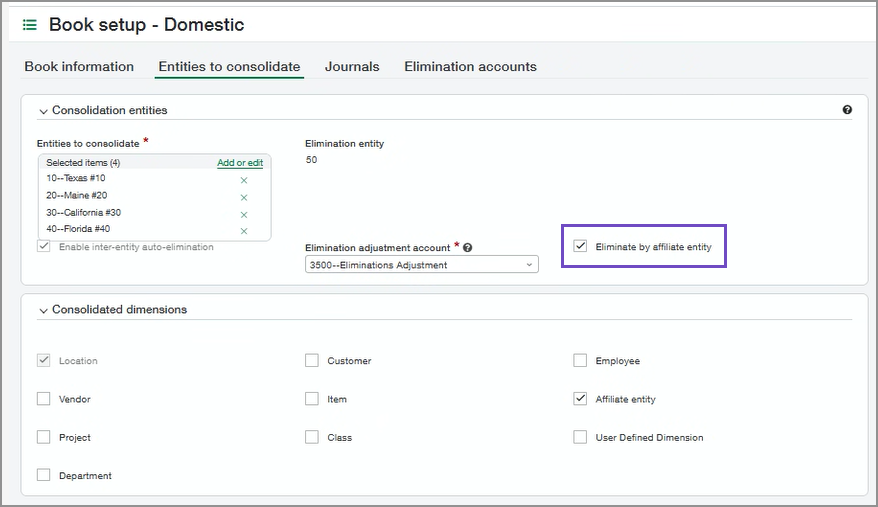
Consolidate the current period to begin eliminating by affiliate entity.
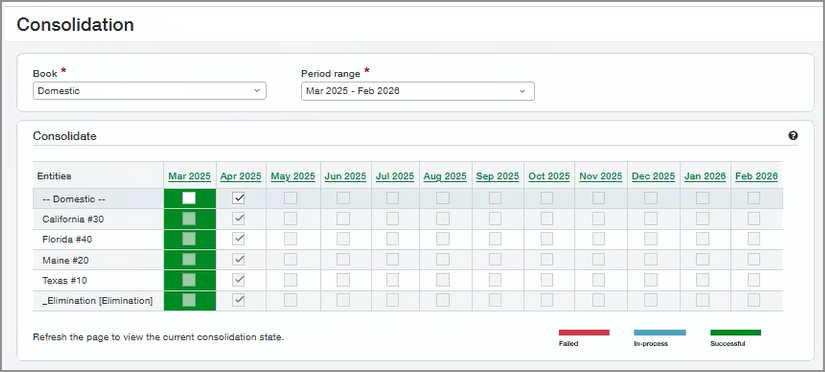
- Select Consolidate.
A Consolidation page appears where you can review the consolidation information and select how the consolidation should be performed.
- (Optional) If desired, you can override the exchange rates to be used in the consolidation.
The exchange rates are pulled from the Intacct Daily Rate.
To override an exchange rate, select the field and type over the existing rate.
- To start the consolidation immediately, select Consolidate now.
You'll need to wait for the consolidation to finish running before getting back to work.
- Alternatively, select Consolidate offline to queue the consolidation request to run later.
The Email notification window is shown.
- Enter the email address of the person you want Intacct to notify when the consolidation has finished.
- Select OK.
On the Consolidation page, the period to be consolidated offline is highlighted in yellow until the consolidation has run.
- Consolidate now: The consolidation runs immediately, and the consolidation period is highlighted green after the consolidation has completed successfully.
- Consolidate offline: Intacct queues the request to run the consolidation, while your work can continue unimpeded. The request is placed at the end of the queue, and jobs run in the order they were received. While the consolidation request is queued, you can't run another consolidation, or change consolidation options. You can, however, choose to cancel the request to run the consolidation offline.
After you consolidate the current period, run a balance sheet report on the consolidation to confirm the elimination by the affiliate entity dimension. The balance sheet report on the consolidation book shows elimination by affiliate entity.
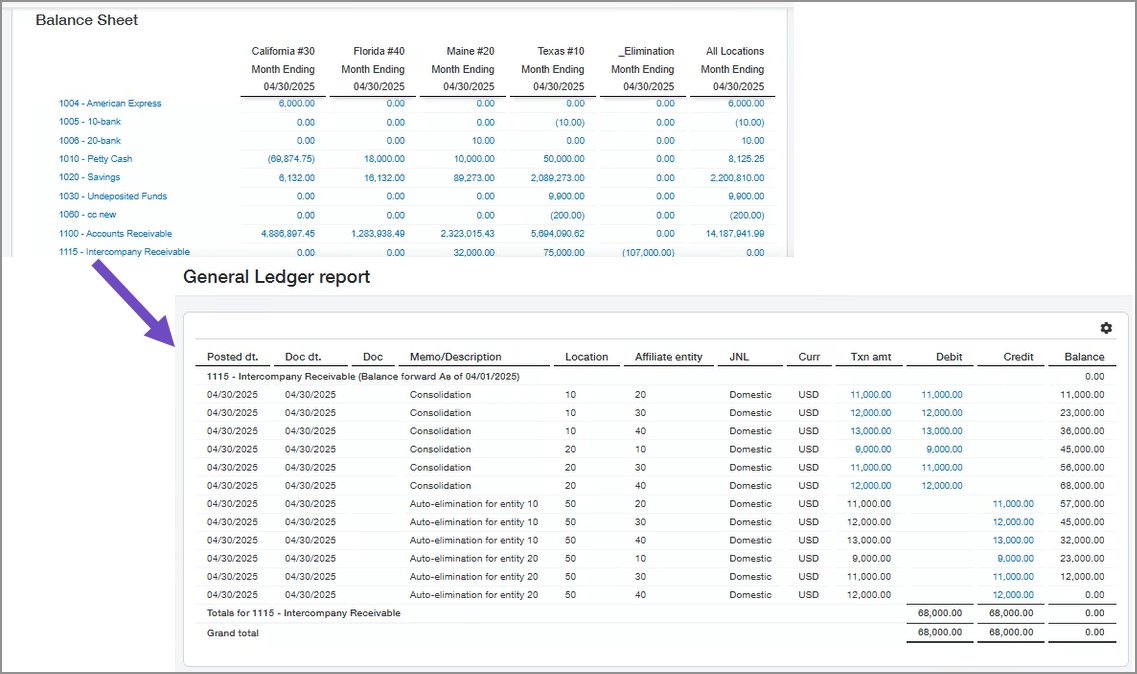
Drill down to view details of the elimination:
|
Date |
Memo |
Location |
Affiliate entity |
Journal |
Transaction amount |
Debit |
Credit |
Balance |
|---|---|---|---|---|---|---|---|---|
|
30 April |
Consolidation |
10 |
20 |
Domestic |
11,000.00 |
11,000.00 |
blank |
11,000.00 |
|
30 April |
Consolidation |
10 |
30 |
Domestic |
12,000.00 |
12,000.00 |
blank |
23,000.00 |
|
30 April |
Consolidation |
10 |
40 |
Domestic |
13,000.00 |
13,000.00 |
blank |
36,000.00 |
|
30 April |
Consolidation |
20 |
10 |
Domestic |
9,000.00 |
9,000.00 |
blank |
45,000.00 |
|
30 April |
Consolidation |
20 |
30 |
Domestic |
11,000.00 |
11,000.00 |
blank |
56,000.00 |
|
30 April |
Consolidation |
20 |
40 |
Domestic |
12,000.00 |
12,000.00 |
blank |
68,000.00 |
|
30 April |
Auto-elimination for entity 10 |
50 |
20 |
Domestic |
11,000.00 |
blank |
11,000.00 |
57,000.00 |
|
30 April |
Auto-elimination for entity 10 |
50 |
30 |
Domestic |
12,000.00 |
blank |
12,000.00 |
45,000.00 |
|
30 April |
Auto-elimination for entity 10 |
50 |
40 |
Domestic |
13,000.00 |
blank |
13,000.00 |
32,000.00 |
|
30 April |
Auto-elimination for entity 20 |
50 |
10 |
Domestic |
9,000.00 |
blank |
9,000.00 |
23,000.00 |
|
30 April |
Auto-elimination for entity 20 |
50 |
30 |
Domestic |
11,000.00 |
blank |
11,000.00 |
12,000.00 |
|
30 April |
Auto-elimination for entity 20 |
50 |
40 |
Domestic |
12,000.00 |
blank |
12,000.00 |
0.00 |
|
Total |
blank |
blank |
blank |
blank |
blank |
68,000.00 |
68,000.00 |
0.00 |
Example 2: Use the affiliate entity dimension in a subset consolidation book
You can apply the affiliate entity dimension to a consolidation book or ownership structure that includes a subset of entities and eliminate by affiliate entity. You can do this by going through the steps outlined here with some changes. A subset consolidation book includes a subset of entities to be consolidated. For example, in this use case we're working with a subset of the previous consolidation book that only includes entities 10 and 30.
Skip steps 1-4 in this document. Begin with a modified version of Step 5.
- Go to the list of books or ownership structures:
- Domestic Consolidation > Setup > Books.
- Global Consolidation > Setup > Books.
- Advanced Ownership Consolidation > Setup > Ownership structures.
- Select Edit next to the book or ownership structure that you want to edit.
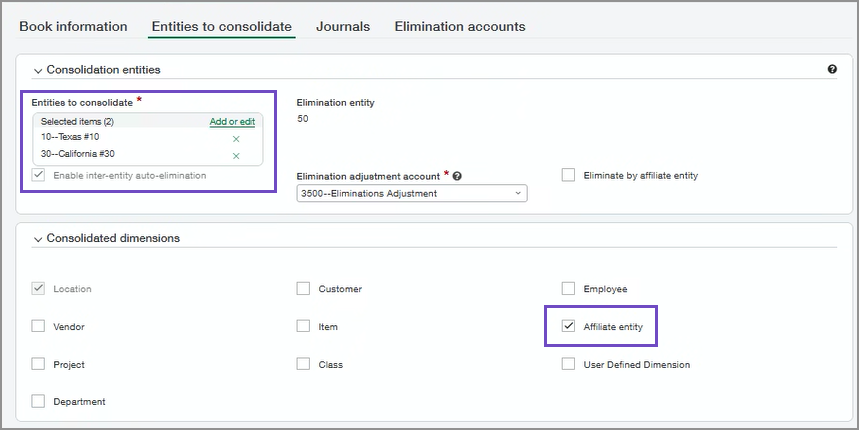
- Go to Consolidated dimension and select the Affiliate entity dimension.
- From Entities to consolidate, ensure that you have selected entities 10 and 30 for the subset consolidation book and the affiliate entity dimension in the Consolidated dimension section:
- Save your changes.
Re-consolidate the previous period of the subset book, in this case March.
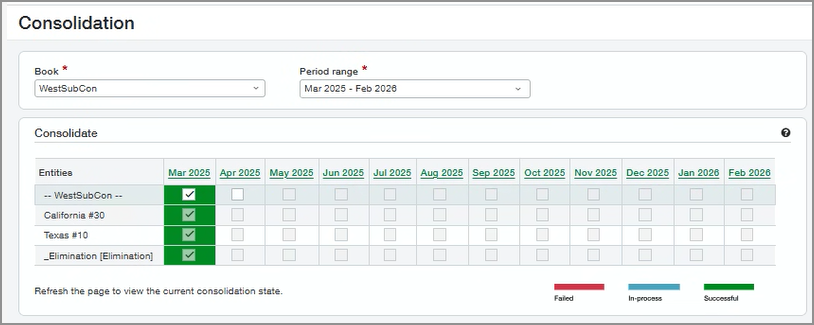
- Select Consolidate.
The Consolidation options page appears.
- Choose Re-consolidate the current selected period and delete future consolidations.
- Select OK. The Consolidation window is shown.
- In the table of exchange rates, optionally override the exchange rates as desired.
- Select a consolidation option for the selected reporting period only. For example, the previous image shows a selected period of December 2019.
- Update consolidation with net changes (recommended): Select to only update new, modified, deleted, or otherwise changed transactions from the selected reporting period, and unchanged transactions will not be processed again.
- Delete and re-consolidate: Select to delete the consolidation for the selected reporting period and re-consolidate the period.
-
To start the consolidation immediately, select Consolidate now.
You'll need to wait for the consolidation to finish running before getting back to work.
-
Alternatively, select Consolidate offline to queue the consolidation request.
The Email notification window is shown.
- Enter the email address of the person you want Intacct to notify when the consolidation has finished.
- Select OK.
On the Consolidation page, the period to be consolidated offline is highlighted in yellow until the consolidation has run.
Edit the subset consolidation book to select Eliminate by affiliate entity and save your changes.
- Go to the list of books or ownership structures:
- Domestic Consolidation > Setup > Books.
- Global Consolidation > Setup > Books.
- Advanced Ownership Consolidation > Setup > Ownership structures.
- Select Edit next to the book or ownership structure that you want to edit.
- Select Eliminate by affiliate entity.
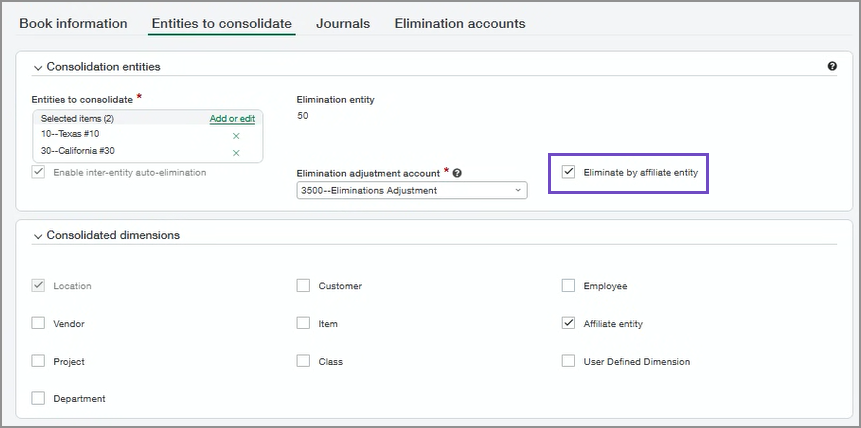
- For a book: On the Entities to eliminate tab, select Eliminate by affiliate entity.
- For an ownership structure: On the Ownership structure page, select Eliminate by affiliate entity.
After you select Eliminate by affiliate entity, Intacct automatically selects Affiliate entity from the list of Consolidated dimensions if it is not already selected.
Consolidate the subset book for the current period, in this case April.
- Select Consolidate.
A Consolidation page appears where you can review the consolidation information and select how the consolidation should be performed.
- (Optional) If desired, you can override the exchange rates to be used in the consolidation.
The exchange rates are pulled from the Intacct Daily Rate.
To override an exchange rate, select the field and type over the existing rate.
- To start the consolidation immediately, select Consolidate now.
You'll need to wait for the consolidation to finish running before getting back to work.
- Alternatively, select Consolidate offline to queue the consolidation request to run later.
The Email notification window is shown.
- Enter the email address of the person you want Intacct to notify when the consolidation has finished.
- Select OK.
On the Consolidation page, the period to be consolidated offline is highlighted in yellow until the consolidation has run.
- Consolidate now: The consolidation runs immediately, and the consolidation period is highlighted green after the consolidation has completed successfully.
- Consolidate offline: Intacct queues the request to run the consolidation, while your work can continue unimpeded. The request is placed at the end of the queue, and jobs run in the order they were received. While the consolidation request is queued, you can't run another consolidation, or change consolidation options. You can, however, choose to cancel the request to run the consolidation offline.
Run a consolidated balance sheet report for the subset consolidation for April:
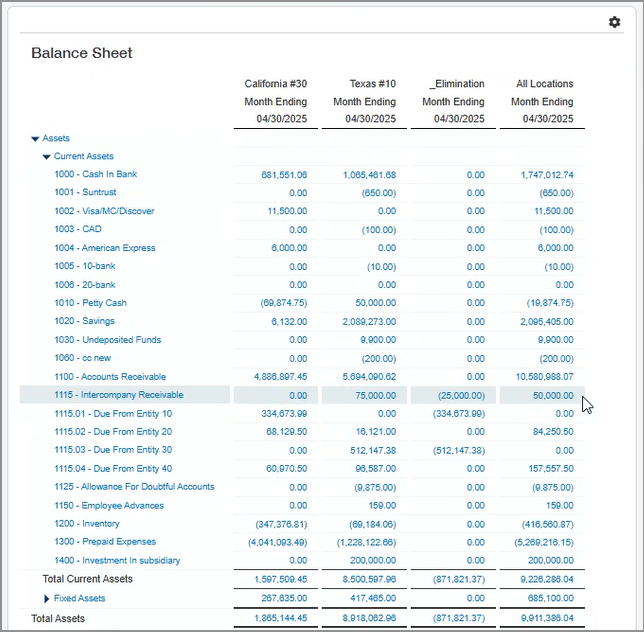
In this case, we're drilling down to the details for the balance of 50,000.00 to learn more about the balance as shown in the following table:
|
Date |
Memo |
Location |
Affiliate entity |
Journal |
Transaction amount |
Debit |
Credit |
Balance |
|---|---|---|---|---|---|---|---|---|
|
1 April |
Balance forward |
blank |
blank |
blank |
blank |
blank |
blank |
26,000.00 |
|
30 April |
Consolidation |
10 |
20 |
WestSubCon2 |
11,000.00 |
11,000.00 |
blank |
37,000.00 |
|
30 April |
Consolidation |
10 |
30 |
WestSubCon2 |
12,000.00 |
12,000.00 |
blank |
49,000.00 |
|
30 April |
Consolidation |
10 |
40 |
WestSubCon2 |
13,000.00 |
13,000.00 |
blank |
62,000.00 |
|
30 April |
Auto-elimination for entity 10 |
50 |
30 |
WestSubCon2 |
12,000.00 |
blank |
12,000.00 |
50,000.00 |
|
Total |
blank |
blank |
blank |
blank |
blank |
36,000.00 |
12,000.00 |
50,000.00 |
The detail for the 50,000.00 balance for inter-entity receivable account 1115 indicates correctly that the auto-elimination for entity 10 is 12,000.00 as tagged to affiliate entity 30. The 12,000.00 for affiliate entity 30 and the 13,000.00 for affiliate 40 are not eliminated because they are not part of the subset consolidation book.
Regional availability
Affiliate entity standard dimension is available to customers with a Consolidation subscription in the following regions:
All regions
