Sage for Construction
Related information
 Related topics
Sage provides an end-to-end construction cloud suite.
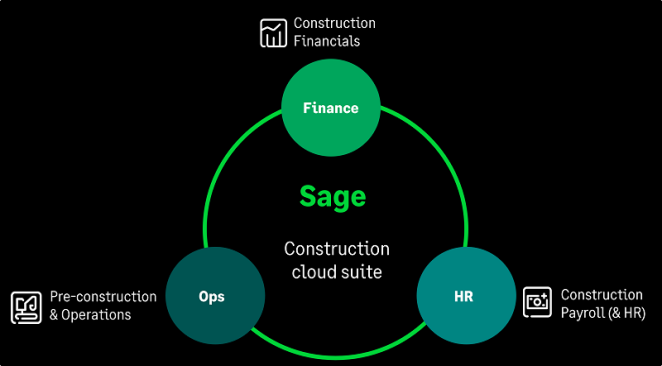
Finance
Sage recommends that finance teams use these following solutions:
Sage Intacct Construction is a cloud accounting software that gives general contractors and real estate developers the control that you need to manage every part of your project. Use Sage Intacct Construction to represent project work in a visual hierarchy (work breakdown structure) with the project, task, and cost type dimensions.
-
Measure project cost and productivity through the full life cycle, including estimating, project management, data collection, and accounting.
-
Ensure that project work is priced, communicated, approved, and incorporated into the billing cycle accurately.
-
Incrementally invoice your customers based on contract terms. Also, share all necessary details, such as amounts, total paid, percentage of work completed, amount due, and total outstanding amount for the project.
-
Track and manage the payment or receipt of contractual retainage amounts.
-
Report on project compliance, progress, costs, and profitability.
Check out the Sage Intacct Construction help center.
Sage Intacct Real Estate (SIRE) is an industry leading financial management solution with comprehensive property management that provides visibility and control over your leases. Lease are at the center of Sage Intacct Real Estate, which allows you to ensure that sublease tenants are administered correctly.
-
Manage multiple leases per tenant, multiple units per lease, and multiple tenants per lease.
-
Work with unique clauses and calculations, such as sublease arrangements.
-
Transform your leases from static legal documents to dynamic information generators.
-
View and adjust expenses from the General Ledger.
-
Identify the primary lessee and sublessee.
-
Track when tenants move in and move out.
-
View the list of properties in your portfolio, whether it be your companies' portfolio or your own portfolio as an asset or property manager.
HR and People
Sage recommends that HR and people teams use this following solution:
Sage Intacct Construction (SIC) Payroll is a cloud solution that can manage your federal, state, and local certified payroll needs. SIC Payroll provides complete visibility into your labor costs, enabling you to reduce cost overruns and improve the accuracy of future estimates.
-
Establish the rules regarding union and tax repository, which becomes effective when work locations change.
-
Complex payroll calculations for deductions and fringes are organized.
-
Both the direct and indirect cost of labor distributes correct project dimensions to provide an accurate estimate to actual labor cost analysis.
Check out the Sage Intacct Construction Payroll help center.
You’ll need to create an account to view the guides. There's no charge to create an account.
Operations
Sage recommends that the operations, pre-construction, and field service teams use these following solutions:
Sage Construction Management is a project delivery solution that's built to handle pre-construction, project management, and finances for construction companies. Sage Construction Management can assist with your operations and finance data so that you can easily manage your projects.
-
Estimators can track leads, prepare bids, create RFP packages, and transfer data from their estimates directly to awarded projects.
-
Project management and field staff can easily manage job site operations, contracts, procurement, and time cards. Take advantage of quality control features to manage vendors, subcontractors, scheduling, and more.
-
Accountants can view project financial analytics to see actual costs, work in progress (WIP), and anticipated costs of a project. They can review contract information and sync project data to their accounting solution.
Check out the Sage Construction Management help center.
Sage Estimating is an industry-leading construction estimating software that you can use to create estimates quickly and accurately.
Sage Estimating combines a familiar spreadsheet interface with powerful features that help you calculate estimates effectively, including the following:
-
Take off items from standard industry databases, your own standard database, or one-off items that you define “on the fly.”
-
Take off simple assemblies or create sophisticated models with a complete set of items and assemblies, so you can take off complete structures all at once.
-
Offer alternates to demonstrate the effects of different choices to your customers, helping them to balance more luxurious finishes with their budgets.
-
Export estimates to Excel to work with them in different ways.
-
Allocate add-ons to project estimate entries when you export an estimate to Sage Intacct Construction.
-
Keep your standard databases up to date by integrating with RS Means city cost indexes, or import item prices from other external sources.
-
Update estimate prices by category or price code, or reprice using factor tables.
-
Create your own sort sequences and estimate layouts to emphasize data of interest to you at different times during the estimate process.
-
Take advantage of standard industry work breakdown structure (WBS) codes or create your own codes.
-
Create a variety of reports using Crystal Reports (with built-in features).
-
Export customized estimate data for use in other business intelligence tools.
Check out the Sage Estimating help center.
If you're looking for information on setting up the integration and exporting estimate data, see the Sage Estimating Sage Intacct Construction Integration Guide, available under Options and Integrations on the Sage Estimating Product Documentation web page.
If you’re interested in purchasing Sage Estimating, visit the Sage Estimating product website.
Sage Field Operations is a field service solution that provides your service team and technicians with the critical information that they need to manage work orders, at any time. Use Sage Field Operations to determine which areas of your service business are most profitable and forecast capabilities for future growth.
-
View work orders and assignments and edit assignment activity.
-
Enter new work order assignments.
-
Complete work order assignment punch actions.
-
Enter work order labor.
-
Enter weekly time submissions.
-
Enter and delete parts and miscellaneous items.
Check out the Sage Field Operations support page at Operix.com.
You’ll need to create an account to view the guides. There's no charge to create an account.
Interested in streamlining work order tracking and synchronizing work order information with Sage Intacct? Check out the Work Order Management Help section to learn more.
