Construction project contract basics
Construction contracts created in the Projects application are not the same as those created in the Contracts application. You cannot have both a Construction subscription and a Contracts subscription in the same company.
Associate a project contract and its corresponding project contract lines with a project to capture a mix of billable details and include those details into your construction project billing.
With project contracts, you can:
- Use different billing types (such as time and materials and progress bill) on one project.
- Map project tasks (cost codes) to project contract lines so that billable expenses are attributed to the correct project contract line automatically.
- Bill project contract lines using OE transaction definitions that create invoice formatting similar to the American Institute of Architects (AIA) invoice format.
- Associate project change orders with project contract lines to capture and include the value of those project changes into project billing.
- Apply rate tables and markups to:
- Timesheet entries
- Purchasing entries
- Accounts Payable entries
- General Ledger entries
- Credit card transactions
- Employee expenses
If you're billing by unit price, create a contract in Order Entry. Otherwise, create the contract in Projects.
Videos
-
A tour of project contracts (3:29)
-
Set up project contracts (3:38)
-
Add project contract lines (5:04)
-
Establish the project contract line price be recording line entries (3:30)
-
Set up project contract lines for time and materials billing (7:47)
Training
Sage University provides training that you can take at your own pace. The courses are designed to help new users get started with Sage Intacct quickly.
Connect with Sage University then select a training link.

Project contracts and billing
Learn how to set up project contracts for different types of billing and how to generate customer invoices.

See all on-demand training
Get up to speed quickly with short video tutorials and interactive training modules.
Understand construction project contract basics
Create the contract in the Projects application if you are not billing by unit price.
If you are billing by unit price, see Create a construction project contract in Order Entry.
Create the contract
| Subscription |
Projects application configured for Project costing and billing Construction |
|---|---|
| User type |
Business Construction Manager Project Manager |
| Regional availability |
|
| Permissions |
Projects Project contracts: List, Add |
-
- Enter a Project contract ID and a Project contract name.
If you configured Projects to use an automatic ID sequence for project contracts, the ID appears after you save the project contract. Otherwise, you can enter the ID manually.
- Select the associated Project.
Do not change the prefilled customer because Construction project contracts bill the project customer.
The project must have a location. Invoices and payments made at the entity level against a top level project with a specified location only appear at the entity level.
- Enter the Contract date.
This field defaults to the calendar date, which you can change.
- Enter project contract details.
- Select Save.
For details on each field, see Field descriptions: Add Construction project contracts.
Add lines to the contract
-
- To add project contract lines, do one of the following:
- Select Lines next to the relevant project contract then select Add.
- Select Edit next to the applicable project contract.
Then, go to the Project contract lines section and select Add.
- Enter a Line ID.
You may want to specify whether it is associated with a parent contract line.
- Enter a Line name.
- Select the Line date.
- Select a GL account.
- Select Billable to include the project contract line when you generate invoices.
- Specify the Billing type by selecting one of the following options:
- Select Progress bill to set up progress billing.
- Select Time and materials to set up time and materials billing, based on cost transactions.A time and materials project contract line only works if the line is associated with a time and materials project
- In the Additional information section, enter the following information:
- The Scope of the line.
- The Schedule information for that line.
- Internal reference information.
- External reference information.
- In the Dimensions section, associate dimensions with this project contract line for billing purposes.
- In the Entries section, the line's billing type determines how the information you enter is used.
Enter information for the Price effective date and Workflow type.
The project contract line uses your entry here to generate the currency value.
- Select Save.
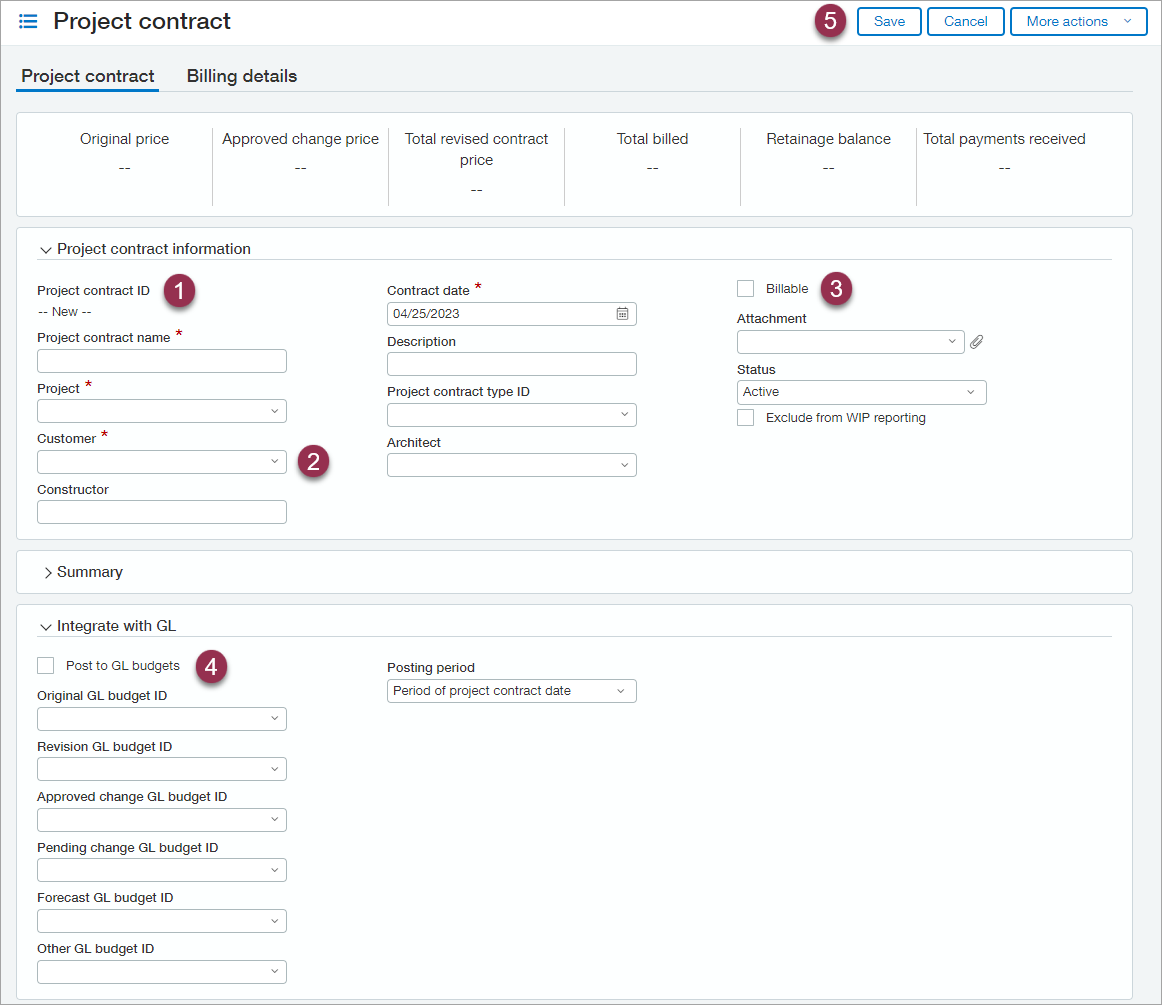
- If a contract ID is not automatically assigned, enter an ID.
- The customer field defaults to the customer associated with the project. Do not change the default selection.
- Select Billable if you want to select this contract for billing in Project Generate Invoices.
-
Select the Post to GL budgets checkbox if you want values from this contract to post to your budgets. Then select the budgets in the fields below.
You can select a budget only if it's set up to allow posting from project contracts.
-
Before adding contract lines, select Save. After the contract is saved, you can reopen it and add your lines.
If you're billing by unit price, create the contract as a sales order in Order Entry.
See Create a sales order.
Sage University offers a 90-minute course that covers this topic: Billing construction contracts as orders.
