Expense report process overview
Related information
 Related Topics
Employees create and submit expense reports, which are presented to the employees' managers for approval. After approval, the expense reports become reimbursement request candidates for the accounting department to process into pending reimbursements, from which checks are printed.
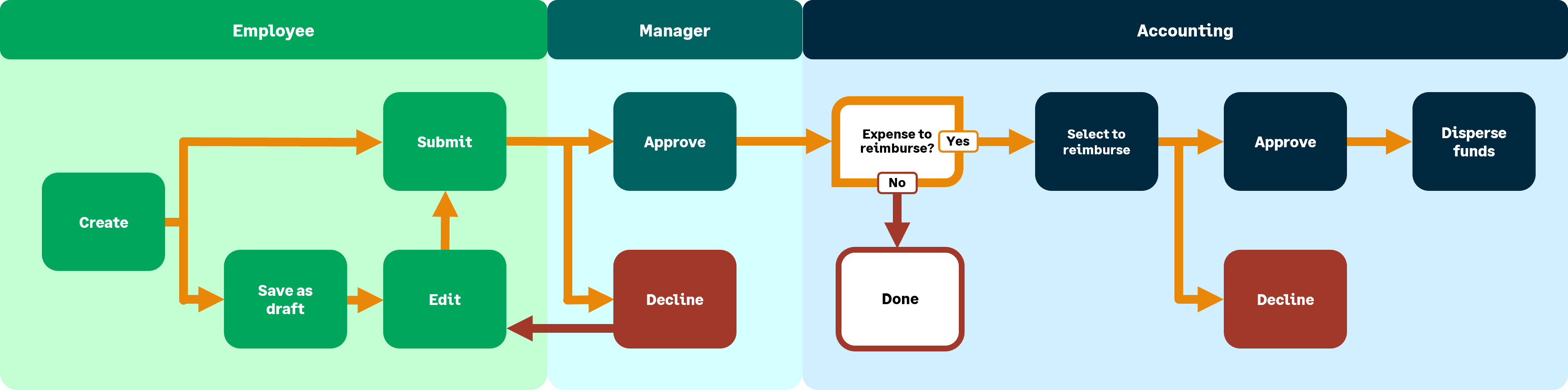
The following two exceptions are when:
-
An advance payment is issued before the employee creates an expense report. In this case, the accounting department first creates an advance payment and prints a check. Later, the employee creates an expense report. The accounting department then applies the advance payment to the payment request for that expense report.
-
Employees email their travel or other receipts and use artificial intelligence (AI) to assist in coding them. Machine learning (ML) remembers the changes for future receipts. Employees can use these electronic receipts to create expense reports.
Approve or decline expense reports
This section is for the employee's manager.
-
Managers must set up users to approve or decline expenses.
-
If email notification is turned on, you will receive an email notifying you that an expense report is ready for your review.
-
If email notification is turned off, you need to examine the expense reports that are ready for your approval.
-
Employees can edit their own unapproved expense reports.
-
Approved expense reports become candidates for reimbursement requests.
For more information, go to Set up approvals for expense reports or Approve or decline expense reports.
Reimburse expenses
Reimbursing expenses is a two-step process:
-
Create reimbursement requests from approved expense reports.
-
Complete the reimbursement (unless an advance cash payment was already made).
If you use the optional approval process, reimbursements must be approved when they are within the required amount range.
Next, select the expense reports to pay and choose a reimbursement method:
-
Cash: Records manual payments.
-
Online: Prints and mails a check through the online printing center.
-
Check: The most common method and can be printed locally as part of a check run.
For more information, go to Select expense reports to reimburse or Print expense reimbursement checks.
Maintenance
Accounting personnel must perform a number of regular tasks.
-
Create expense reports for others
-
It might be necessary for you to enter an expense report for someone else. For more information, go to Create expense reports.
-
For example, a person has left the company and no longer has access to Intacct.
-
-
Partially edit or reclassify submitted expense reports
-
You might need to change errors in expense reports after they are submitted. For more information, go to Reclassify an expense report.
-
-
Review pending
-
Review approved expense reports that are ready for reimbursement. For more information, go to View pending expense reimbursements.
-
-
Run reports
-
You might want to run reports, such as an Expense Ledger. For more information, go to Expense Ledger report.
-
You can also view and void posted reimbursements. For more information, go to Void posted employee expense reimbursements.
-
Sage Expense Management
Sage Expense Management (SEM) is a Sage Intacct solution that simplifies expense tracking and reporting, making it easier to manage business expenses.
-
Expense reports: Expense reports group multiple expenses together for submission and approval. They provide a summarized view of your spending over a specific period.
-
Approvals: After you submit an expense report, it goes through an approval workflow. This usually involves your manager and potentially other approvers.
-
Reimbursements: After your expense reports are approved, you will receive reimbursements for any out-of-pocket expenses.
For more information, go to Sage Expense Management.
