Accounts Receivable
E-Invoicing for Germany—Early Adopter
Sage Intacct now supports E-Invoicing for Germany. This feature helps businesses to stay compliant with evolving regulations while streamlining invoice processing.
Key benefits
Germany has mandated that businesses must be able to send and receive invoices electronically (e-invoicing) in the ZUGFeRD format. ZUGFeRD is a hybrid e-invoicing file format that uses a human-readable PDF file along with an embedded machine-readable XML file to automate data processing. This new feature allows you to send and receive ZUGFeRD e-invoices in entities where the operating country is Germany.
With this feature, you can do the following:
- Set up e-invoicing for your German entities.
- Send e-invoices in the ZUGFeRD format from Accounts Receivable or Order Entry.
- Receive e-invoices in the ZUGFeRD format in Accounts Payable, with or without AP Automation.
How it works
-
Go to Company > Admin > Subscriptions and subscribe to E-Invoicing.
-
Select Configure next to E-Invoicing.
-
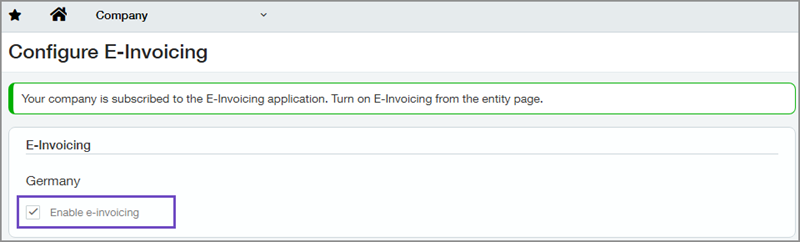
In the E-Invoicing section, select Enable e-invoicing for Germany and save.
-
Go to Company > Setup > Entities and enable your German entities to use e-invoicing.
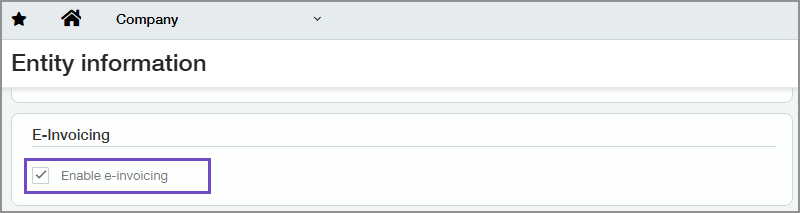
After e-invoicing has been enabled for an entity, it cannot be turned off.
During this first phase, you can only send e-invoices one at a time, and only to VAT-enabled entities.
-
Send the invoice from Accounts Receivable or Order Entry.
-
Do one of the following:
- Go to Accounts Receivable > All > Invoices.
- Go to Order Entry > All > Transactions > Invoice > Sales invoice.
-
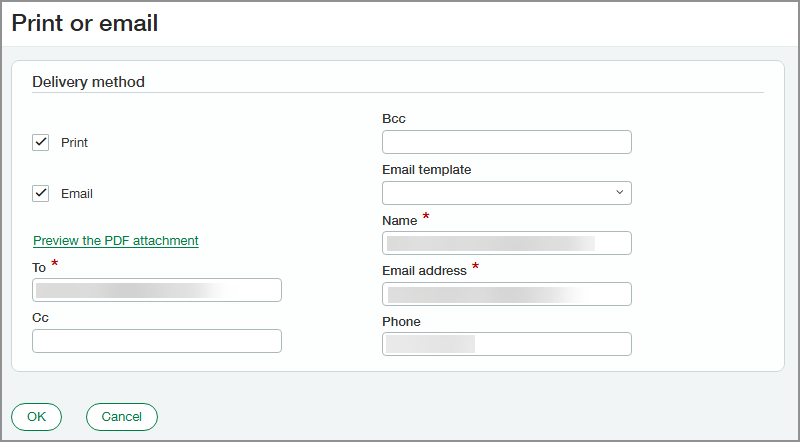
- Find the invoice that you want to send and select Print or email at the end of the row.
-
To email an e-invoice, select Email, enter the required information, and select OK.
-
To print an e-invoice, select Print to generate a ZUGFeRD file that you can then save and send.
It can take some time to generate the ZUGFeRD file.
During this first phase you can also use the method for printing or emailing multiple invoices from Accounts Receivable and Order Entry, but be aware that if there is more than one invoice ready to print, the PDFs that are generated are regular PDFs that do not use the ZUGFeRD format.
You can process ZUGFeRD e-invoices by uploading or emailing the invoice.
-
To upload an invoice:
- Go to Accounts Payable > All > Automated transactions.
- Select Upload.
- Drag and drop the invoice, or browse to the invoice and select it.
-
To email an invoice to the email address configured with your E-Invoicing subscription:
-
Ensure that you send draft bills to the email address that was set up when you subscribed to E-Invoicing.
-
Go to Company > Admin > Subscriptions.
-
Select Configure next to E-Invoicing.
-
In the Service mailbox configuration section, find the email address for the entity and send draft bills to that address.
-
-
Review and post draft bills.
- Go to Accounts Payable > All > Automated transactions.
- On the View menu, select Drafts.
-
Find the bill you want to review and update.
-
Select Edit at the end of the row.
- Review bill details and edit them as necessary.
- Submit or post the bill.
-
If you’re subscribed to AP automation, Intacct populates additional fields that are generally not available in ZUGFeRD document, such as GL Account, Location, and Department.
Learn more about how AP Automation saves you time by automatically populating bills and purchasing transactions in these help articles: About AP Automation and About AP Automation with Purchasing.
What's the Early Adopter program?
The Early Adopter program is available to a select group of customers who test new features and provide feedback. Your input will help us refine and improve these features before the general release.
If you want to be considered for the Early Adopter program, complete this form today.
Permissions and other requirements
| Subscription |
Accounts Payable Accounts Receivable Company E-Invoicing AP Automation (optional) |
|---|---|
| Regional availability |
Germany |
| User type |
Setting up E-Invoicing: Business user with admin privileges Sending and receiving e-invoices: Business |
| Permissions |
Administration
Accounts Payable
Accounts Receivable
Company
|
| Restrictions |
Operating country of the entity must be Germany to enable e-invoicing. |
