Cash Management
Introducing Cash requirements with expanded currency support—Early Adopter
Take our new Cash requirements feature for a test-drive and join the Early adopter program. Cash requirements now supports all available currencies, with improved short-term payables forecasting.
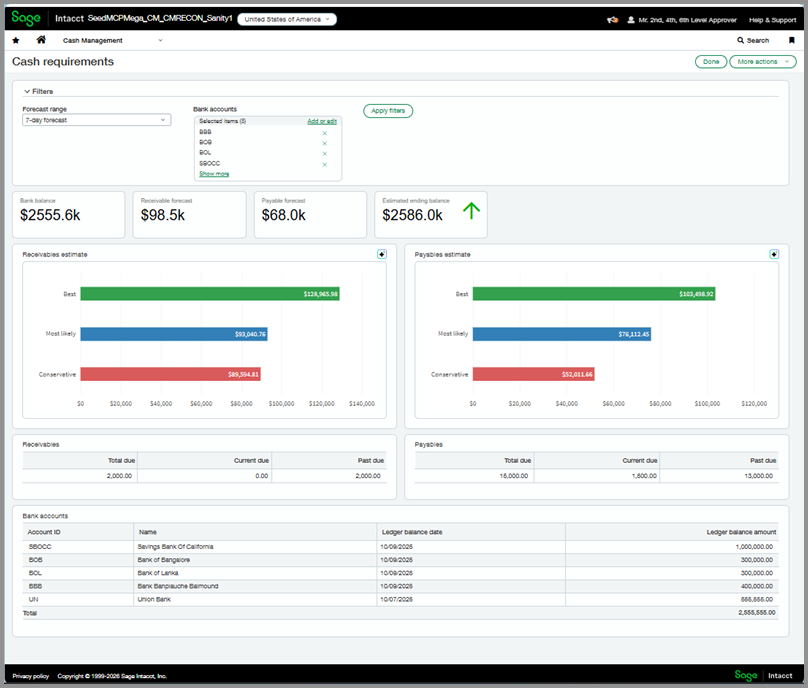
View amounts for payables, receivables, and bank balances on a single page to help efficiently surface cash flow insights.
What's changed
-
Expanded currency support: Cash requirements now supports additional currencies and is available to any single-currency company in all regions. Previously, it was only available to single-currency companies operating in USD.
-
Improved payables forecasting: With this release, Cash requirements uses a predictive model and real-time data to project the next 1-4 weeks of expected AP outflows.
For more information, go to About Cash requirements.
Key benefits
-
Optimized cash management: See cash balance and forecasted change to understand your weekly cash position.
-
AI-powered cash analysis: Leverage Copilot insights to quickly interpret short-term cash requirements and risks.
-
Faster payment decisions: Identify potential shortfalls impacting upcoming cash obligations to prioritize payments with confidence.
How it works
Access Cash requirements at the entity level.
Step 1. Grant permissions to view the Cash requirements page
-
Go to Company > Admin > Users, roles, and groups > Users.
-
Find the user that you want to enable for Cash requirements.
-
Select More actions > Edit at the end of the row.
-
Select Subscriptions.
-
Find the Cash Management application and select Permissions.
-
Find the Cash requirements permission and select View.
This permission only appears after your Early Adopter access has begun. -
Select Save.
Step 2. Grant permissions to view data
Grant permissions for AP, AR, and bank account data so the Cash requirements page can display balances and calculate estimates.
Permissions need to be granted at the entity level. Refer to the Permissions and other requirements table below. For more information, go to Assign permissions to users.
Step 3. View Cash requirements
-
Go to Cash Management > All > Cash requirements.
-
Select Cash requirements.
What's the Early Adopter program?
Early Adopter programs give participants access to features before they're available to everyone. Early adopters are expected to respond to feedback and survey requests. As an early adopter, you can influence how we develop the product so that it best meets your business needs.
Permissions and other requirements
| Subscription |
Cash Management |
|---|---|
| Regional availability |
All regions |
| User type |
Business |
| Permissions |
To view the Cash requirements page
Cash Management
To view bank balance data, one of the following
Cash Management
To view outstanding bank account transactions
Cash Management
General Ledger:
To view payables information
Accounts Payable
To view receivables information
Accounts Receivable
|
| Restrictions |
Available for single-currency enabled companies. Only available at the entity level. |
