Cash Management
New bank file format for HSBC SEPA
Save time and pay vendors and employees electronically in Sage Intacct with a new bank file format. We now support an HSBC SEPA payment file that includes the bank account and vendor or employee address details in the file. The new SEPA file format supports payments in euro (EUR) currency for banks in France and the UK.
How it works
To make use of the new file format, follow these steps:
-
Set up the relevant account to use the new file format.
-
Go to Cash Management > All or Setup > Accounts and select the required account.
This must be an account that uses euro (EUR) as currency.
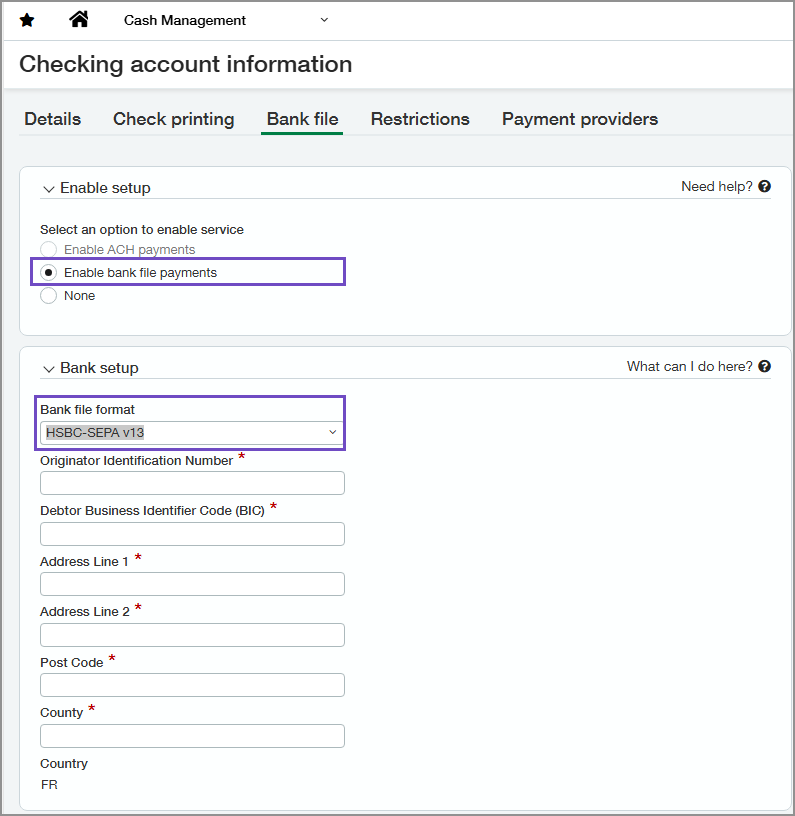
- On the Bank file tab, in the Enable setup section select Enable bank file payments, if not already selected.
-
In the Bank setup section, from the Bank file format dropdown list select the appropriate HSBC-SEPA file with address, and complete the rest of the fields that appear.
-
-
For vendors, in Accounts Payable, confirm that the vendor is set up to enable bank file payments.
- Go to Accounts Payable > All or Setup > Vendors and select the vendor that you want to be able to pay using the new file format.
- On the Bank file tab, in the Enable setup section ensure that Enable bank file payments is selected.
- In the Bank file payments section, ensure that the correct payment country is selected, and that the vendor's payment information and address details are present.
-
For employees, in Expenses, confirm that the employee is set up to enable bank file payments.
- Go to Expenses > All or Setup > Employees and select the employee that you want to be able to pay using the new file format.
- On the Reimbursement information tab, in the Enable setup section ensure that Enable bank file payments is selected.
- In the Bank file payments section, ensure that the correct payment country is selected, and that the employee's payment information and address details are present.
Permissions and other requirements
| Subscription |
Accounts Payable Cash Management Sage Cloud Services Time and Expenses |
|---|---|
| Regional availability |
For accounts using EUR currency in the following countries:
|
| User type | Business |
| Permissions |
Accounts Payable
Cash Management
Expenses
*Required to access the vendor's or employee's account information for bank file payments |
| Configuration |
Enable bank files in the following areas:
|
