Contracts
Revert dimension reassignment
You can now quickly undo the most recent dimension reassignment on a contract line.
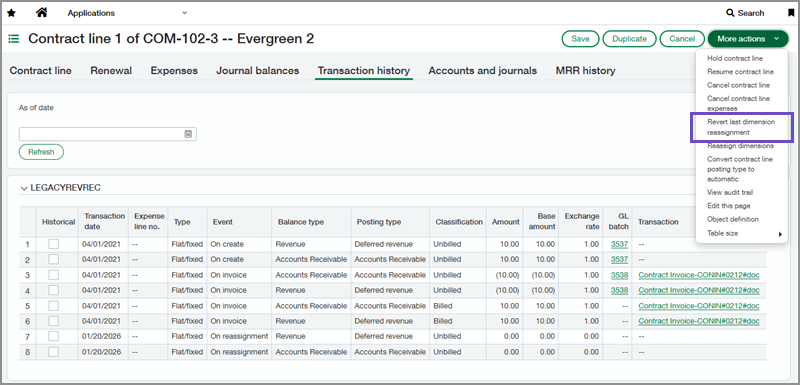
This update helps you fix mistakes without editing the General Ledger or performing another reassignment the next day. It restores the original dimensions with a single action, saving time and reducing errors.
Good to know
-
Reverting a reassignment restores the contract line's previous dimensions, removes the reassignment record from the contract line's transaction history, and deletes the associated General Ledger journal entries.
-
To revert a reassignment, the contract line must have no transactions posted after that reassignment.
-
You can only revert the most recent reassignment. To revert an older one, revert each newer reassignment first.
How it works
-
Go to Contracts > All > Contract lines.
-
Find the contract line with the reassignment that you want to revert.
-
Select Edit.
-
Select More actions > Revert last dimension reassignment.
-
Select OK to confirm.
Permissions and other requirements
| Subscription |
Contracts |
|---|---|
| Regional availability |
|
| User type |
Business |
| Permissions |
Contracts
|
