Fixed Assets Management
Flexible Asset GL account assignment
We've removed a restriction on Asset GL accounts and added a new field to bill and purchasing transaction lines to give you a more flexible experience.
What's changed
Previously, each asset classification required its own unique Asset GL account. Now, multiple asset classifications can share the same Asset GL account. The GL account still behaves the same way, recording asset‑related transactions, but you now have more control to align classifications with your company’s accounting structure.
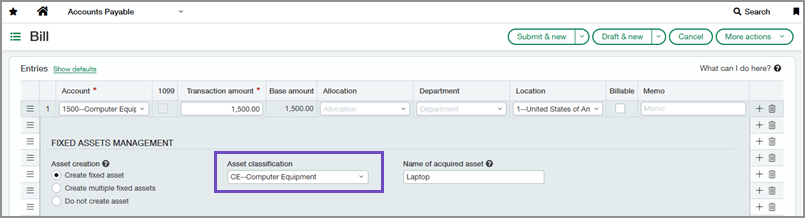
To support this update, bill and purchasing transaction lines that create assets now include an Asset classification dropdown. When you select an account for a line, the dropdown automatically filters to show only classifications that use that account as their Asset GL account. This helps keep your selections accurate and ensures new assets inherit the correct GL configuration.
Permissions and other requirements
| Subscription |
Fixed Assets Management Accounts Payable Purchasing |
|---|---|
| Regional availability |
All regions |
| User type |
Business |
| Permissions |
Fixed Assets Management
Accounts Payable
Purchasing
|
| Configuration |
|
