Fixed Assets Management
Roll Forward report
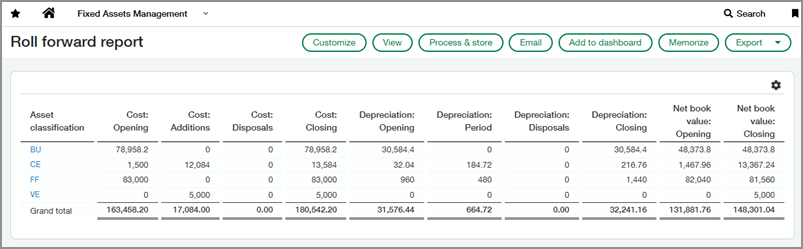
We’ve added a standard Roll Forward report for Fixed Assets Management. This report provides complete visibility into asset lifecycle changes across periods, so teams can reconcile the fixed assets subledger to the general ledger with confidence.
Key benefits
-
Increase efficiency: Eliminate manual roll-forward calculations and spreadsheets.
-
Improve accuracy: Reduce the risk of errors and discrepancies by using a standard report.
-
Strengthen audit readiness: Deliver a clean, structured report that aligns with audit expectations and reduces prep time.
-
Support better decisions: Gain insight into asset lifecycle trends to guide capital planning and asset management.
Good to know
The Roll Forward report includes the following types of activity:
-
Asset cost (opening, additions, disposals, and closing balances)
-
Depreciation (opening, period depreciation, disposals, and closing balances)
-
Net book values (opening and closing balances)
You can filter the report by asset range, asset classification, location, journal, and asset state. You can also choose whether to include non-depreciable assets in the report.
How it works
Before you begin, ask your administrator to grant you the Roll forward report: Run user permission for Fixed Assets Management.
To run the report:
-
Go to Fixed Assets Management > All > Reports > Roll forward report.
-
Provide the time period and filters.
-
Select View.
Permissions and other requirements
| Subscription |
Fixed Assets Management |
|---|---|
| Regional availability |
All regions |
| User type |
Business user with admin privileges Business Employee |
| Permissions |
Fixed Assets Management
|
