supplies inventory
Flexible selection and reservation of supplies
Does one of your team members need an out-of-stock item fast? This update provides you and your team more control and confidence when requesting and ordering supplies items.
When you do not have enough of a requested supplies item, you can now set up substitutions for priority items. Additionally, you can create an automatic reservation order, which ensures that items on a supplies purchase order are prioritized for delivery to the requester.
Key benefits
- Maintain productivity: Flexible supplies item substitutions mean fewer delays when items are out of stock.
- Protect priority needs: Limited supplies are safeguarded for the intended recipient.
- Improved order management: Automatic reservations prevent order mix-ups and ensure that supplies requests are filled as intended.
What's changed
With this enhancement, you can better meet employee demand with item substitutions for your supplies items. Additionally, with the Reserve PO option, you avoid the potential for reassignment of purchased supplies items when they arrive.
How it works
When creating a new supplies request, requesters can select a substitute for out-of-stock items. Supplies managers can also choose to issue a supplies substitution when filling requests, or create a reserved purchase order.
-
Go to Inventory Control > Setup > Items.
-
Select a supplies item.
-
On the Cross references tab, in the Alternate item ID field, select a substitute supplies item.
Only a supplies item can be selected as a supplies item substitute. -
Select Save.
Substitute items can be selected when creating or editing a supplies request.
-
Go to Purchasing > Supplies Inventory > Requisitions and create a new supplies request.
-
In the Entries table, select an item you want to order.
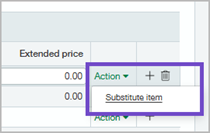
If there's no stock on hand, the Quantity on hand column is blank. - Select Action > Substitute.
- Select a substitute item, if one is available.
Only items with available substitutions display. -
Complete the requisition details, and submit.
-
Go to Inventory Control > Supplies Inventory > Workbench.
-
Open a supplies request in Edit mode.
-
In the Entries table, if there's an item with no Quantity on hand, select Action > Substitute.
-
Select a substitute item, if one is available.
Only items with available substitutions display. -
Complete the requisition details, and post.
-
Go to Inventory Control > Supplies Inventory > Workbench.
-
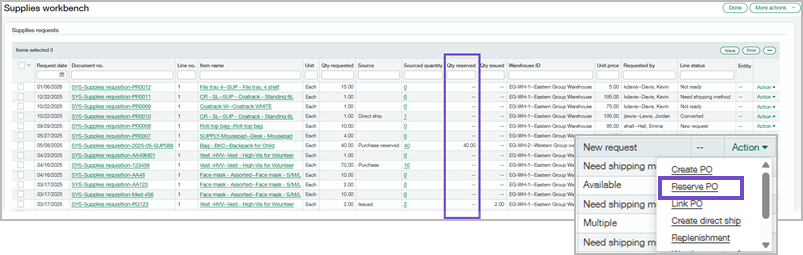
Find the supplies request that you want to fill, and then select Action > Reserve PO.
-
Complete the purchase order transaction.
-
When items arrive, the ordered supplies can only be issued to the employee who requested them.
Permissions and other requirements
| Subscription |
Inventory Control or Supplies Inventory |
|---|---|
| Regional availability |
|
| User type |
Business Warehouse |
| Permissions |
Inventory Control
|
| Configuration |
Enable Supplies Inventory in Inventory Control, or subscribe to Supplies Inventory. |
