Purchasing
Line-level matching for AP Automation—General availability
Line-level document matching introduces a more precise way to automate transaction processing with AP Automation with Purchasing. For line-level matching, AI does the following:
-
Matches the vendor document to the source Purchasing transaction.
-
Populates line items in the target transaction using data from the uploaded or emailed vendor document, rather than the source transaction.
-
Flags any differences found in terms of price or quantity between the vendor invoice and the source transaction.
Key benefits
-
Strengthen your purchasing process with intelligent 3-way matching between purchase orders, receivers, and vendor invoices while eliminating the need to convert transactions manually.
-
Quickly identify AI-flagged discrepancies in quantity or price between the automated transaction and source transaction, allowing you to determine and resolve line variations and unexpected lines.
-
Minimize review effort on minor differences with match tolerance thresholds.
How it works
-
Go to Purchasing > Setup > Configuration.
-
Select Override header-level matching with line-level matching.
-
Select Save.
Continue emailing and uploading documents for processing.
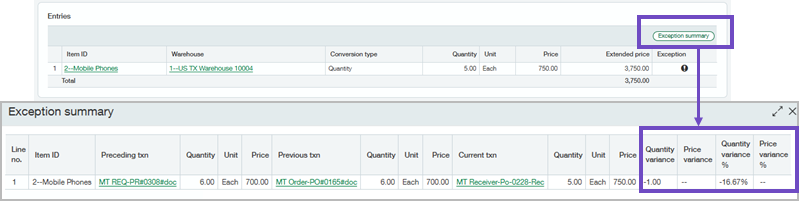
View a summary of exceptions when there are discrepancies between matched transaction lines. For example, the purchase order has an item price of $5, but the vendor invoice charged you $8 for that item.
-
Select View exceptions to see the discrepancy summary when AI flags lines that do not match.
-
Edit the automated transaction lines or post the exceptions as needed.
Permissions and other requirements
| Subscription |
Purchasing Accounts Payable AP Automation Sage Cloud Service |
|---|---|
| Regional availability |
All regions |
| User type |
Upload transactions for Purchasing automation
View, edit, and post automated transactions
Move a draft transaction to the Accounts Payable workflow
|
| Permissions |
Accounts Payable (to change a draft transaction to an AP bill)
Purchasing (to view or edit the automated transactions)
|
| Configuration |
|
