Purchasing
Your email domain for AP Automation is changing
We first announced this email domain change in May 2025, and it will go into effect in February 2026. Over the weekend of February 13-16, all companies are moving to this new email experience. The new email domain supports highly requested features such as auto-forwarding rules, more file formats, and additional notification capabilities when documents do not get processed.
For organizations with large data volumes, the migration process may require a few additional days to complete. This transition modernizes our email infrastructure, as the existing domain no longer supports our platform's evolving requirements.
-
Go to Accounts Payable > Setup > Configuration.
-
In the Automation setting section, select Configure next to Email services.
Your email addresses will end in @ai.sage.com when you're on the new email experience.
Key benefits
With smarter email capabilities, you'll notice the following enhancements:
- Auto-forwarding rules: Save time with auto-forwarding rules, so you do not have to forward each email to your automation email manually.
-
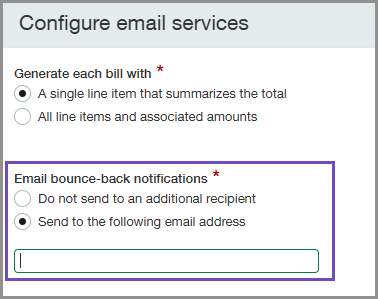
Email copy capabilities for bounce back notifications: Get notified when automated transaction documents bounce back to the original sender. This helps you stay on top of incoming transactions and proactively communicate with vendors when documents do not get processed.
- New file formats:
- Attachments that are in the email body can now be extracted for processing.
- Transactions can now be read even when they're in the email body as text, not just when added as an attachment.
- iPhone images in the HEIC file format are now supported.
This format is not supported for split view, but you can download the attachment to compare transaction details.
Action required
-
Go to Accounts Payable > Setup > Configuration and find the Bill automation settings section.
-
Select Configure next to Email services.
-
Select Send to the following address.
-
Enter the email address to which you want to send notifications when email documents bounce back.
-
Select Save.
Sage Intacct sends a copy of any bounce-back notifications to this email address as soon as your AP Automation email addresses end in @ai.sage.com
Permissions and other requirements
| Subscription |
Purchasing Accounts Payable AP Automation Sage Cloud Service |
|---|---|
| Regional availability |
All regions |
| User type |
Upload transactions for automated transaction matching
View, edit, and post automated transactions
Move a draft transaction to the Accounts Payable workflow
|
| Permissions |
Accounts Payable permissions(to change a draft transaction to an
Purchasing permissions (to view or edit the automated transactions)
|
| Configuration |
Purchasing configurations
|
| Restrictions |
Avalara Avatax is not supported for automated transactions |
