Accounts Payable
Enhancements to AP Automation
We’ve made several improvements to AP Automation to give AP teams more flexibility and streamline transaction processing. These updates focus on making it easier to upload and review bills while improving how automation adapts to real-world variations.
Flexible line entry method on bills
AP Automation now supports changing the line entry format directly within draft bills. This gives you the flexibility to choose how line item data is structured after upload, instead of locking that decision in advance.
How it works
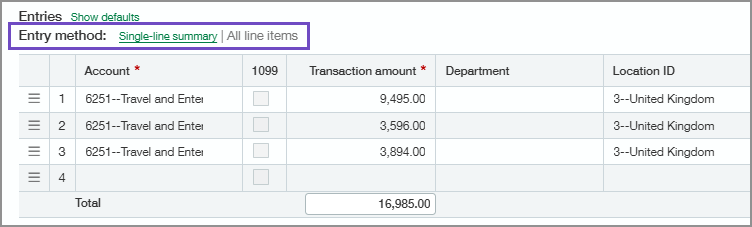
When reviewing a draft bill, switch between a single-line summary entry and all line items with amounts. Both formats are available during transaction review, allowing you to select the option that best matches the bill. The selected format is used when saving the draft or posting the bill, and your choices help improve future automation accuracy over time.
When making changes to the line entries, save the draft before changing the entry method.
Upload bills directly in the Automated transactions list
You can now upload bills in the Automated Transactions list, creating a more unified and intuitive experience when you use AP Automation with Purchasing. This update removes the need to move between separate lists when working with automated AP and Purchasing transactions.
How it works
You can upload bill documents to this list, and the system automatically creates the bill draft and displays it in both the Automated transactions list and the Bills list. If the system predicts a purchase transaction incorrectly, you can switch it to an AP bill and choose whether to always create transactions for the vendor as bills.
Permissions and other requirements
| Subscription |
Accounts Payable AP Automation |
|---|---|
| Regional availability |
All regions |
| User type |
Business |
| Permissions |
Automated transactions: List Bills: List, View, Add, Edit, Delete |
| Restrictions | Line entry method options are only available for automated bills. Automated purchasing transactions do not support single-line summary entries. |
