Accounts Receivable
Process customer refund payments through Accounts Payable
This release introduces a new way to process customer refunds by integrating Accounts Receivable and Accounts Payable workflows. You can now create refunds in Accounts Receivable that generate linked bills in Accounts Payable for payment processing. This approach helps enforce segregation of duties while making customer refunds easier to track and manage.
Key benefits
- Separate refund creation from payment processing by allowing Accounts Receivable users to create refunds and Accounts Payable users to issue payments.
- Refunds processed through Accounts Payable are fully linked, making it easier to track refund status, related bills, and payments across applications.
What's changed
- You can now process customer refunds in Accounts Payable, in addition to recording refunds that have been paid outside of Sage Intacct.
- We've added a Customer refunds section in the Configure Accounts Receivable page, and amended customer and vendor records to support refund payment processing.
- When you process a refund through Accounts Receivable, Intacct automatically creates a linked Accounts Payable bill that mirrors the refund.
- Accounts Receivable users continue to control refund creation, while Accounts Payable users manage the disbursement of funds using existing pay bills workflows. You can view and track refunds from both Accounts Receivable and Accounts Payable, with links between refunds, bills, and payments.
How it works
- Go to Accounts Receivable > Setup > Configuration.
-
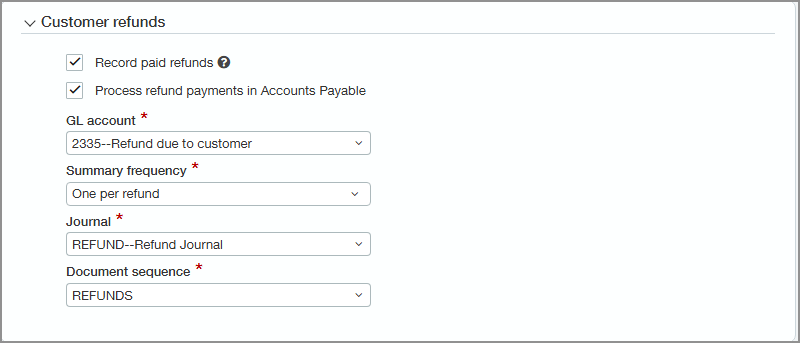
In the Customer refunds section, select one or both of the following:
-
Record paid refunds.
This option allows you to record refunds that are made outside of Intacct.
-
Process refund payments in Accounts Payable.
This option allows you to process refunds within Intacct, as described below.
-
- In the GL account dropdown list, select the offset general ledger account in which refund payments are processed.
- In the Summary frequency dropdown list, select how often Intacct creates and processes auto-summaries of refund transactions.
- In the Journal dropdown list, select the journal in which refunds are recorded.
-
In the Document sequence dropdown list, select the document sequence to use to assign document numbers to refunds.
You can set up your customers to create an auto-generated vendor, link to an existing vendor, or block refunds for a specific customer.
To create an auto-generated vendor:
- Go to Accounts Receivable > All > Customers.
- Find the customer you want to edit.
-
On the Refunds tab select Auto-generated vendor.
Intacct creates a new vendor that will be used for any refunds you process for that customer.
You can only delete this auto-generated vendor if no refunds have been processed for the customer.
The next time you view the Refunds tab on the customer record, the Linked vendor box shows the name of the linked vendor.
To link a customer to an existing vendor:
- Go to Accounts Receivable > All > Customers.
- Find the customer you want to edit.
- On the Refunds tab in the Linked vendor dropdown list select the vendor you want to use when processing refunds for that customer.
To block refunds for a single customer:
- Go to Accounts Receivable > All > Customers.
- Find the customer you want to edit.
-
On the Refunds tab select Block refunds for this customer.
You cannot select this option while there are any refunds in progress.

-
Go to Accounts Receivable > All > Payments and select Add (circle) next to Refunds.
-
Select the customer.
The Available credits list updates to show credits that have balances available to refund.
- Optionally, change the Pay to contact, provide a reference, or upload an attachment.
- Enter the date when you want to refund the customer.
- In the Payment method dropdown list, select Process in AP.
-
If your company has multi-curency transactions enabled, enter currency information.
Intacct filters the list of credits to match the Credit currency you select.
- Select the credits to refund.
- Adjust the Refund amount for any credits that you’re partially refunding.
- Select Post or Draft.
After you issue a refund, it appears as a bill to be paid. Follow your usual pay bills workflow to issue the payment.
Permissions and other requirements
| Subscription |
Accounts Payable Accounts Receivable Administration |
|---|---|
| Regional availability |
All regions, excluding France |
| User type |
Business user with admin privileges |
| Permissions |
Set up customer refunds
Administration
To create a customer refund
Accounts Receivable
To process a refund payment
Accounts Payable
|
| Restrictions |
Customer refunds are not supported in transactions that use cash basis tax capture. |
