Fixed Assets Management
Enhancements to CIP asset capitalization
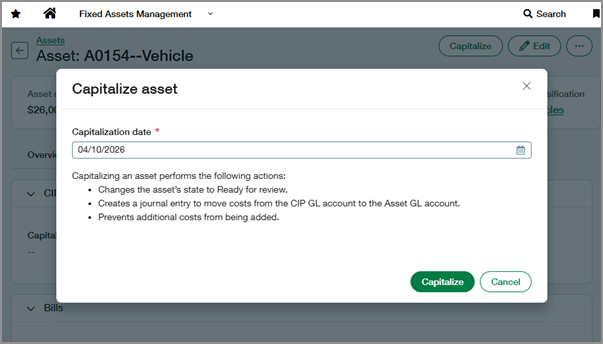
Get more control over when and how you capitalize Construction in Progress (CIP) assets. You can now specify a capitalization date that aligns with your accounting timelines and revert a capitalization if you need to make changes. Previously, capitalization always used the current date and couldn’t be undone.
Key benefits
-
Flexible capitalization timing: Specify a capitalization date that supports backdated entries and month-end close.
-
Easier corrections: Revert a capitalization if it was created in error or if additional costs need to be added.
-
Improved control over asset lifecycle: Move assets between Construction in progress and Ready for review states without manual workarounds.
What's changed
-
When capitalizing a CIP asset, you can now enter a capitalization date instead of using the current date by default.
This date is used for the capitalization journal entry that moves costs from the CIP GL account to the Asset GL account. -
The capitalization date now displays on the asset's CIP tab.
-
A Revert capitalization action is available for CIP assets in the Ready for review state.
-
Reverting a capitalization changes the asset's state back to Construction in progress and deletes the capitalization journal entry.
How it works
-
Go to Fixed Assets Management > All > Assets.
-
Find the CIP asset that you want to capitalize.
-
Select the asset's name to view it.
-
At the top-right of the page, select Capitalize.
-
Select a Capitalization date.
-
Select Capitalize.
-
Go to Fixed Assets Management > All > Assets.
-
Find the CIP asset that you want to revert.
-
Select the asset's name to view it.
-
At the top-right of the page, select More actions > Revert capitalization.
-
Select Revert to confirm.
Permissions and other requirements
| Subscription |
Fixed Assets Management |
|---|---|
| Regional availability |
All regions |
| User type |
Business |
| Permissions |
Fixed Assets Management
|
| Configuration |
Enable CIP must be turned on in Fixed Assets Management configuration. To revert capitalizations, Correction treatment must be set to Revert in Fixed Assets Management configuration. |
| Import Service |
You can use the Import Service to revert capitalizations in bulk. |
| Dependencies or other requirements |
The capitalization date must be on or after the asset's acquisition date and in an open period. |
