Fixed Assets Management
Other updates to Fixed Assets Management
We made several updates across Fixed Assets Management (FAM) including layout updates and label improvements.
Disposals moved to a dedicated tab
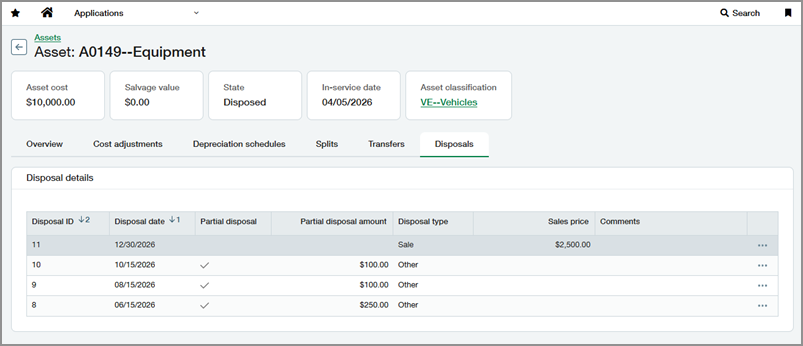
Disposal details now appear on a dedicated Disposals tab on assets, making disposal activity easier to find and review. Previously, this information appeared on the Overview tab.
FAM section repositioned for AP and Purchasing
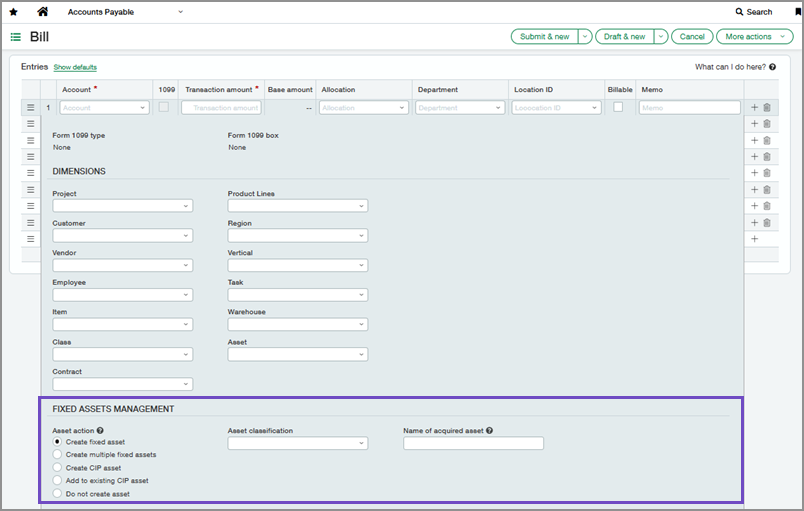
The Fixed Assets Management section on bill and purchasing transaction lines now appears below Dimensions. Previously, this section appeared above Dimensions and was combined with custom fields.
Label improvements
We updated labels to improve clarity and consistency across the Fixed Assets Management user interface. For details, see the User interface changes release note.
Permissions and other requirements
| Subscription |
Fixed Assets Management |
|---|---|
| Regional availability |
All regions |
| User type |
Business |
| Permissions |
Fixed Assets Management
|
| Configuration |
To view and use the Fixed Assets Management section on bill and purchasing transaction lines: Create assets from bills or Create assets from purchasing transactions must be enabled in Fixed Assets Management configuration. |
