Fixed Assets Management
Revert partial disposals
Easily undo partial disposals while preserving accurate depreciation and audit trails.
You can now revert the most recent partial disposal for an asset directly in Fixed Assets Management. This simplifies error correction and removes the need for manual General Ledger workarounds.
Key benefits
-
Easier corrections: Quickly undo accidental partial disposals directly from the asset record.
-
Accurate data restoration: Automatically restore depreciation schedules and amounts to their state before the partial disposal.
-
Time savings: Eliminate time‑consuming workarounds previously required to fix partial disposal mistakes.
What's changed
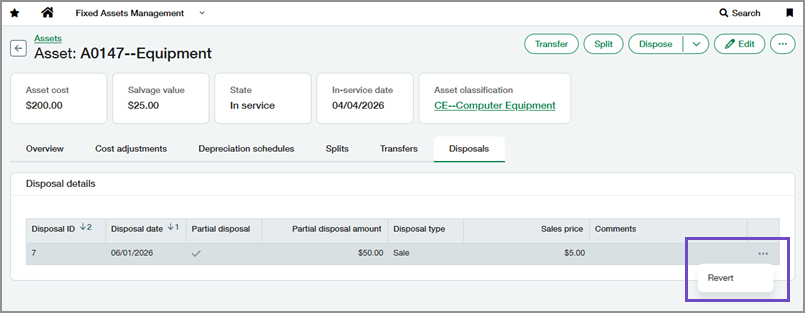
A Revert action is now available for partial disposals on the Disposals tab of assets.
Reverting a partial disposal:
-
Deletes the related partial disposal journal entries.
-
Removes the partial disposal record from the Disposals tab.
-
Restores depreciation schedules and amounts to their state before the partial disposal.
Good to know
-
You must revert the most recent partial disposal before you can revert an earlier one.
-
You can only revert a partial disposal if no subsequent journal entries (such as transfers or depreciation expense) have been posted for the asset after the partial disposal date.
How it works
-
Go to Fixed Assets Management > All > Assets.
-
Find the asset that you want to update.
-
Select the asset's name to view it.
-
Select the Disposals tab.
-
Find the most recent partial disposal.
-
Select More actions > Revert at the end of the row.
-
Select Revert to confirm.
Permissions and other requirements
| Subscription |
Fixed Assets Management |
|---|---|
| Regional availability |
All regions |
| User type |
Business |
| Permissions |
Fixed Assets Management
|
| Configuration |
Correction treatment must be set to Revert in Fixed Assets Management configuration. |
