inventory control
More control of transaction cost precision
Customers working with high-precision costs need more predictable and consistent behavior. Sage Intacct now gives you more control of how many decimal places—up to 10—are used when posting and editing transactions. This improvement gives you greater transaction handling confidence with consistently accurate item costs to reduce rounding discrepancies.
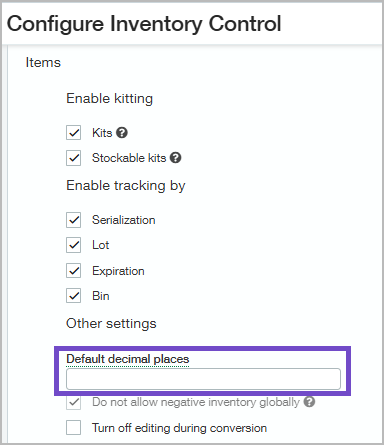
By default, Inventory Control accepts 10 decimal places when items are added to transactions. After posting, 2 decimal places display when a transaction is opened in View or Edit mode. With this update, you can configure the number of decimal places that you want to display by default in your Inventory Control transactions.
What's changed
With more configuration control of decimal precision in Inventory Control, items retain greater decimal precision accuracy when transactions are edited or posted. Additionally, an item's unit cost precision setting takes priority over the application setting, ensuring consistent cost handling across application workflows.
Why the change
For organizations calculating item unit costs with more than two decimal places, rounding discrepancies could occur when editing a draft inventory transaction or posting an adjustment. This could lead to unexpected cost differences.
How it works
To configure Inventory Control with default decimal places for unit costs:
-
Go to Inventory Control > Setup > Configuration.
-
In the Items section, go to the Other settings section to set the Default decimal places, up to 10.
If no decimal value is entered, Sage Intacct applies the default of 10 decimal places during transaction entry. After posting, 2 decimal places display when the transaction is in View or Edit mode.
To configure specific item decimal places for transactions:
-
Go to Inventory Control, Order Entry, or Purchasing > Setup > Items.
-
Open an item record and select the Advanced tab.
-
In the Precision section, enter the number of Default decimals for unit cost you want to use for your Inventory, Sales, and Purchasing transactions.
If no value is entered, the application-level setting is used.
Permissions and other requirements
| Subscription |
Inventory Control or Supplies Inventory |
|---|---|
| Regional availability |
|
| User type |
To configure application-level decimal precision: Business user with admin privileges To configure item-level decimal precision: Business |
| Permissions |
To configure application-level decimal precision
Administration
To configure item-level decimal precision
Inventory Control
|
| Configuration |
Enable advanced workflow to configure item-level decimal precision. |
| Restrictions | Item-level decimal precision can only be set when advanced workflow is enabled. |
