Order Entry
Individual charges and invoice runs for billing groups
This idea came from you
Manage customer‑specific charges more efficiently and gain clear visibility into billing group activity. This update introduces individual charges and a centralized invoice runs list, making it easier to handle customer‑level adjustments, reduce manual work, and review billing outcomes without disrupting existing billing schedules.
Key benefits
-
Greater billing flexibility: Handle customer‑specific adjustments, exceptions, and contract complexity within a billing group.
-
Reduced manual effort: Replace one‑off invoices and offline tracking with a consistent, repeatable billing process.
-
Improved billing accuracy: Ensure that charges apply only to customer‑specific invoices during billing group invoice generation.
-
Clear operational visibility: Review billing activity and outcomes across billing groups to better support reconciliation, troubleshooting, and audit needs.
What's changed
This release includes the following billing group enhancements:
-
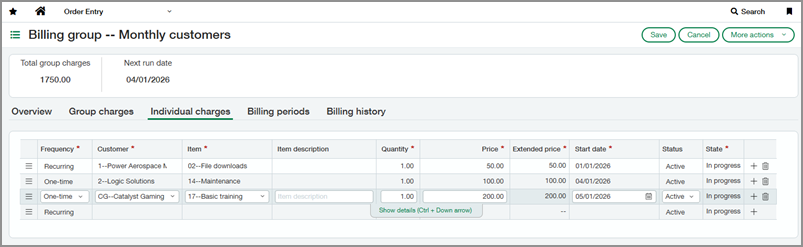
Individual charges: Billing groups now support charges associated with a specific customer. Individual charges are included only on that customer’s invoices during billing group invoice generation. You can add and manage individual charges from the billing group, customer record, or Individual Charges list.
-
Invoice Runs list: The Invoice Runs list displays invoice runs across all billing groups, with drill-down access to run-level and invoice-level details.
-
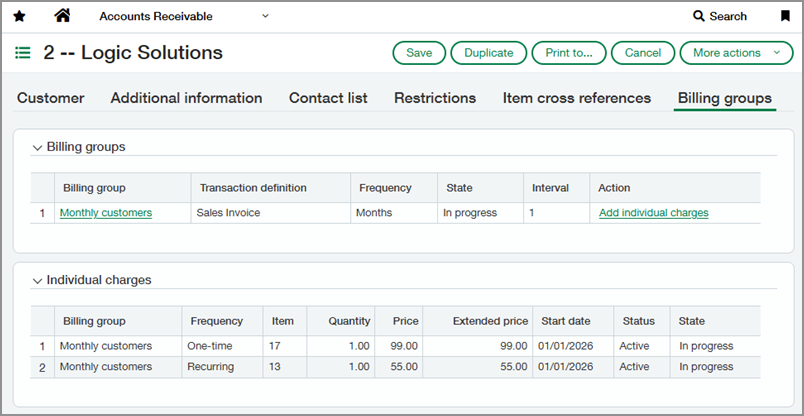
Customer billing groups tab: Customer records now include a Billing groups tab, which shows the billing groups and individual charges associated with that customer.
-
Inline charge entry: Charges are now entered inline in a grid, instead of through a separate entry page.
-
Billing group schedule frequencies: Billing groups now support Semi‑monthly and End of month schedules. The Days frequency has been removed to align with common billing practices.
-
Navigation update: Billing groups are now found on the All tab in Order Entry instead of the Setup tab.
How it works
-
Choose one of the following ways to add an individual charge.
Add from a customer record-
Go to Order Entry > All > Customers.
-
Find the customer associated with the charge.
-
Select Edit.
-
Select the Billing groups tab.
-
Next to the billing group, select Add individual charge.
Add from a billing group-
Go to Order Entry > All > Billing groups.
-
Find the Billing group that you want to edit.
-
Select Edit.
-
Select the Individual charges tab.
-
Select Add to add a new charge.
Add from the Individual Charges list-
Go to Order Entry > All and select Add (circle) next to Individual charges.
-
Select the Billing group associated with the charge.
-
-
Define charge details.
-
Select a frequency.
-
Recurring: The charge is included in every invoice run after the charge's start date.
-
One-time: The charge is included only once, in the first invoice run after the charge's start date.
-
-
Select the customer associated with this charge.
-
Define the item, pricing details, and start date.
-
Select Save.
-
-
Go to Order Entry > All > Individual charges.
-
Go to Order Entry > All > Invoice runs.
-
Select View to drill down into the details of a run.
-
Go to Order Entry > All > Customers.
-
Find the customer.
-
Select View.
-
Select the Billing groups tab.
Permissions and other requirements
| Subscription |
Order Entry |
|---|---|
| Regional availability |
All regions |
| User type |
Business |
| Permissions |
Order Entry
|
| Restrictions |
|
