PROJECTS AND GRANTS
Project & Grant financial summary enhancements
You can now switch between currencies and view the results in the project financial summary on the Project summary tab located on the Project information page. By default the values in the Financial summary section of the Project summary are displayed in the base currency.
When you make a selection from the Display currency dropdown menu, the financial summary values update instantaneously. The values are calculated by using the Intacct Daily Rate.
With the proper permissions, you can drill down to the financial data and see the details in a General Ledger report.
The currency shown in the Financial summary (on the Project summary tab) defaults to the base currency. The Display currency option is blank until a currency other than the default is selected.
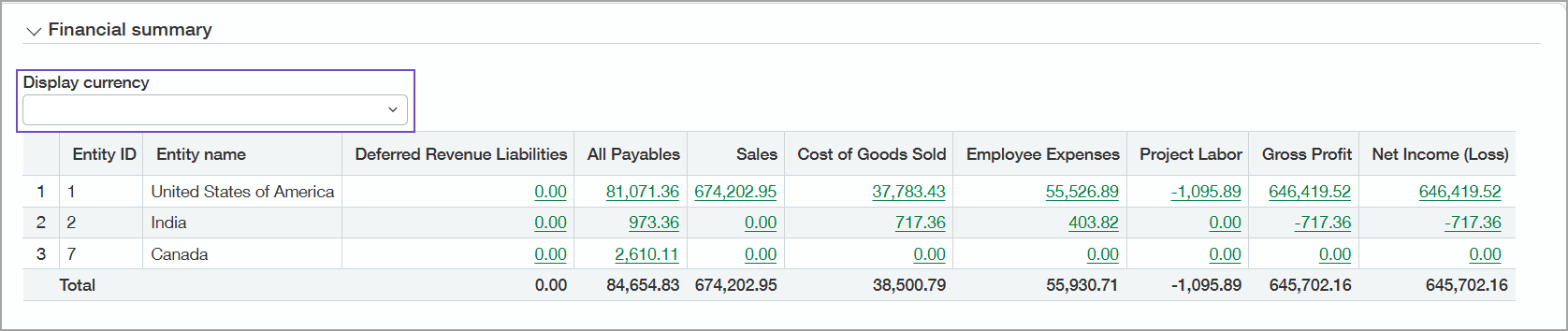
For example, a Project Manager might want to review the financial position of a project that's configured for the United States but has financial ties to European markets. The Project Manager can switch easily between project summary data in Euro and US dollars, with Intacct Daily Rate translation automatically applied to produce the results.
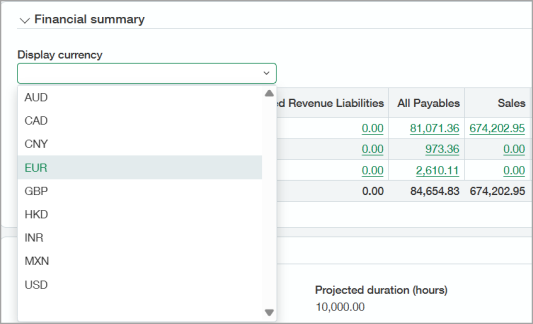
The Project Manager can drill down into the financial data of the supporting transactions to view the General Ledger report in the base currency.
Key benefits
- The currency displayed in the Financial summary of the Project summary tab defaults to the base currency.
- When there are multiple entities, the base currency is shown initially. The Display currency option is blank until another currency is selected. When you select another currency from the dropdown list, the results appear in the Financial summary instantaneously.
- With the correct permissions, you can drill down to the Financial summary data to view the GL balance of the account group in the base currency. The drill-down capability provides faster root-cause analysis of variances and exceptions.
-
Explicit permission to run the General Ledger (GL) report is required to drill-down and view the report data. This security measure ensures data integrity and protection.
- The data you’re able to see in the GL report is commensurate with your user permissions.
How it works
You can switch between different currencies for a project, then drill down to Financial summary data, if you have the correct permissions. By default, the financial summary numbers are shown in base currency.
-
Go to Projects > All > Projects.
-
Find the project in the list and select the Project name link.
-
Select the Project summary tab and scroll to the Financial summary section.
-
Select the desired currency for a project from the Display currency dropdown menu.
-
Select links in the Financial summary section to drill-down and view the GL balance of the account group in the original transaction base currency.
For more information, see Switch currencies and drill down to financial data.
Permissions and other requirements
| Subscription |
Projects Projects Costing & Billing Grant Tracking & Billing |
|---|---|
| Regional availability |
All regions Construction:
|
| User type |
Business user with admin privileges Business Construction Manager Project Manager |
| Permissions |
Projects: List, View, Edit |
| Dependencies or other requirements |
Users must have access to the projects and permission to view the financial data. Explicit permission to run the General Ledger (GL) report is required to drill down and view the report data. |
