Purchasing
Custom Purchasing approvals—Early Adopter
This idea came from you
Reduce manual effort while strengthening control over purchasing approvals and helping to support compliance.
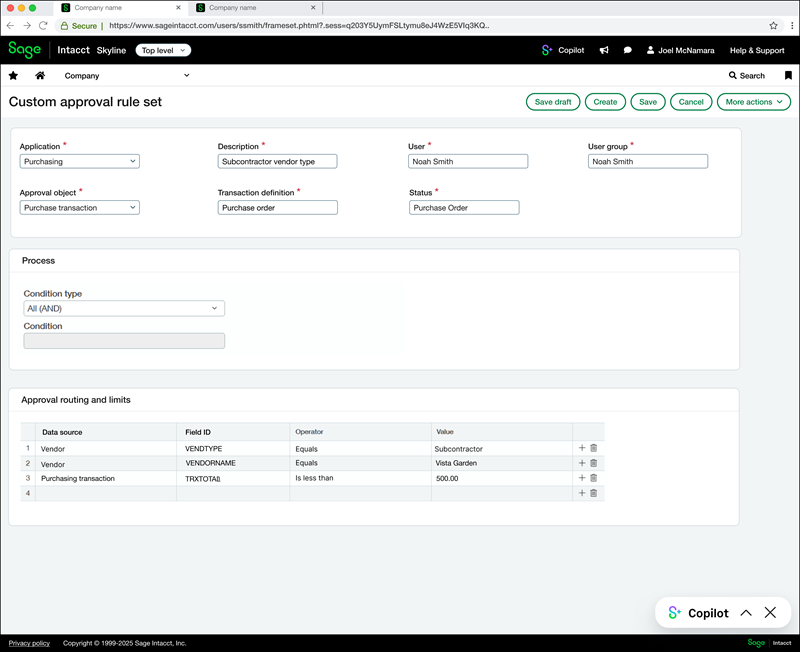
Configure custom approval workflows for Purchasing transactions using flexible, rule‑based logic. With custom Purchasing approvals, administrators can define approval rules based on vendor attributes, payment priority, and transaction amounts to automatically route Purchasing transactions to the appropriate approvers.
Key benefits
-
Flexible approval criteria: Create custom approval rule sets using vendor details, such as vendor type or payment method, currency, and transaction totals.
-
Precise approval routing: Combine multiple conditions using AND/OR logic to route Purchasing transactions to the right approvers based on your business rules.
-
Consistent approval behavior: Route Purchasing transactions for approval to a specific user or user group while maintaining the same approval experience used across Purchasing.
-
Audit-ready visibility: Maintain transparency with a built-in audit trail in your transactions and approval history to help support compliance.
How it works
-
Create a custom approval rule set.
Go to Company > Setup > Custom approval rule sets, then create a Purchasing rule set and select a transaction definition.
-
Assign approvers.
Specify the user or user group responsible for approving Purchasing transactions that meet the defined conditions.
-
Define approval conditions.
Select vendor‑related attributes and transaction total amounts based on available field names. Combine conditions using AND/OR logic to control when the rule applies.
-
Activate the rule set in your existing Purchasing approval configuration.
Go to Purchasing > Setup > Configuration > Approval policies, then add the custom rule set to a Purchasing approval policy for a transaction definition. This action activates the rule set. Make sure to place the rule set in sequential order in terms of which you want to run first.
When a Purchasing transaction meets the rule conditions, Sage Intacct routes it to the assigned approvers and records each decision in the audit trail.
Good to know
Approval rules run sequentially, not concurrently, based on the order defined in your approval policy.
What's the Early Adopter program?
The Early Adopter program is available to a select group of customers who test new features and provide feedback. Your input will help us refine and improve these features before the general release.
Permissions and other requirements
| Subscription |
Purchasing, Administration |
|---|---|
| Regional availability |
All regions |
| User type |
To create custom and activate approval rule sets
Business user with admin privileges To approve Purchasing transactions
Business Employee Project Manager Warehouse |
| Permissions |
To approve Purchasing transactions
Purchasing
|
