Purchasing
Intelligent 3-way matching with AP Automation
Intelligent 3-way matching strengthens AP Automation by introducing AI‑driven, line-level document matching across purchase orders, receivers, and vendor invoices. This enhancement increases accuracy, reduces manual intervention, and helps teams resolve discrepancies faster and with greater confidence.
Key benefits
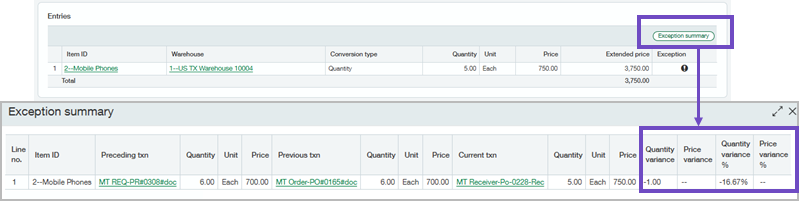
- Faster exception handling: AI automatically flags quantity and price differences so reviewers can quickly identify and address line discrepancies in the Exception summary.
- More precise automation: Vendor invoices are matched directly to the source purchasing transaction at the line level, rather than relying solely on header‑level document matching.
- Reduced review effort: Match tolerance thresholds help minimize unnecessary review of minor differences, allowing teams to focus on true exceptions.
How it works
When line-level matching is enabled for Purchasing automation, documents continue to be uploaded or emailed as usual. The system applies AI to match vendor invoice lines to purchase orders and receivers, surfaces discrepancies, and allows users to review exceptions or post transactions as needed.
-
Go to Purchasing > Setup > Configuration.
-
Select Automate header-level document matching.
-
Enter transaction definitions to match as follows:
Entity Target Source Top level Receiver Purchase order Top level Vendor invoice Receiver -
Select Override header-level matching with line-level matching.
-
Select Save.
Continue emailing and uploading documents for processing.
View a summary of exceptions when there are discrepancies between matched transaction lines. For example, a purchase order has an item price of $5, but the vendor invoice charged you $8 for the item.
-
Select View exceptions to see the discrepancy summary when AI flags lines that do not match.
-
Edit the automated transaction lines or post the exceptions as needed.
Permissions and other requirements
| Subscription |
Accounts Payable AP Automation Purchasing |
|---|---|
| Regional availability |
All regions |
| User type |
Business |
| Permissions |
To set up 3-way matching
Administration
Purchasing
To change a draft transaction to an AP bill
Accounts Payable
To view or edit automated transactions
Purchasing
|
| Configuration |
|
