Accounts Payable
Reimburse employee expenses through Accounts Payable or payroll
This idea came from you
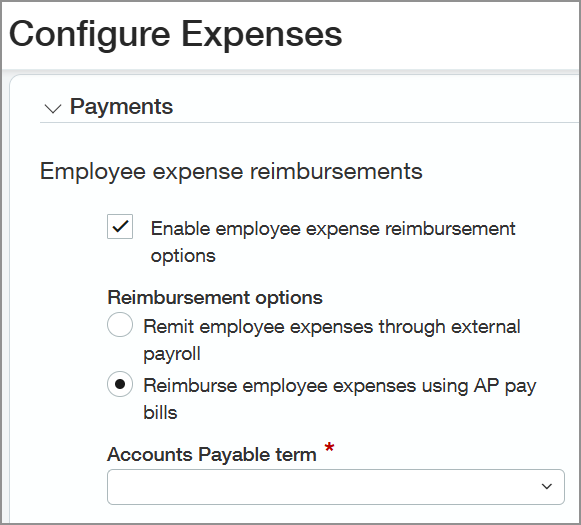
Sage Intacct now allows reimbursement of employee expenses using Accounts Payable or remit employee expenses through your external payroll provider. This update helps align employee reimbursements with your existing payment process while improving control and visibility over expense payments. Previously, you could reimburse employee expenses using the legacy reimbursement option.
Key benefits
Work with familiar processes: Use existing payment workflows by reimbursing employees through Accounts Payable or payroll.
Gain greater financial oversight: Improve financial visibility and control with reimbursement activity tracked through standard Accounts Payable and payroll processes.
Adapt to your business needs: Increase flexibility by allowing you to choose the reimbursement method that best fits your company's processes.
How it works
Reimburse expenses using Accounts Payable
Open the Configure Expenses page.
Enable Reimburse employee expenses using AP bills.
Select an Employee liability expense account for expense reimbursements.
Associate a vendor with each employee for reimbursements.
Submit an employee expense report for approval.
Approve the expense report.
The approved expense report automatically generates a corresponding bill in Accounts Payable.
Pay the bill in Accounts Payable to reimburse the employee.
Run the Expense ledger report to track employee expense balances.
Remit expenses through payroll
Open the Configure Expenses page.
Enable Remit employee expenses through payroll.
Select an Employee liability expense account for expense reimbursements.
Submit an employee expense report for approval.
Approve the expense report.
The approved expense report is processed for reimbursement through payroll.
Remit employee expense reimbursements through payroll.
Run the Expense ledger report to track employee expense balances.
What's changed
The following changes apply when you reimburse employee expenses through Accounts Payable or payroll:
Default payment method field
Default bank account field
Contacts for notifications field
Expense report reimbursement approval settings
Allow reclassification option
Enable reversal of unpaid expenses option
Reimbursements - Approve
Reimbursements - Pending
Reimbursements - Posted
Reimbursements - Select expenses to reimburse
Expense employee aging report
On employee records, we added the following section to the Reimbursement information tab:
Associated vendor
We added the following field on expense reports:
Associated bill
We added the Remit expense reports for payroll label on the Expenses menu.
Good to know
After a bill is created, you cannot change the employee expense reimbursement method.
Remit employee expenses or reverse remittance in the entity where the expense was created.
You can choose how employee expenses are reimbursed:
Reimburse expenses using AP bills
When an expense report is approved, Intacct automatically generates a bill in Accounts Payable for employee reimbursement.
Pay bills through the standard Accounts Payable process to reimburse employees.
Remit expenses through payroll
Approved expense reports can be exported and processed to your payroll provider.
Employees receive reimbursements as part of payroll.
Permissions and other requirements
| Subscription | Time and Expenses Accounts Payable Administration |
|---|---|
| Regional availability | All regions |
| User type | Business user with admin privileges |
| Permissions | Administration
Expenses
Accounts Payable
|
