construction
Other updates to Sage Intacct Construction
This release includes the following updates to improve your Sage Intacct Construction experience.
Gain more flexibility in posting retainage
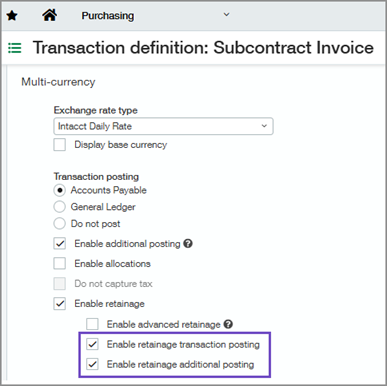
You can now post retainage amounts to multiple General Ledger (GL) retainage offset accounts for purchasing transactions. To support more flexible retainage posting, we've added two new settings to purchasing transaction definitions:
Lets you map retainage account and offset account combinations (debit and credit). Available when you select Enable retainage.
Enables the Is retainage? column in the Transaction posting AP or GL account mapping section of the Posting configuration tab where you can configure account mappings.
Lets you map additional retainage account and offset account combinations (debit and credit). Available when you select Enable retainage and Enable additional posting.
Enables the Is retainage? column in the Additional GL posting account mapping section of the Posting configuration tab where you can configure additional account mappings.
To use this feature, define at least one GL retainage and GL retainage offset account combination (debit and credit) on each applicable transaction definition. If no retainage offset accounts are defined, Sage Intacct defaults to the retainage offset account configured in Accounts Payable.
Learn how to Configure General Ledger retainage and retainage offset account posting.
| Subscription | Construction Purchasing |
|---|---|
| Regional availability |
|
| User type | Business user with admin privileges |
| Permissions | Purchasing
|
| Configuration | Enable retainage transaction posting:
Enable retainage additional posting:
|
| Dependencies or other requirements | On Purchasing transaction definitions:
|
Analyze advanced retainage calculations more effectively
We've enhanced the Advanced retainage calculation log to help you review and share retainage calculations more efficiently. You can now:
Customize column order to suit your preferences, and save custom layouts for future use.
Export calculation log information to a CSV for enhanced analysis, reporting, and sharing.
In addition, the log now sorts calculations by Primary document ID and Calculation sequence automatically, making related calculations easier to review and analyze.
Learn how to Audit advanced retainage calculations.
| Subscription | Construction Purchasing |
|---|---|
| Regional availability |
|
| User type | Business Construction Manager |
| Permissions | Purchasing
|
| Configuration | To use the advanced retainage workflow, enable retainage and advanced retainage in Accounts Payable configuration and on the applicable Purchasing transaction definitions (primary document and invoice). |
Prevent duplicate source line conversions
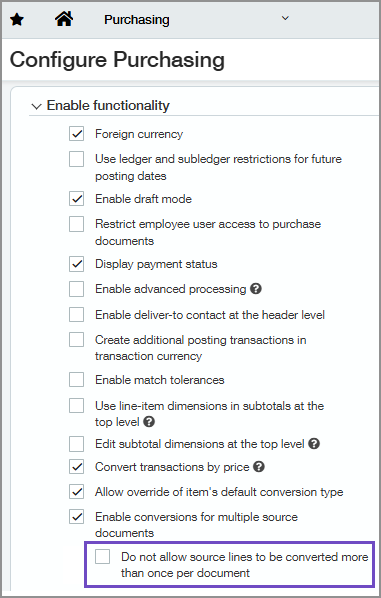
If you've configured Purchasing to convert multiple documents into a single transaction, you can now hide source document lines that have already been selected for conversion.
In Purchasing configuration, we've added a new setting called Do not allow source lines to be converted more than once per document. When enabled, the Source document line ID field on a transaction displays only lines that have not yet been selected, reducing risks for converting the same line multiple times.
| Subscription | Construction Purchasing |
|---|---|
| Regional availability |
|
| User type | Business Construction Manager |
| Permissions | Configure Purchasing Administration
Convert documents Purchasing
|
| Configuration | On the Configure Purchasing page, select Enable conversions for multiple source documents. Then select Do not allow source lines to be converted more than once per document. |
Streamline project cost reporting with standardized cost categories
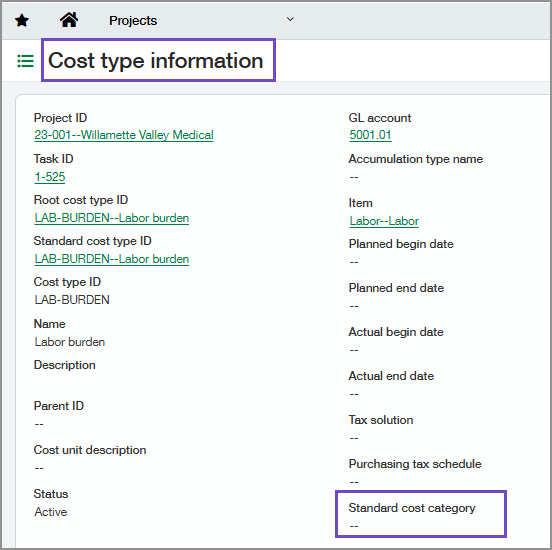
Reporting on project costs is now easier and more consistent. New fields in the Projects application surface cost category information directly on cost records, reducing the need for complex lookups and simplifying cost analysis.
Cost types now include a read-only Standard cost category field. This field displays the cost category inherited from the associated standard cost type.
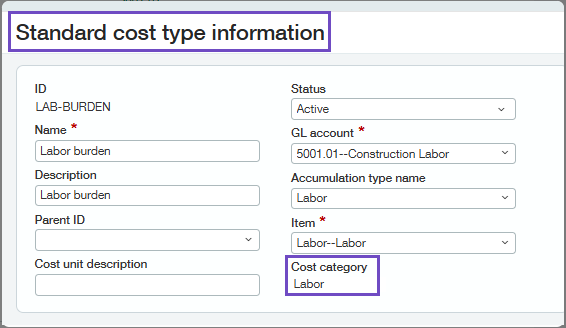
Standard cost types now include a read-only Cost category field. This field displays the cost category associated with the linked accumulation type.
| Subscription | Construction Projects |
|---|---|
| Regional availability |
|
| User type | Business user with admin privileges Construction Manager Project Manager Employee (view only) |
| Permissions | Projects
|
New fields on primary documents
In Purchasing, we've added fields to primary documents to provide greater visibility into document conversions and quantity revisions. The following fields are now available on the Primary document details section of the Primary document details tab:
Conversion type
Quantity
Unit
Price
Quantity converted
Price converted
Revised quantity
| Subscription | Construction Purchasing |
|---|---|
| Regional availability |
|
| User type | Business Construction Manager Project Manager |
| Permissions | Purchasing
|
New validations for allocations and retainage
We've added validations to prevent allocations and retainage from being entered on the same purchasing invoice line. Using allocations and retainage on the same line is not supported.
| Subscription | Construction Purchasing |
|---|---|
| Regional availability |
|
| User type | Business Construction Manager Project Manager |
| Permissions | Purchasing
|
