construction
Subcontractor payment application workflow—General availability
Record and track payment applications and valuations in line with regional construction industry practices and requirements.
Key benefits
Simplified workflow: Replace manual workarounds with a streamlined workflow, starting with a purchase order and moving from application to valuation to invoice.
Improved visibility: View payment application activity and related documents in one place with Payment application details tabs.
Greater reporting accuracy: Reduce period‑end adjustments by maintaining accurate, traceable payment amounts across reporting periods.
What's changed
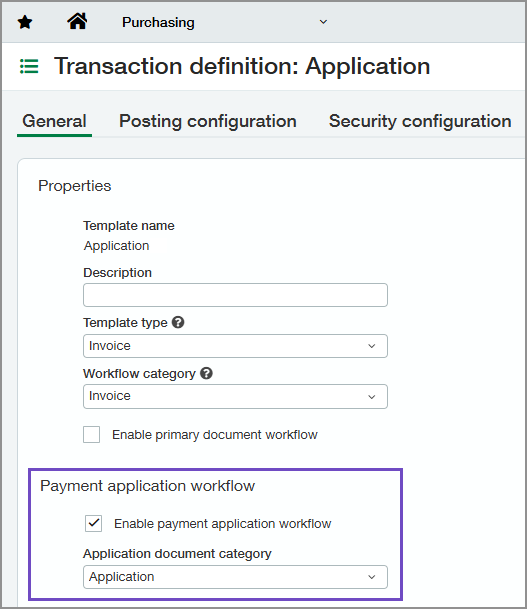
On Purchasing transaction definitions, we added a Payment application workflow section with two settings:
Enable payment application workflow: Use to enable the payment application workflow on the selected transaction definition.
This setting is available when you select either Order or Invoice as both the Template type and Workflow category.
Application document category: Select the document type for the transaction definition: Application, Valuation, or Invoice.
This setting is available when you enable the payment application workflow.
Applications and valuations can post to the General Ledger (GL) or remain non-posting transactions. When posting to the General Ledger, subtotals are suppressed to prevent duplicate postings.
How it works
Move transactions through the payment application workflow as follows:
Create and post a purchase order or subcontract using a transaction definition with the workflow enabled.
Convert the order to an application and post it.
When amounts are certified, convert the application to a valuation and post it.
Convert the valuation to an invoice.
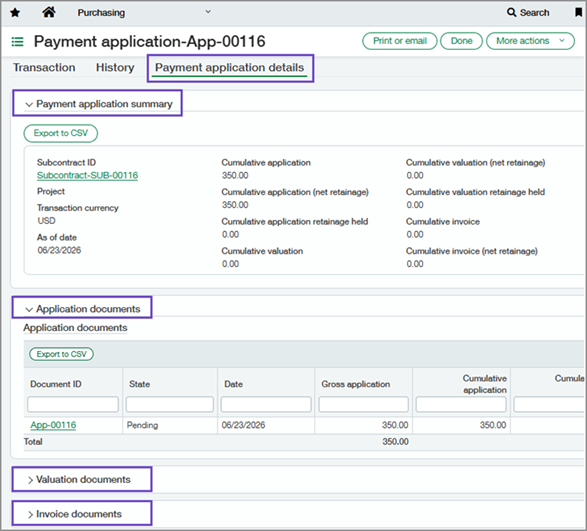
Each document in the workflow includes a Payment application details tab where you can track activity for applications and their associated valuations and invoices.
Good to know
As documents move through each stage:
For payment applications, converted lines must originate from the same primary document.
For valuations, converted lines can come from multiple applications if those applications originate from the same primary document.
For invoices, converted lines can come from multiple valuations based on the same primary document.
Permissions and other requirements
| Subscription | Construction Purchasing |
|---|---|
| Regional availability |
|
| User type | Business Construction Manager Project Manager |
| Permissions | Configure transaction definitions Purchasing
Use the payment application workflow Purchasing
|
| Dependencies or other requirements | Purchasing On purchasing transaction definitions:
|
| Restrictions | You can only convert transactions with a State of Pending or Partially converted. |
