Contracts
Copy lines and expenses when duplicating contracts
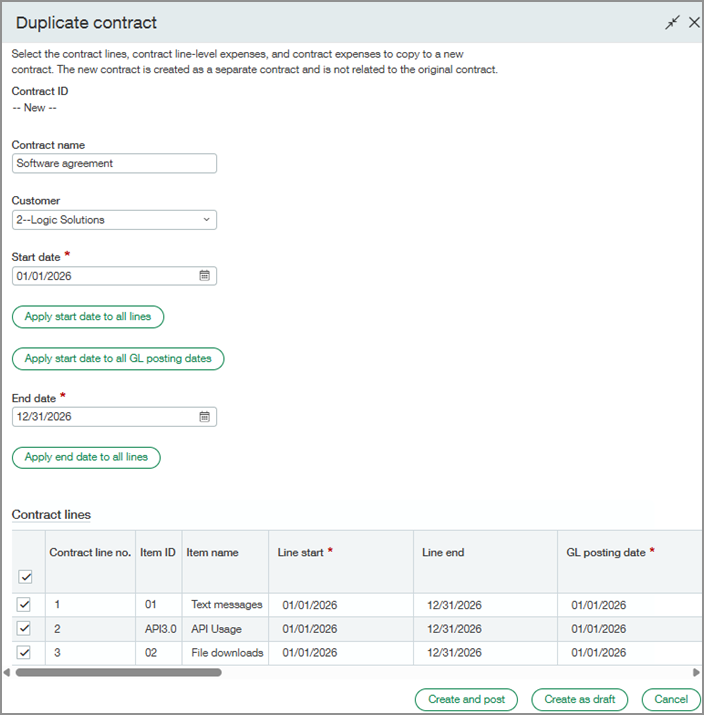
Save time when duplicating contracts by copying existing lines into the new contract. Copy all contract lines, contract line-level expenses, and contract expenses, or select only the items you want to include. Previously, duplicating a contract copied only the contract header information.
Key benefits
Faster contract creation: Copy existing lines and expenses instead of recreating them manually.
Flexible duplication: Choose which lines to copy, and update line information before creating the duplicate.
Improved accuracy: Reuse existing contract information to help prevent data entry errors.
Workflow control: Create the contract as a draft for further review or create and post it immediately.
Good to know
The duplicate is created as a separate contract and is not related to the original contract.
The selection list does not include canceled, renewal-only, renewal forecast, or historical lines.
Kit components are included through their parent kit line and cannot be selected individually.
To copy a line-level expense, you must also select its associated contract line.
You can apply dates to all rows on the current page of each section using the Apply start date to all lines, Apply start date to all GL posting dates, or Apply end date to all lines options.
Permissions and other requirements
| Subscription | Contracts |
|---|---|
| Regional availability |
|
| User type | Business |
| Permissions | Contract: List, View, Add, Post |
