Fixed Assets Management
Reverse asset transfers
Reverse asset transfers in Fixed Assets Management to restore an asset’s previous dimensions and correct transfer errors. Unlike reverting a transfer, reversing preserves the original transfer record and accounting activity while creating an offsetting journal entry that clearly records the correction.
Key benefits
Correct errors with confidence: Restore an asset to the dimensions assigned before the transfer so you can correct transfer or date mistakes.
Preserve posted accounting activity: Retain the original transfer record while creating an offsetting journal entry that records the correction.
Reduce manual effort: Eliminate manual journal entry adjustments in the General Ledger and avoid creating additional transfers.
How it works
In Fixed Assets Management configuration, set Correction treatment to Reverse.
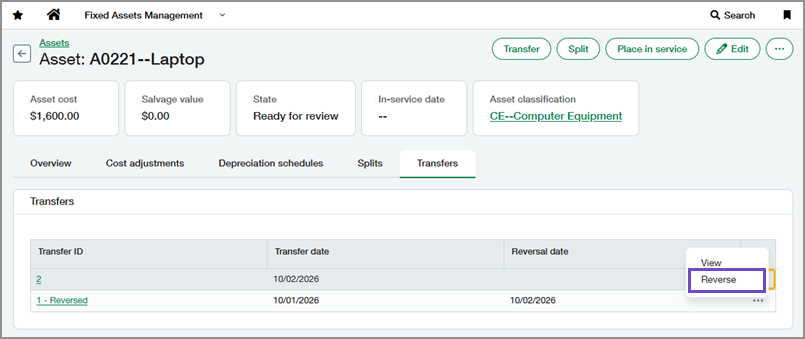
From the asset's Transfers tab, reverse the most recent transfer.
When you reverse an asset transfer, Fixed Assets Management does the following:
Creates an offsetting journal entry by swapping the debit and credit lines from the original transfer journal entry.
Restores the asset to the dimensions assigned before the transfer.
Retains the original transfer record on the Transfers tab, marks it as reversed, and records the reversal date.
What's changed
Added a Reverse action for asset transfers. This option is available when correction treatment is set to reverse in Fixed Assets Management configuration.
Transfer records now include the reversal date and remain available after they’re reversed.
The Journal entries link on the transfer record provides access to both the original transfer journal entry and the reversal journal entry.
Why the change
Some organizations require posted accounting activity to be reversed rather than deleted. This update provides a consistent and auditable way to correct transfers while supporting regional accounting requirements.
Permissions and other requirements
| Subscription | Fixed Assets Management Administration |
|---|---|
| Regional availability | All regions |
| User type | Configure Business user with admin privileges Reverse transfers Business |
| Permissions | Configure Administration
Reverse transfers Fixed Assets Management
|
| Configuration | In Fixed Assets Management configuration, Correction treatment must be set to Reverse. |
| Dependencies or other requirements |
|
| Restrictions | Assets with reversed transfers cannot be deleted. |
