Fixed Assets Management
Revert asset splits
This idea came from you
Easily undo asset splits that were created by mistake without manual adjustments or workarounds. Reverting a split deletes the assets created by the split and restores the original asset to its state before the split.
Key benefits
- Error correction: Undo an accidental or incorrect asset split.
Accurate data restoration: Automatically restore the original asset to its pre-split state and remove the assets created by the split.
Reduced manual effort: Avoid complex adjustments and workarounds when correcting a split.
How it works
Open an asset that's in the Split state.
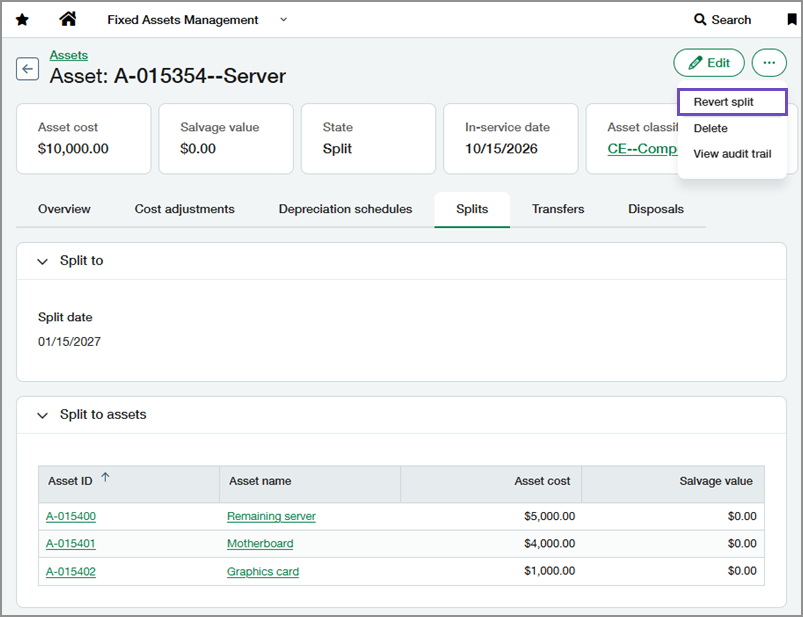
Select More actions > Revert split.
Select Revert to confirm.
Fixed Assets Management deletes the assets created by the split and restores the original asset to its state before the split, allowing you to continue working with the original asset or create a new split.
Good to know
The revert split option is available only when correction treatment is set to Revert in Fixed Assets Management configuration.
You cannot revert a split if any asset created by the split has subsequent activity, such as posted depreciation, transfers, disposals, or AP adjustments. Revert the subsequent activity before reverting the split.
You can revert a split only when all assets created by the split remain in the same state they were in immediately after the split. Return any assets that have changed state before reverting the split.
Permissions and other requirements
| Subscription | Fixed Assets Management |
|---|---|
| Regional availability | All regions |
| User type | Configure Business user with admin privileges Revert splits Business |
| Permissions | Configure Administration
Revert splits Fixed Assets Management
|
| Configuration | In Fixed Assets Management configuration, Correction treatment must be set to Revert. |
| Dependencies or other requirements | The asset must be in the Split state. |
