General Ledger
Other updates to General Ledger
This release includes the following General Ledger updates.
Changes to the Configure General Ledger page
To increase visibility, fields that were previously unavailable on the Configure General Ledger page are now displayed. You can change these settings, but your changes are not saved. When you select Save, Sage Intacct validates your changes and displays an error message if a setting cannot be updated.
Also, when you view the Configure General Ledger page from an entity, you'll now see the same fields that were previously displayed only at the top level. These fields are read-only at the entity level and are shown to provide information about the General Ledger configuration.
| Subscription | General Ledger |
|---|---|
| Regional availability | All regions |
| User type | Business user with admin privileges |
| Permissions | Administration Application subscriptions: List, View, Configure |
Updates to the accounting sequence setting
The following changes simplify configuration and help support compliance.
Accounting sequence setting moved
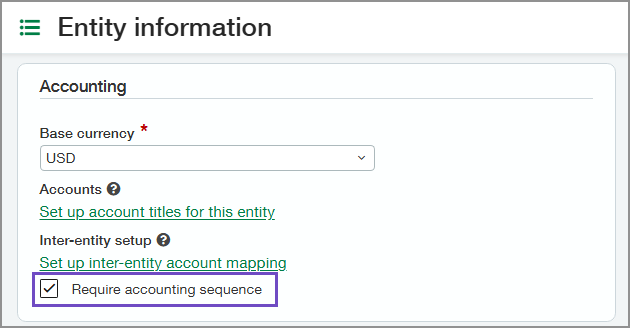
The option to require an accounting sequence is now available on the Entity Information page as the Require accounting sequence checkbox. It was previously located on the Configure General Ledger page.
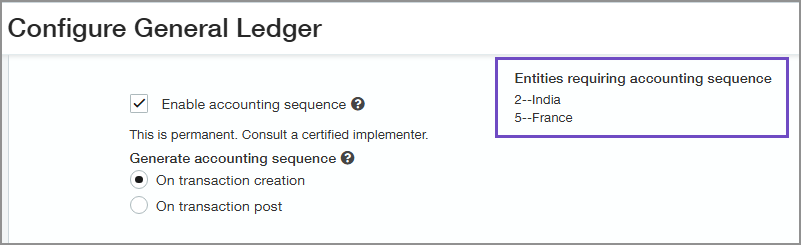
The list of entities that require an accounting sequence is visible on the Configure General Ledger page.
Creating an accounting sequence
You can create an accounting sequence only for entities that have the Require accounting sequence checkbox selected.
| Subscription | General Ledger |
|---|---|
| Regional availability | All regions |
| User type | Business user with admin privileges |
| Permissions | Administration Application subscriptions: List, View, Configure |
