Order entry
A new way to combine multiple documents into a single transaction
This idea came from you
In response to valuable customer input, we introduced a time-saving multi-document convert function for the Purchasing application last year. This functionality is now also available in Order Entry.
You can now simplify your workflow during conversion by combining multiple documents, or specific line items, into a single transaction. For example, when you need to send a customer invoice for multiple sales orders, you can create a single invoice transaction from multiple documents, including specific line items.
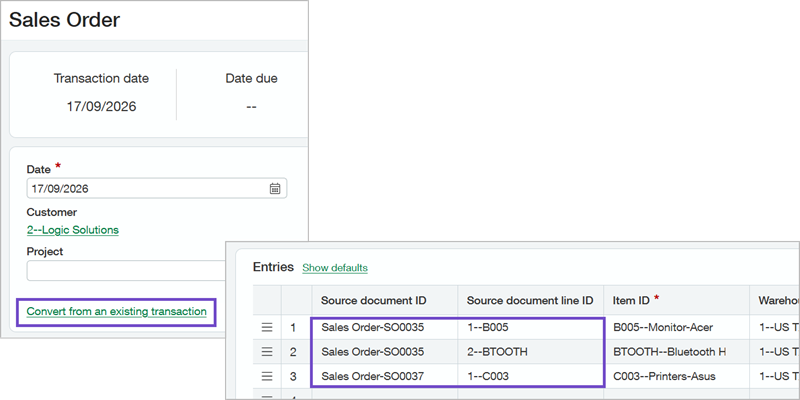
What's changed
When you move a transaction through a sales workflow, you convert one document to the next step, as defined in the corresponding Order Entry transaction definition. However, the convert functionality only allows you to convert one full document at a time. Now you can choose to convert one or more sales orders at a time, including specific lines from different orders.
You have a recurring sales order for monthly plant maintenance service delivery, billed quarterly. When you send the customer the quarterly invoice, you want it to include billing for 3 months of service delivery.
In Order Entry, you'll create an invoice and select the customer. Then you'll select each monthly billing order to include on the invoice. When each month's order is selected, the service line detail is automatically listed and available to select.
How it works
Before you can convert multiple documents or multiple transaction line items, you first configure Order Entry.
Go to Order Entry > Setup > Configuration and select Enable multiple source document conversion.
Add a new sales transaction.
Select a customer.
To convert multiple documents, select Convert from an existing transaction and select a transaction document from the list.
Repeat to select additional documents.
To convert multiple line items, in the Entries table on an item row select the Source document ID and then the Source document line ID for each line item you want to include.
Repeat to select items from additional documents.
Permissions and other requirements
| Subscription | Order Entry |
|---|---|
| Regional availability | All regions |
| User type | Business Warehouse |
| Permissions | Configure Order Entry Administration
Create sales transactions Order Entry
|
| Configuration | Order Entry has advanced workflow enabled. |
| Restrictions | You can only convert transactions where the State is Pending or Partially converted. |
