Platform
Warnings for unapproved email addresses in trigger configuration and logs
Improve security and consistency by knowing which emails are not on your company's allowed list. A warning about the use of an email that's not authorized appears if you try to include it in your Send email trigger type.
Key benefits
Improved email security: Uses approved, allow‑listed sender and reply‑to addresses to support authentication and sender‑identity policies.
Consistent customer-facing communication: Helps to ensure that your triggers contain the correct and intended email addresses.
Reduced configuration errors: Reminds you to add emails to the allow list or remove emails that are not in it. Triggers that contain emails not on the allow list continue to work for now.
What's changed
Now you can immediately see whether an email that you use in a Platform email trigger type is in your company's allowed list. When you create a trigger using the Send email trigger type, a warning displays if you use an email that's not on the Allowed email address list . Previously you could add an email that was not on the allowed list without a warning appearing.
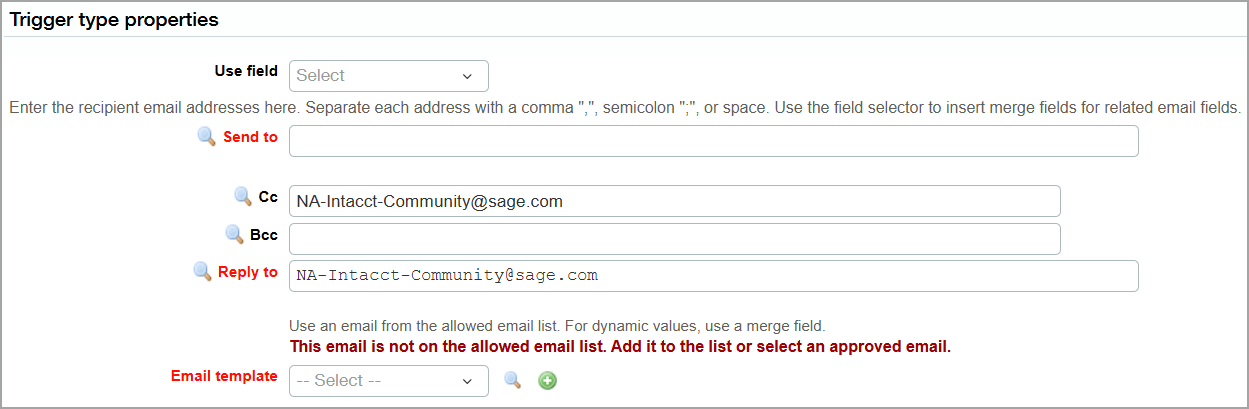
You can create a trigger using the email trigger type that does not contain an allowed email. If you do, the Trigger log indicates that the trigger uses an email not on the allowed list.
Permissions and other requirements
| Subscription | Platform Services |
|---|---|
| Regional availability | All regions |
| User type | Business with full admin privileges |
| Permissions | Permissions to the Platform Services application |
