Sage ai & Automation
Finance Intelligence Agent—General availability
The Finance Intelligence Agent is your Sage Ai-powered partner that helps you find answers about your financial data and drive better decision-making. Using Sage Copilot, you can ask questions, get insights, and explore your information all by using natural language.
Key benefits
The Finance Intelligence Agent provides the following benefits:
Comprehensive data retrieval: Retrieve and aggregate data across Sage Intacct.
Easier analysis: Perform analysis automatically so you see what’s driving the numbers.
Trend discovery: Identify potential trends to support your decision-making process.
Clear explanations: Understand the "why" behind every answer with clear, transparent reasoning.
Better decision making: Get predictions and recommendations to guide better decisions.
How it works
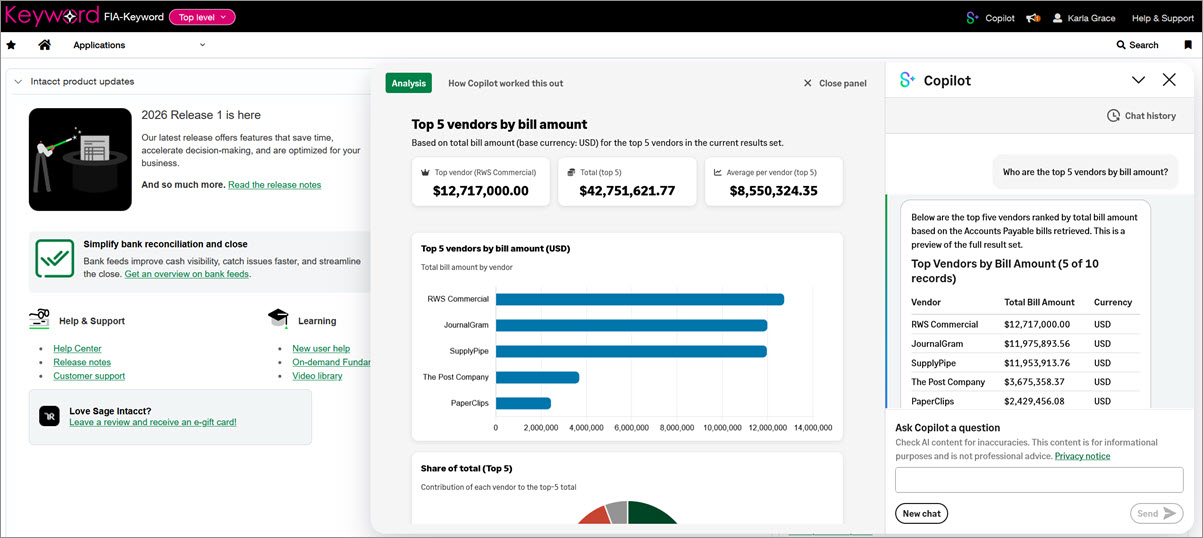
After your administrator has enabled the Finance Intelligence Agent and assigned permissions, you can start a chat using Sage Copilot. You start a chat by using prompts. A prompt is a question or command that tells Sage Copilot what you want it to do for you.
On any page in Sage Intacct, select the Copilot button in the top title bar.
If you're only subscribed to one Sage Ai Agent, the Sage Copilot panel opens.
If you're subscribed to multiple Sage Ai agents, you'll see a dropdown menu. Select Finance Intelligence. Then the Sage Copilot panel opens.
Enter a prompt using natural language in the Ask Copilot a question field located at the bottom of the panel.
For example, ask it to "List my vendors with overdue bills." Sage Copilot starts processing the prompt and shows you status while it's processing. When it finishes processing, it displays the response.
To see more details about a response concerning your financial data, scroll to the bottom of the Copilot panel and select View analysis.
A panel opens with additional information.
To understand how Copilot derived the answer to your question, select How Copilot worked this out at the top of the Analysis panel.
For more information, see About the Finance Intelligence Agent.
Permissions and other requirements
| Subscription | Finance Intelligence Agent |
|---|---|
| Regional availability |
|
| User type |
|
| Permissions | To configure the Finance Intelligence Agent Administration
To use the Finance Intelligence Agent
|
