Taxes
Transaction allocations for VAT and GST in Accounts Payable—Early Adopter
Accurately distribute Accounts Payable (AP) bill amounts across dimensions when your entity uses a VAT or GST tax solution. You can apply a percentage-based transaction allocation directly to a bill line, reducing manual work while maintaining the appropriate tax calculation and allocation details for reporting and audit purposes.
Key benefits
Less manual work: Allocate costs across dimensions directly from an AP bill instead of using manual processes outside the tax calculation workflow.
More consistent cost distribution: Apply a predefined, percentage-based allocation to split bill amounts across locations, departments, and other dimensions within an entity.
Improved reporting and traceability: Retain the allocation definition, dimensional split, and resulting tax information with the AP bill transaction.
How it works
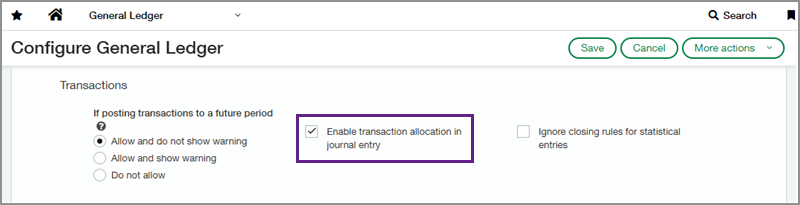
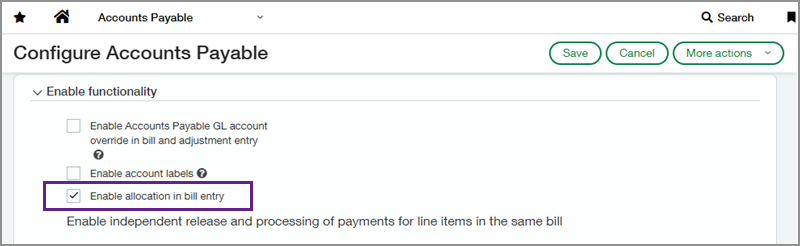
Enable transaction allocation in General Ledger and Accounts Payable, then create transaction allocation definitions in General Ledger.
When you create an AP bill for a VAT- or GST-enabled entity, select a percentage-based transaction allocation for the applicable bill line. The allocation distributes the line amount across dimensions using the percentages that you defined. Sage Intacct calculates the tax for the allocated amounts and records the allocation details with the transaction for reporting and audit purposes. In the More details view of the bill, you can see the line amount distributed among the dimensions. Detailed allocated tax lines are available after the transaction is posted.
Good to know
Transaction allocations for VAT and GST are only supported at the entity level for percentage-based allocations. Cross-entity allocations, custom allocations, absolute-value allocations, and fixed-amount allocations with over/under logic are not supported.
Allocations are also unavailable for adjustment transactions, recurring transactions, and manual payments. They cannot be changed while a bill is in partial edit or reclassification mode.
Join the Early Adopter program
We invite you to explore this feature as part of the Early Adopter program. Your feedback helps us improve the experience before broader release.
As part of the program, you'll work closely with the product team and provide feedback about your experience using the feature.
Sign up for Early Adopter access here.
Permissions and other requirements
| Subscription | Accounts Payable Taxes |
|---|---|
| Regional availability | All regions |
| User type | Business |
| Permissions | Administration Application subscriptions: List, View, Configure General Ledger Transaction allocations: List, View, Add, Edit, Delete Accounts Payable Bills: List, View, Add, Edit, Delete |
| Configuration | You must enable allocations in General Ledger before you can enable allocations in Accounts Payable. |
| Restrictions | You must create allocations at the entity level for use on an entity-level AP bill. You must use a percentage-based transaction allocation for VAT or GST transactions. |
