Taxes
Avalara use tax in Purchasing—General availability
Subscribers to Avalara AvaTax can now apply use taxes in Purchasing transactions. Use tax is applied when sales tax is not collected or differs from the tax owed in the jurisdiction where goods are used. When you enable Avalara use tax, you can apply use tax as a standalone tax, or to offset sales tax when partial taxes have been paid on out-of-state purchases.
Key benefits
Streamline Purchasing workflows: Automatically determine use tax for out-of-state or untaxed purchases in your Avalara-enabled Purchasing transactions.
Enhance visibility into tax calculations: Access clear breakdowns of vendor tax and use tax in transaction details.
Improve tax accuracy and compliance: Ensure correct accounting treatment by posting use tax to your selected tax journal.
How it works
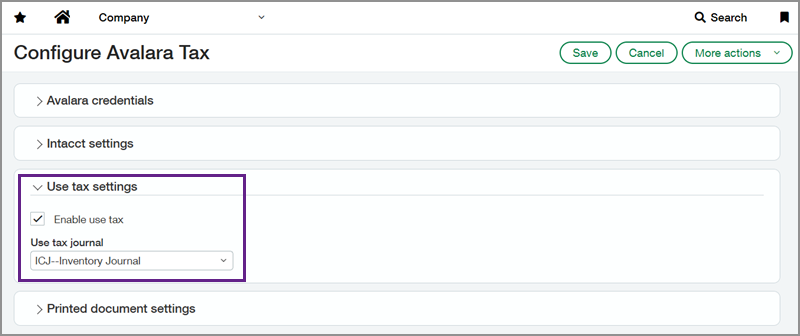
Enable use tax on the Avalara configuration page. The journal that you select during configuration captures the use tax portion separately from the main transaction postings to ensure accounting compliance.
When you enter a Purchasing transaction, you can include vendor-charged tax in the subtotal section. Avalara then calculates the difference between the vendor tax and the tax owed in the jurisdiction of use, determining the use tax amount for you.
When this matters
You purchase goods in one state or province but use them in another jurisdiction with different tax rates.
Vendors do not charge sales tax at the time of purchase, requiring you to self-assess use tax.
Your tax or accounting team needs automated tax calculations integrated into Purchasing workflows.
To request a follow-up on 2026 Release 4 enhancements, fill out this form. Your account manager will be in touch.
To contact your account manager directly, see Contact your Sage Intacct account manager.
Permissions and other requirements
| Subscription | Avalara AvaTax Purchasing Taxes |
|---|---|
| Regional availability | United States |
| User type | Business |
| Permissions | Purchasing Purchasing transactions: List, View, Add, Edit Taxes Tax solutions: List, View, Add, Edit |
| Configuration | Enable Use tax on the Avalara subscription configuration page. |
| Restrictions | You must set up use tax thresholds in Avalara. |
