Taxes
Enhancements for Taxes
This release includes the following updates to improve your Taxes experience.
Set reporting date basis for tax submissions
Improve reconciliation between VAT or GST submissions and your General Ledger by selecting the date used to determine which transactions belong in a submission period. You can continue reporting by transaction date, or you can select GL posting date to align tax submissions with posting periods, period-close controls, and ledger reconciliation.
Key benefits
Greater flexibility: Select GL posting date or retain the existing transaction date reporting basis according to your organization’s reporting needs.
Improved reconciliation: Align tax submissions with General Ledger posting periods.
Stronger reporting period control: Report late-posted transactions in the appropriate open period without pulling them into a previously closed period.
How it works
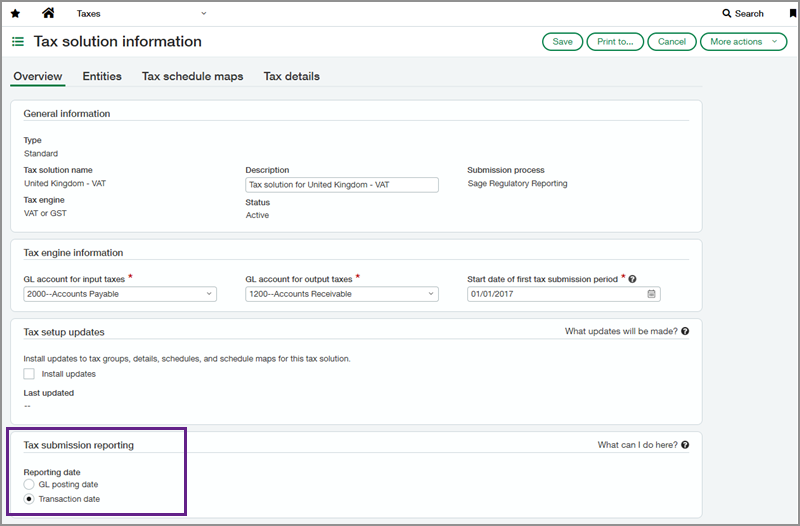
In Taxes > Setup > Tax solutions, select a standard or custom tax solution to edit. In the Tax submission reporting section, the reporting basis is set by default to Transaction date. You can change the default reporting date to GL posting date and enter the date when your new selection becomes effective.
Sage Intacct uses the selected date basis to determine whether tax records fall within a submission period. When you create a tax return, the reporting basis and effective date used for that return are retained as read-only information. This gives you an auditable record even if you change the reporting date configuration later.
| Subscription | Taxes |
|---|---|
| Regional availability | All regions |
| User type | Business |
| Permissions | Taxes
|
| Restrictions | The reporting basis is configured in the tax solution and applies to all entities that use that tax solution. You cannot change the reporting date basis for entities that use cash basis tax capture. |
Tax memo field update for custom reports
Preserve meaningful transaction context when reviewing tax information for Order Entry (OE) and Purchasing (PO) transactions. Tax record reports and tax ledger entries now use the line-level memo or description from the originating OE or PO transaction instead of substituting the tax detail name.
Key benefits
Consistent reporting: When you select the Memo column in a Custom Report Writer report that uses the tax record data source, the report uses the line-level memo across all transaction types.
Improved traceability: Line-level information entered on OE and PO transactions carries through to the corresponding tax ledger entry description.
How it works
For OE and PO transactions with a line memo or description, that information is carried through to the corresponding tax ledger entry description.
Reports that use the tax record data source, the Memo field, and the corresponding tax record description used for tax reporting, now use the source line memo from OE and PO instead of the tax detail name. Previously, these transactions used the tax detail name in place of the line-level memo.
| Subscription | Order Entry Purchasing Taxes |
|---|---|
| Regional availability | All regions |
| User type | Business |
| Permissions | Customization Services
Platform Services
Taxes
|
| Restrictions | If the source OE or PO line does not contain a memo, the tax ledger description is left blank. |
